How to Make an Instagram Carousel Without Canva
Skip the template drag-and-drop. Learn how to make an Instagram carousel without Canva using AI tools like Canvora, and get results faster. Try it free.
On this page
Making an Instagram carousel without Canva is straightforward: paste your content into an AI design platform, choose a visual style, and export your slides as PNGs. The fastest method uses a tool like Canvora, which accepts a URL, PDF, Word document, image, or plain text as input and generates a complete 10-slide carousel in about a minute, formatted at the standard 1080x1080 or portrait dimensions Instagram expects. You don't browse templates or drag elements around. You give the tool your content, and it writes the captions, lays out the slides, and applies your brand colors and fonts automatically if you have a brand kit configured. The output is a set of platform-ready static images you export as PNG or ZIP and upload directly to Instagram. No design skills required. No subscription to a template library. Just content in, finished carousel out.
TL;DR
- You don't need Canva (or any template-based tool) to make a polished Instagram carousel. AI design platforms generate slides directly from your content.
- Canvora accepts text, URLs, PDFs, Word docs, or images as input and produces a carousel of up to 10 slides, formatted and captioned, in about a minute.
- Brand kits (logo, colors, fonts) apply automatically on Starter plans and above, keeping every slide visually consistent without manual work.
- Content on the slides can be generated in 150+ languages, which matters if you're running multilingual social campaigns.
- You can edit any slide after generation using plain-language instructions ("make the headline larger", "use a darker background") or by clicking directly into the text in the Visual Editor.
- Exports are PNG, PDF, or ZIP at up to 4K resolution.
- Canvora also works inside Claude and ChatGPT via MCP, so you can brief a carousel from inside an AI conversation and get the slides without switching tabs.
Why People Skip Canva for Instagram Carousels
Most people skip Canva for Instagram carousels not because Canva is bad, but because the workflow fights you at every step. You open it, browse through hundreds of carousel templates, pick one that's close enough, then spend the next 20 minutes replacing placeholder text slide by slide, adjusting fonts so they don't clash, nudging elements that shifted when you typed more than expected, and finally realizing the color scheme doesn't match your brand. That's before you've touched the content. Non-designers often end up with carousels where slide three looks nothing like slide one, because Canva's template system doesn't enforce visual consistency across a multi-slide set. The resize step is its own tax: Instagram carousels need square (1080x1080) or portrait (1080x1350) frames, and getting there from a template built for a different ratio means another round of manual adjustment. The core frustration is structural. Canva is a manual canvas editor. It gives you tools and templates, then expects you to do the design work.
How Canvora Handles the Layout So You Don't Have To
Canvora starts from the opposite end. You bring the content. A blog post URL, a PDF, a Word doc, a few lines of plain text. Canvora reads it, extracts the key points, and generates a complete Instagram carousel with consistent slide layouts, matched typography, and a coherent visual style applied across every slide. There is no template to browse, no placeholder text to hunt down, no manual resizing. The output is already sized for Instagram.
Brand consistency across slides comes from the brand kit. On any plan, you attach your logo, brand colors, and fonts once. Every generation applies them automatically, so slide seven matches slide one without any intervention.
What You Actually Need to Make an Instagram Carousel
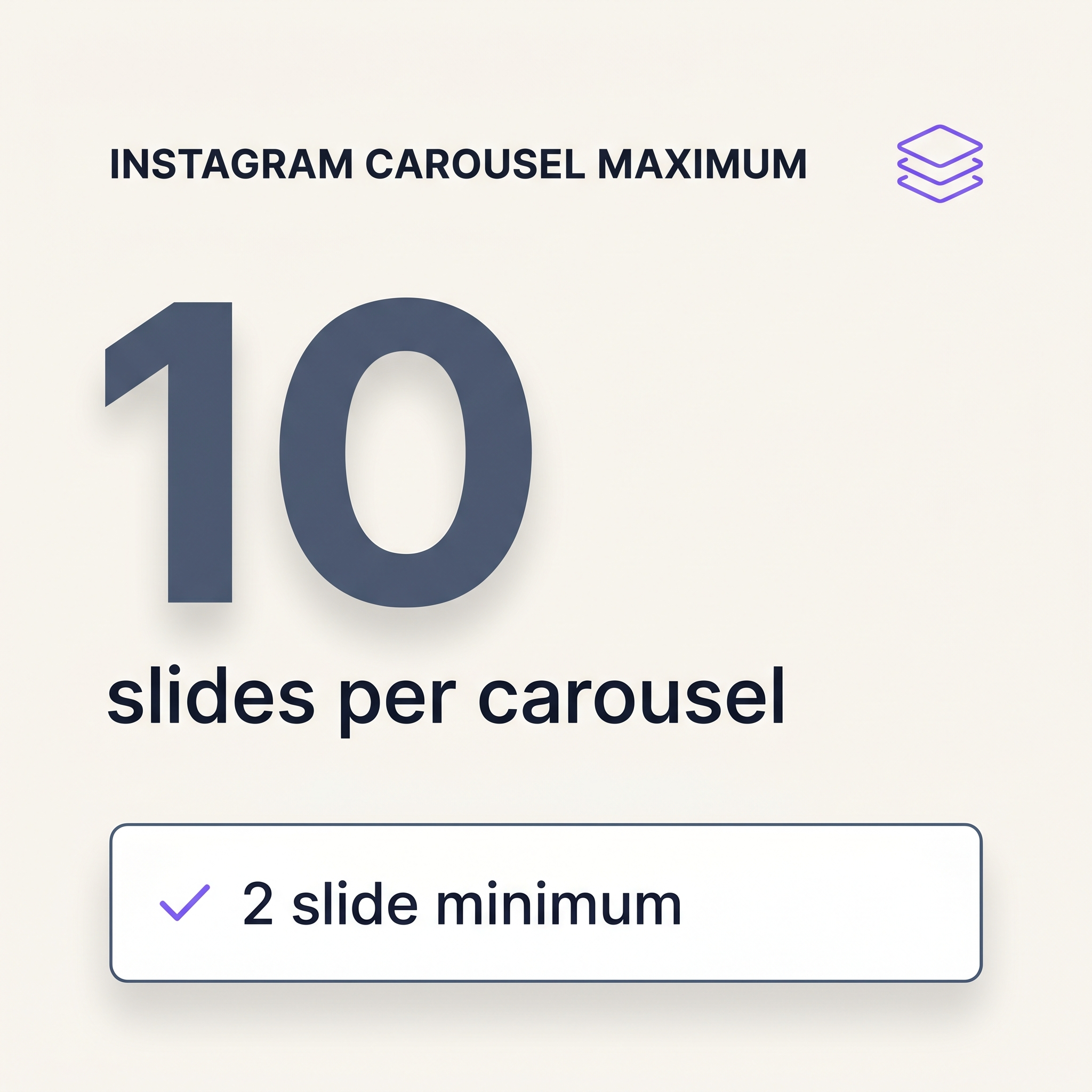 Instagram carousel specs: square (1080×1080) or portrait (1080×1350) slides.
An Instagram carousel is 2 to 10 slides, each exported as a PNG or PDF and uploaded in sequence. Instagram supports square slides at 1080×1080 pixels and portrait slides at 1080×1350 pixels. Either works, but pick one and stick with it: mixing aspect ratios in a single carousel creates inconsistent cropping in the feed. The more important constraint is visual consistency across all slides. Fonts, colors, and layout hierarchy need to carry through from the cover slide to the last one, because readers swipe expecting continuity, not a design reset every two frames. A carousel where slide three looks nothing like slide one signals amateur execution, regardless of how good the individual slides are. Before you open any tool, have your content ready: the key points you want to cover, any stats or quotes you plan to feature, and a rough sense of how many slides the topic warrants. The tool handles layout; you supply the substance.
Instagram carousel specs: square (1080×1080) or portrait (1080×1350) slides.
An Instagram carousel is 2 to 10 slides, each exported as a PNG or PDF and uploaded in sequence. Instagram supports square slides at 1080×1080 pixels and portrait slides at 1080×1350 pixels. Either works, but pick one and stick with it: mixing aspect ratios in a single carousel creates inconsistent cropping in the feed. The more important constraint is visual consistency across all slides. Fonts, colors, and layout hierarchy need to carry through from the cover slide to the last one, because readers swipe expecting continuity, not a design reset every two frames. A carousel where slide three looks nothing like slide one signals amateur execution, regardless of how good the individual slides are. Before you open any tool, have your content ready: the key points you want to cover, any stats or quotes you plan to feature, and a rough sense of how many slides the topic warrants. The tool handles layout; you supply the substance.
How Canvora Builds the Slides for You
Most carousel builders hand you a blank slide and a library of templates. You pick one, swap the text, nudge the font size, copy the slide, repeat nine times, and hope the result looks intentional. That process takes 20 to 40 minutes on a good day.
Canvora works differently. Paste your content (a URL, a PDF, a block of text, or a Word doc) and specify that you want an Instagram carousel. Canvora generates a complete, up-to-10-slide carousel with consistent fonts, colors, and visual hierarchy already applied, in about a minute. There are no templates to browse. The AI reads your content, decides what belongs on each slide, and lays it out.
If you have a brand kit set up (available on every plan), Canvora applies your logo, brand colors, and fonts automatically. Every slide matches your brand without manual adjustment. You can also choose from 8 visual styles: modern, minimal, bold, elegant, playful, corporate, creative, and dark. If none of those fit, you can import a visual style from a public Instagram profile and use it as a reusable design preset.
After generation, edits happen in plain language. Type "make the headline larger" or "use a darker background on slide two" and Canvora updates the visual. You can also edit text directly in the Visual Editor if you need precise copy changes.
Export as PNG (for direct Instagram upload) or PDF, at up to 4K resolution on Starter and above.
Canvora Pricing: What It Costs to Make Carousels
Each carousel slide costs 15 credits. A 10-slide carousel costs 150 credits.
| Plan | Price | Monthly Credits | Brand Kits | Design Presets |
|---|---|---|---|---|
| Free | $0 | 150 (one-time, no renewal) | 1 | 0 |
| Starter | $19/mo | 1,000 | 1 | 1 |
| Pro | $49/mo | 2,500 | 5 | 5 |
| Business | $99/mo | 5,000 | Unlimited | Unlimited |
The Free plan gives you a one-time 150-credit signup bonus. That covers exactly one 10-slide carousel, with watermarked output and 1 brand kit. It is useful for testing the workflow, not for publishing.
At Starter ($19/mo), 1,000 credits covers roughly six full 10-slide carousels per month, plus room for single-image posts and edits. Pro and Business plans scale for teams and higher-volume content calendars.
Option 1: Use Canvora to Turn Your Content Into a Carousel
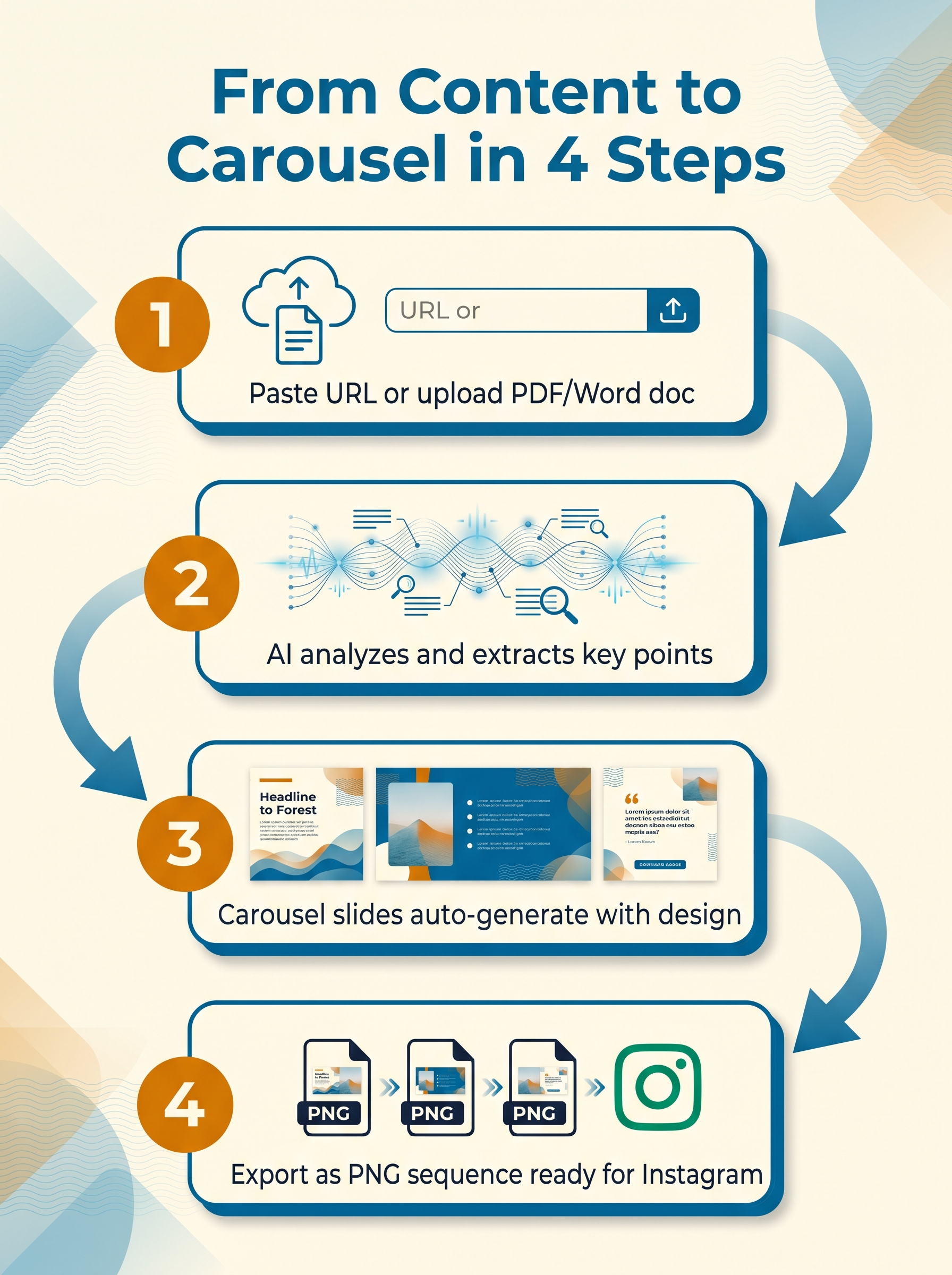 Canvora transforms any content into a carousel in four steps.
Canvora is the most direct path from a piece of content to a finished Instagram carousel if you want to skip the template-browsing loop entirely. Paste a URL, drop in a PDF or Word doc, or type your content directly into the prompt field. Canvora reads the source, extracts the key ideas, and generates a carousel of up to 10 slides formatted to Instagram's square or portrait dimensions, with headlines, body copy, and a visual layout already in place. Pick one of eight visual styles (modern, minimal, bold, elegant, playful, corporate, creative, or dark) before generating, and the output arrives styled and ready. Attach a brand kit so your logo, colors, and fonts apply automatically across every slide. The whole generation takes about a minute. When the slides appear, edit any element by typing a natural language instruction ("make the headline larger," "use a darker background on slide 3") or click directly into the Visual Editor to change text, fonts, or copy. Export as PNG or PDF and upload straight to Instagram.
Canvora transforms any content into a carousel in four steps.
Canvora is the most direct path from a piece of content to a finished Instagram carousel if you want to skip the template-browsing loop entirely. Paste a URL, drop in a PDF or Word doc, or type your content directly into the prompt field. Canvora reads the source, extracts the key ideas, and generates a carousel of up to 10 slides formatted to Instagram's square or portrait dimensions, with headlines, body copy, and a visual layout already in place. Pick one of eight visual styles (modern, minimal, bold, elegant, playful, corporate, creative, or dark) before generating, and the output arrives styled and ready. Attach a brand kit so your logo, colors, and fonts apply automatically across every slide. The whole generation takes about a minute. When the slides appear, edit any element by typing a natural language instruction ("make the headline larger," "use a darker background on slide 3") or click directly into the Visual Editor to change text, fonts, or copy. Export as PNG or PDF and upload straight to Instagram.
Content In, Carousel Out
Template-based tools like Canva give you a blank slide and a library of components. You choose a template, swap the text, adjust the colors, repeat for every slide, and hope the result looks coherent. Canvora works the other way. You give it content, it gives you a structured carousel.
The layout decisions (type hierarchy, spacing, visual weight across slides) come from the AI. Your job is to review, refine, and export. If a slide reads awkwardly or a color feels off, one natural language instruction fixes it without you touching a single layer. For teams that produce Instagram content regularly, that shift from manual assembly to AI-generated-then-refined cuts the per-carousel workload significantly.
Option 2: Build a Carousel in Google Slides or PowerPoint (Free, Manual)
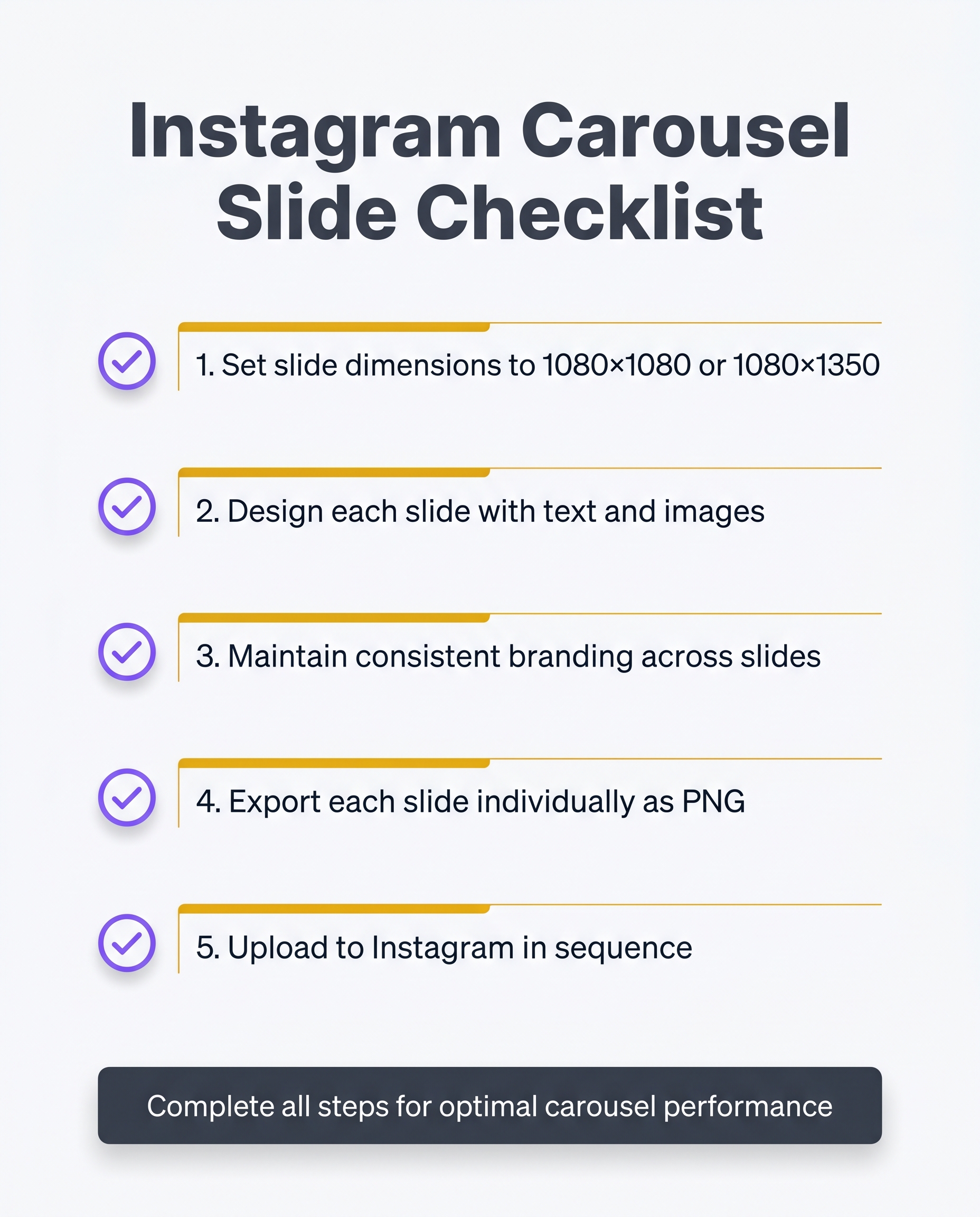 Free carousel workflow requires manual setup and individual slide exports.
Both Google Slides and PowerPoint can produce Instagram carousels at zero cost. The workflow is straightforward, but it takes longer than most people expect.
Free carousel workflow requires manual setup and individual slide exports.
Both Google Slides and PowerPoint can produce Instagram carousels at zero cost. The workflow is straightforward, but it takes longer than most people expect.
Set the right dimensions first. Instagram carousels display at 1080×1080px (square) or 1080×1350px (portrait). In Google Slides, go to File → Page setup → Custom and enter those pixel values. In PowerPoint, use Design → Slide Size → Custom Slide Size and set width and height accordingly. Get this wrong and your exported images will look soft or cropped on mobile.
Design each slide by hand. Pick your fonts, set your brand colors, place images, and arrange text on every slide individually. There are no smart layout suggestions, no brand kit to pull from, and no AI to distribute content across slides. Every decision is yours.
Export as PNG. In Google Slides: File → Download → PNG image (.png, current slide), repeat for each slide. In PowerPoint: File → Export → Change File Type → PNG, which saves all slides at once. Either way, you end up with one image file per slide.
Upload to Instagram. Zip the images if needed, then upload them in order as a multi-image post.
Honest time estimate: a polished 5-slide carousel takes 30-60 minutes, assuming you already have the copy written and images sourced.
This route works well for one-off carousels when you have design experience and time to spare. If you're producing carousels regularly, the per-carousel time cost compounds quickly.
Option 3: Use Canva Alternatives That Are More Automated
Adobe Express and Visme are capable tools, but they follow the same pattern as Canva: browse templates, pick one, swap in your content, adjust the layout, fix the fonts. The starting point is always a template, not your content. Piktochart leans further toward infographics and data visualization, so its carousel workflow feels like a workaround rather than a native feature.
Most template-based design tools trade one manual process for another. You're still making layout decisions. You're still hunting for a design that fits your message, rather than generating one from it.
How Canvora Differs From Template Tools
Canvora inverts the workflow. Paste a blog URL, drop in a PDF, or type a topic, and Canvora generates a finished Instagram carousel (up to 10 slides, square 1080x1080 format) from that content. There's no template browsing step because there are no templates. The AI reads your content, structures the slides, writes the copy, and applies your brand kit automatically if you have one set up.
If the output needs adjusting, you can edit via natural language ("make the headline larger", "use a darker background") or click directly into the Visual Editor to change text.
Making Multilingual Carousels: A Step Most Tools Skip
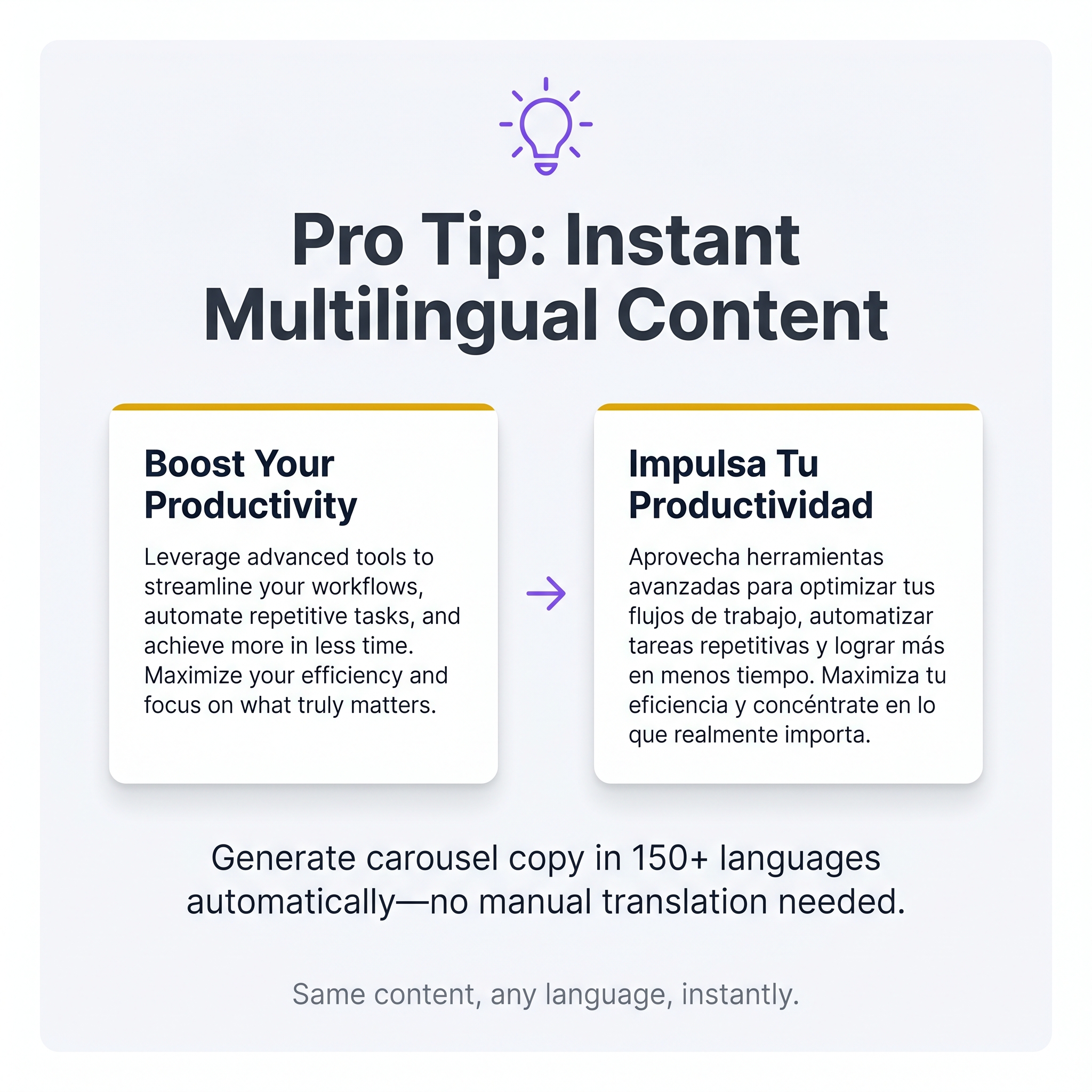 Auto-translation into 150+ languages eliminates manual localization work.
Canvora generates carousel slide copy in 150+ languages directly from your source content. Paste a blog URL, upload a PDF, or drop in plain text, specify the target language, and the carousel is generated in that language from the start. No separate translation step. No copy-pasting translated text into individual slides afterward.
Auto-translation into 150+ languages eliminates manual localization work.
Canvora generates carousel slide copy in 150+ languages directly from your source content. Paste a blog URL, upload a PDF, or drop in plain text, specify the target language, and the carousel is generated in that language from the start. No separate translation step. No copy-pasting translated text into individual slides afterward.
That last part matters more than it sounds. Template-based tools like Canva or Adobe Express require you to manually retype or paste translated copy into each slide, then recheck line breaks, font rendering, and text overflow for every language variant. Arabic runs right-to-left. Hindi uses Devanagari script with different vertical spacing. A 10-slide carousel in three languages means 30 manual text edits before you've even looked at the layout.
Canvora handles the layout alongside the language. When you specify Spanish, Hindi, or Arabic, the generated slides account for the copy in that language rather than forcing English-length text into a fixed frame.
Who This Actually Helps
This is particularly useful for teams running campaigns across LATAM, EMEA, India, SEA, and East Asian markets. A bilingual campaign workflow becomes straightforward: generate the English carousel, then re-run from the same source content in Spanish, Portuguese, or Bahasa Indonesia. Same brand kit, same visual style, different language. Each run takes about a minute and produces a separate, platform-ready carousel.
For solo creators managing accounts in two languages, that removes what is usually the most tedious part of the workflow.
Using Canvora Inside ChatGPT or Claude to Create Carousels
Canvora connects to Claude and ChatGPT through MCP (Model Context Protocol), which means you can generate a fully designed Instagram carousel without opening a separate design tool at all. The integration is OAuth-based, requires no API key, and works on every plan including Free. Setup takes about 2 minutes: add Canvora as a connector inside your AI assistant, and from that point forward, any prompt that starts with "Use Canvora" routes the request directly to the design engine. A prompt like "Use Canvora to create a 10-slide Instagram carousel from this blog post URL" returns a finished, brand-styled carousel inside the same chat window. No tab-switching, no template hunting, no manual layout work. The full setup walkthrough is at canvora.ai/help/integrations/mcp-setup.
How the Carousel Gets Built Inside the Chat
Once the MCP prompt runs, Canvora reads the source content, writes the slide copy, applies a visual style, and sizes everything to 1080x1080 for Instagram. You can follow up in plain language: "make the headline larger" or "switch to the bold style." The carousel is ready to export as PNG or PDF without touching a design canvas.
Tips for a Carousel That Actually Gets Saved and Shared
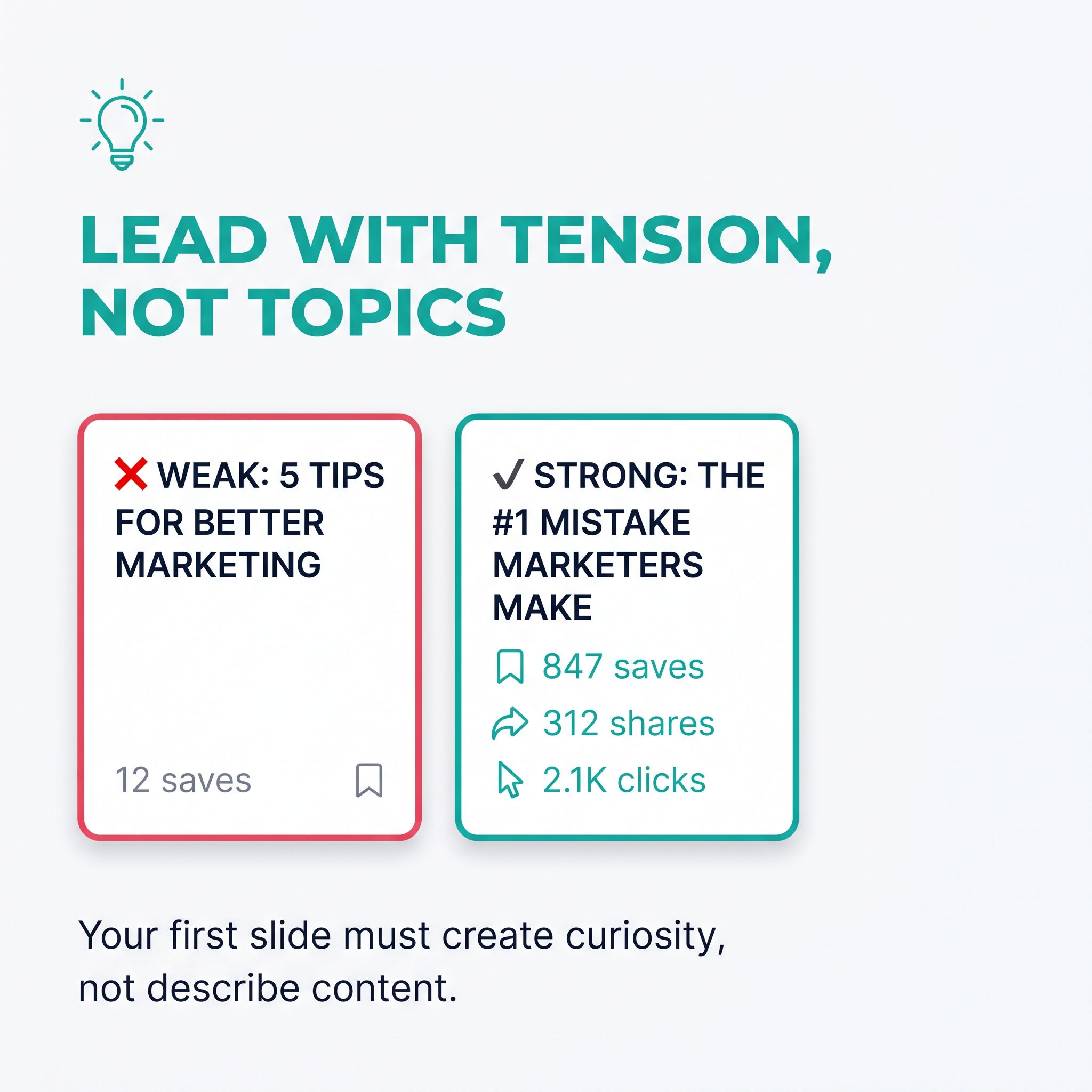 A carousel lives or dies on its first slide. If slide one reads like a title page ("5 Tips for Better Marketing"), it gets scrolled past. Treat it as a headline: lead with the tension, the surprising stat, or the outcome the reader wants. "Your Instagram reach dropped 40%. Here's why" earns the swipe. "Instagram Tips" does not.
From slide two onward, one idea per slide is the rule. A slide crammed with three bullet points and a footnote is a slide people abandon. Strip each one to its single sharpest point, then let the visual carry the weight.
Carousels with 7 to 10 slides consistently drive more swipe-throughs than short 2 or 3 slide sets, because the algorithm rewards completion rate and saves. Give people a reason to keep swiping, then close with a CTA slide that tells them exactly what to do: save this, follow for more, or check the link in bio. Vague endings waste the momentum you built.
Visual consistency across every slide signals that a real brand made this, not a rushed side project. When you use Canvora, a saved brand kit applies your logo, colors, and fonts automatically across all slides, so consistency is structural rather than something you manually check.
Finally, don't let a finished carousel sit in isolation. The same content that powers your carousel can become individual quote cards, stat cards, or Pinterest pins in the same session, each formatted for its platform without rebuilding anything from scratch.
Frequently Asked Questions
Q: How many slides can an Instagram carousel have?
Instagram allows between 2 and 10 slides per carousel post. There is no way to publish a single carousel with more than 10 slides. If you have more content than that, split it into two separate carousels or repurpose the extra slides as standalone posts. Canvora generates Instagram carousels up to the 10-slide maximum, so the platform limit and the tool limit align exactly.
Q: Can I make an Instagram carousel for free without Canva?
Yes. Canvora offers a free plan with a one-time 150-credit signup bonus, which is enough to generate and test several carousels. Free-plan outputs are watermarked and capped at 2K resolution, so this tier is best for evaluating the workflow before upgrading to a paid plan. Google Slides is another free option, though it requires fully manual design work with no AI generation.
Q: What file format does Instagram accept for carousel uploads?
Instagram accepts JPEG and PNG image files for carousel posts. Export each slide as a PNG, then upload them in order. Canvora exports carousels as PNG files (and also as PDF or PPTX), so you can download and upload directly to Instagram without any conversion step. No additional software required between export and publish.
Q: How do I keep all carousel slides visually consistent without a designer?
Consistency comes from locking in fonts, colors, and layout rules before you start. In Canvora, applying a brand kit (available on every plan) automatically applies your logo, brand colors, and fonts to every slide in the carousel. If you are working manually in Google Slides or PowerPoint, create a master slide template and duplicate it for each new slide rather than designing each one from scratch.
Q: Can I create Instagram carousels in languages other than English?
Yes. Canvora supports content generation in 150+ languages, so the text on your carousel slides can be generated in Spanish, Hindi, Arabic, French, Portuguese, or any of the other supported languages from the same source content. Most template-based design tools require you to manually type or paste translated text into each slide yourself. Canvora handles the copy generation as part of the same workflow.
Q: Is there a way to create Instagram carousels directly inside ChatGPT or Claude?
Yes. Canvora integrates with Claude and ChatGPT via MCP (Model Context Protocol). The integration is OAuth-based and works on all Canvora plans, including Free. No API key is required. Add Canvora as a connector in your AI assistant, then prompt it with "Use Canvora to create a 10-slide Instagram carousel from your content." Setup takes about 2 minutes. The full guide is at canvora.ai/help/integrations/mcp-setup.
Q: How long does it take to make a carousel without Canva using an AI tool?
With Canvora, a 10-slide Instagram carousel takes about a minute to generate once you have pasted your content. Compare that to 20-40 minutes of manual work in a template-based tool. The difference compounds quickly when you are producing multiple carousels per week. Canvora's generation-first approach removes the template-browsing and slide-by-slide editing steps entirely, which is where most of that manual time goes.
Q: Do I need design skills to make a carousel without Canva?
No. Canvora is built for people without design backgrounds. Paste your content (a URL, a PDF, a Word doc, or plain text), choose a visual style and output format, and the AI handles layout, typography, and visual hierarchy. You can refine any slide using plain-language instructions like "make the headline bigger" or "use a darker background" without touching any design controls directly.
Q: What are the correct dimensions for an Instagram carousel?
Instagram carousels support square slides at 1080x1080 pixels or portrait slides at 1080x1350 pixels. Landscape (1080x566) is technically supported but tends to perform less well in the feed. Canvora automatically generates carousel slides at the correct Instagram dimensions. If you are building manually in Google Slides, set your page size to match those dimensions before you start designing to avoid cropping issues on upload.
Tools mentioned in this article:
For your team / role:
Comparisons:
Turn your content into a carousel now
Paste a URL, PDF, or idea — Canvora generates a ready-to-post carousel, on brand and in 150+ languages.
Free to start · 150 credits, no card · 150+ languages
More from the blog
How to Make an Instagram Carousel from a Blog Post
Learn how to turn any blog post into a polished Instagram carousel, step by step, with tools, tips, and size specs. Start repurposing your content today.
How to Turn a Blog Post Into an Instagram Post
Learn how to turn a blog post into an Instagram post, from picking the right format to generating visuals fast. Start repurposing your content today.