How to Turn a Blog Post Into an Instagram Post
Learn how to turn a blog post into an Instagram post, from picking the right format to generating visuals fast. Start repurposing your content today.

On this page
Turning a blog post into an Instagram post means extracting the most shareable ideas from your content and rebuilding them as visuals your audience can absorb in a scroll. The most practical workflow: identify three to five key points from the post, decide which Instagram format suits each one (a single quote card, a stat card, or a multi-slide carousel), then generate the visuals with a tool that accepts your blog URL directly. With Canvora, you paste the URL, choose your output formats, and get up to 15-20 platform-ready visuals across formats in about a minute, including Instagram carousels of up to 10 slides, quote cards, and stat cards, all with your brand colors and fonts applied automatically. Write or refine your caption separately, pulling the hook from your blog's intro or a surprising stat. Export as PNG, add your hashtags, and post. The entire process, from blog URL to ready-to-publish Instagram content, takes under 15 minutes.
TL;DR
- A blog post contains more Instagram content than most marketers realize: pull quotes, stats, step-by-step tips, and key takeaways each map to a different visual format.
- Instagram carousels (up to 10 slides) work best for structured, multi-step content like how-tos and listicles. Single-image posts work best for standalone quotes or stats.
- Canvora accepts a blog URL as direct input and generates Instagram-ready visuals, including carousels, quote cards, and stat cards, without any template browsing or manual layout work.
- Your caption should come from the blog itself: use the opening hook, a surprising stat, or the post's core argument as the first line.
- Brand consistency across your Instagram grid is easier when you apply a brand kit once and let the tool carry it across every visual format.
- Repurposing one blog post into multiple Instagram formats (a carousel, two quote cards, a stat card) is a content batching strategy, not extra work. It multiplies distribution from a single piece of writing.
- The same workflow extends to LinkedIn, Pinterest, Facebook, and Threads with minimal additional effort.
Why Repurposing a Blog Post for Instagram Actually Works
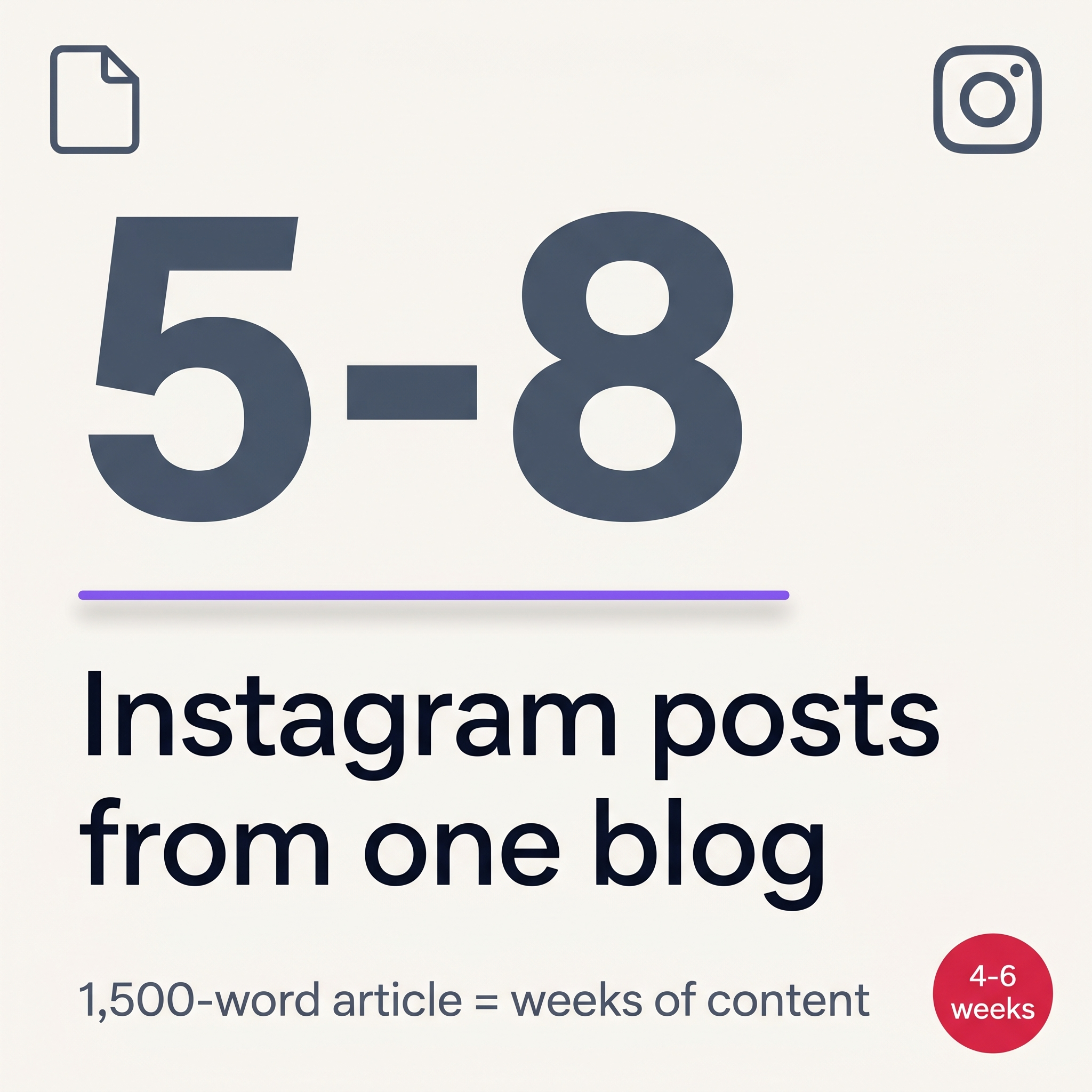 One blog post = weeks of Instagram content across multiple formats.
A single blog post contains enough distinct ideas, statistics, and arguments to fuel weeks of Instagram content. Most posts have a central thesis, three to five supporting points, at least one quotable line, and a handful of concrete examples or data points. Each of those is a viable Instagram post in its own right: a quote card, a stat graphic, a carousel walking through the steps, a single-image summary for the grid. Repurposing does not mean copying and pasting. It means extracting the signal from long-form content and presenting it in the format Instagram's audience actually consumes. That audience has almost certainly never read your blog. To them, the content is new. And because Instagram's algorithm rewards accounts that post consistently, repurposing solves two problems at once: it fills your content calendar without requiring you to generate new ideas from scratch, and it keeps your messaging consistent across every channel where your audience might find you.
One Blog Post, Multiple Instagram Formats
The formats available on Instagram are varied enough that a single piece of long-form content can map cleanly onto several of them without repetition. A 1,500-word post on productivity habits might yield a 10-slide carousel covering the core framework, three separate quote cards from the most quotable lines, a stat graphic if the post cites any data, and a single-image summary for the grid. None of those posts cannibalizes the others. Each works as a standalone piece for a different moment in a viewer's feed.
Consistent Messaging Without Starting From Scratch
Writing from scratch for every platform is where most content teams lose time. Repurposing from a blog post keeps the core argument intact while adapting the presentation layer. The headline becomes a caption hook. The subheadings become carousel slide titles. The conclusion becomes a call to action. The intellectual work is already done. What remains is formatting, and that is where a tool like Canvora removes the remaining friction.
Step 1: Choose the Right Instagram Format for Your Blog Content
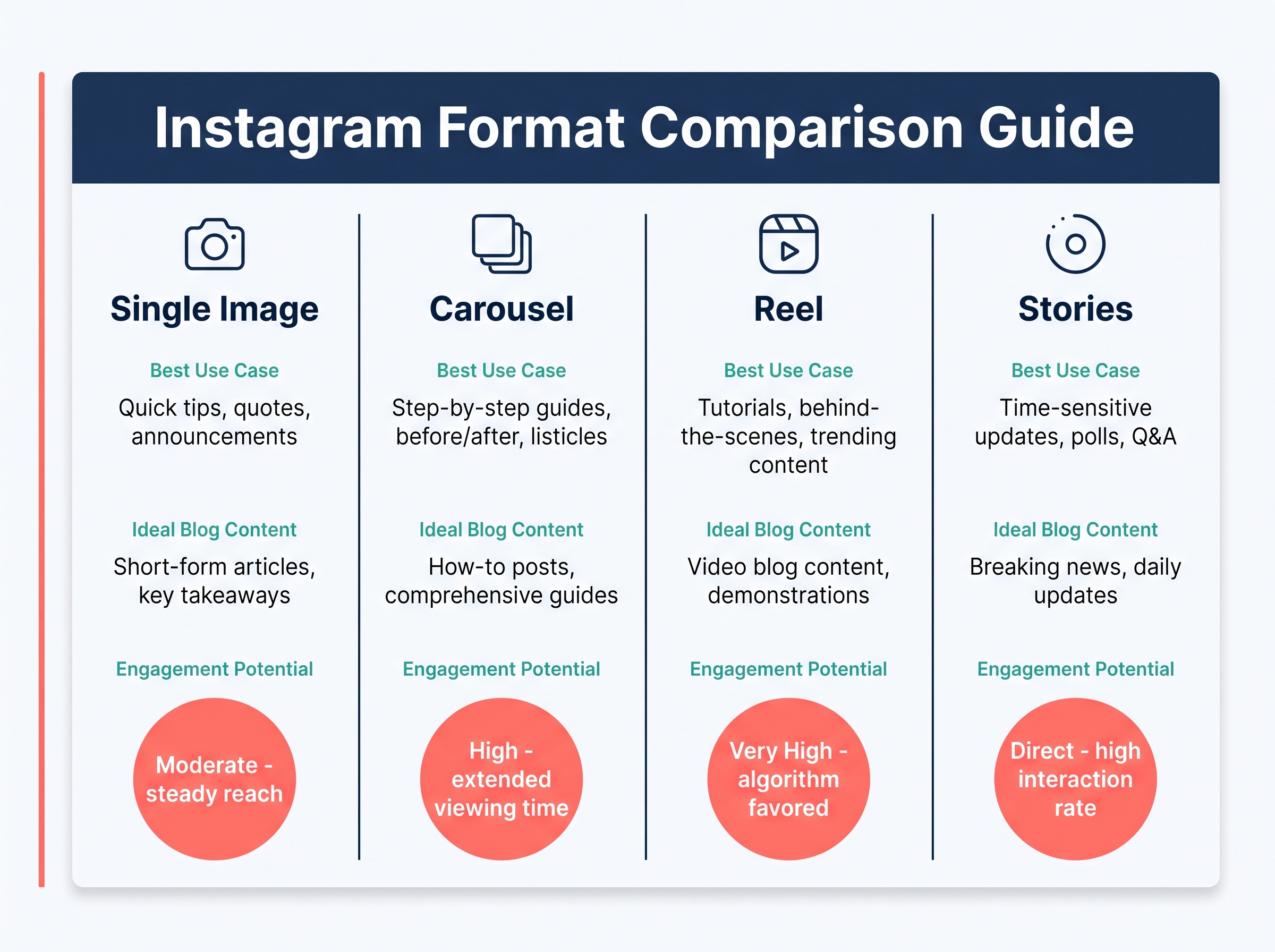 Match your blog content to the Instagram format that performs best.
The format you choose before opening any design tool determines how much of your blog's value actually transfers to Instagram. A single image post works best when your blog contains one standout stat, a quotable sentence, or a single strong takeaway that can hold its own without context. A carousel (up to 10 slides) is the right call for listicles, step-by-step how-tos, or any argument that builds across multiple points. Quote cards isolate a compelling line from the post and make it visually dominant, which tends to perform well for thought leadership content. Stat cards do the same for numbers: one striking figure, large and centered, with minimal surrounding copy. A story-style graphic works differently: it teases the blog's premise without giving away the conclusion, functioning as a traffic driver rather than a standalone piece of content. Tip card series break a "7 tips" or "5 mistakes" section into individual cards, which you can post across multiple days to extend the content's reach.
Single image vs. carousel: a quick decision rule
If your blog makes one central point, use a single image. If it makes three or more distinct points that each need a sentence or two of explanation, a carousel earns more time in the feed and gives the algorithm more swipe interactions to reward.
Tip card series and quote cards
Both formats are low-effort to produce and high-frequency to post. A 1,500-word blog typically yields four to six pull quotes and two to three usable stats, which means one post can supply a week's worth of individual cards without repeating content.
Step 2: Extract the Core Ideas Worth Turning Into Visuals
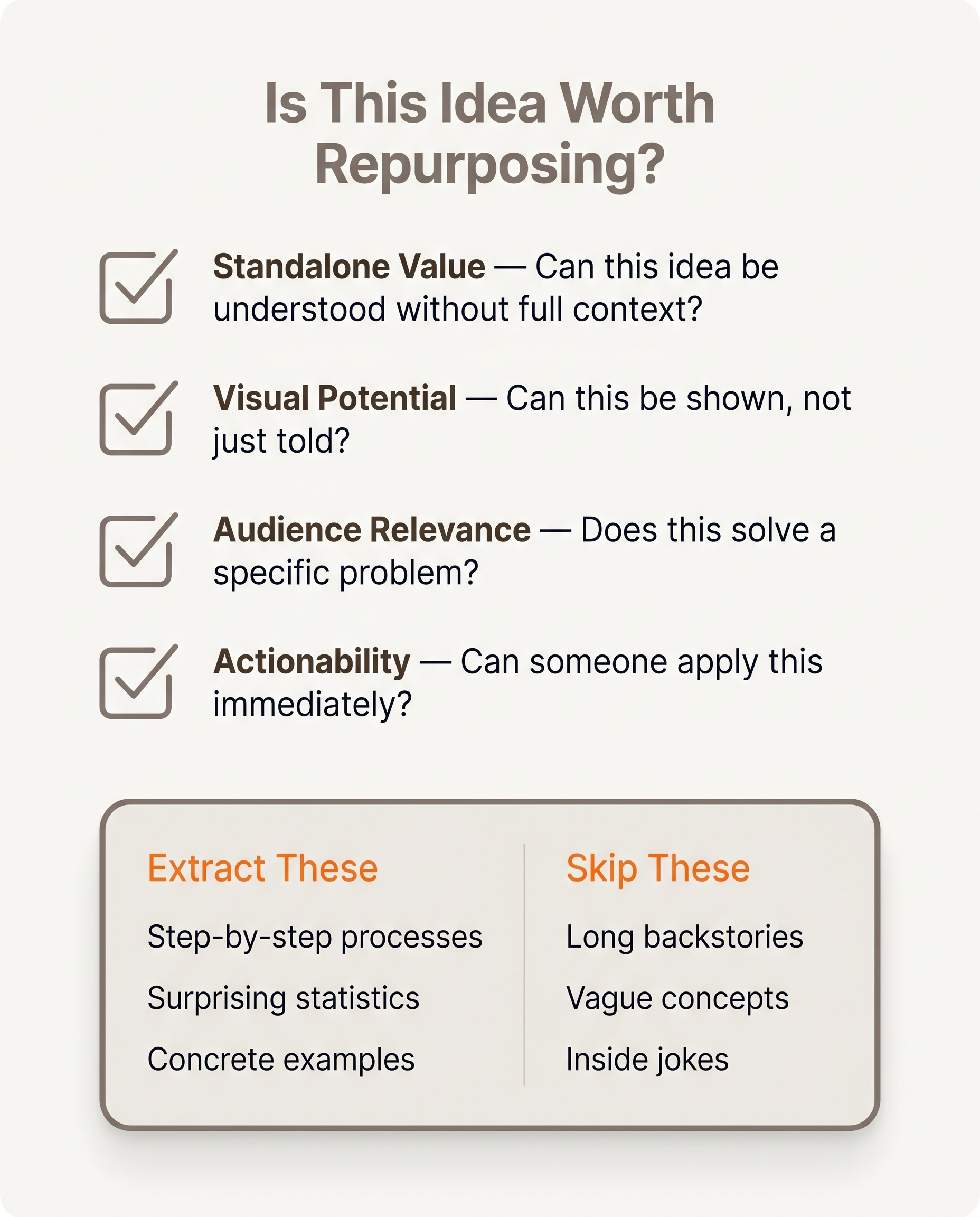 Not every sentence deserves a second life—use this filter.
Not every sentence in a blog post deserves a second life on Instagram. The goal is to extract the handful of ideas that work as standalone visuals, not to compress the entire article into a grid.
Start by scanning for the 3-5 most shareable sentences. These are usually the ones that made you nod when you wrote them: a counterintuitive claim, a sharp observation, a one-line summary of something your audience struggles to articulate. Each one is a quote card waiting to happen.
Numbered lists and step-by-step sections
If your post has a numbered list or a process breakdown, you already have a carousel structure. Each step maps to a slide. A "7 ways to..." section becomes a 7-slide carousel (or two carousels if you want more breathing room per idea). The work is mostly done.
Data points and comparisons
Any percentage, benchmark, or before/after comparison in the post can stand alone as a stat card. These tend to perform well because they give the reader something concrete to screenshot or share.
The main argument
Pull the post's central conclusion as a single quote card. If someone reads nothing else, what's the one sentence you want them to take away? That's your anchor visual.
Subheadings as a series
Each subheading in a long-form post is a potential standalone Instagram post. A 6-subheading article can become a 6-post series, published across a week.
One rule throughout: distill, don't copy-paste. Dense paragraph prose reads poorly on a visual. Rewrite for the format.
Step 3: Write Instagram Captions That Work Without the Blog
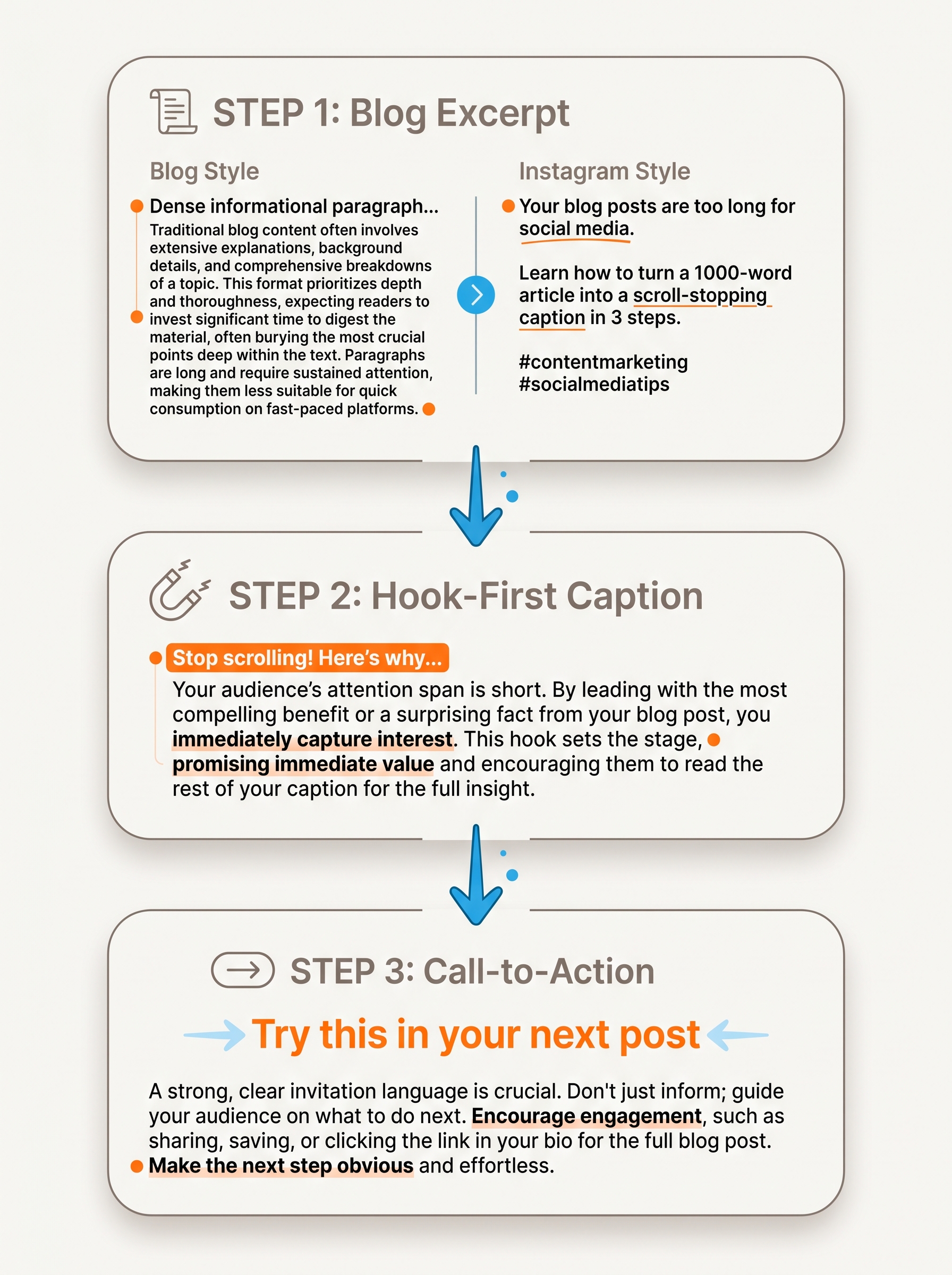 Blog excerpts need rewriting for Instagram's scroll-stopping format.
A caption is not a blog excerpt. The goal is to make someone stop scrolling, read three sentences, and take one action, not to summarize 1,500 words into a wall of text.
Start with a hook on the first line. Instagram truncates captions after roughly 125 characters before showing the "more" link, so that first line carries disproportionate weight. Pull the most surprising stat or counterintuitive claim from your blog and lead with it. "Most Instagram carousels get more reach than single images" lands harder than "We wrote a blog post about carousels."
Compress the core idea into 2–3 sentences. Readers who tap "more" want context, not a full article. Give them the one insight that makes the visual make sense.
Structure a caption that converts
A reliable pattern:
- Hook (one punchy line, under 125 characters)
- Context (2–3 sentences that deliver the core point)
- CTA ("Full breakdown in bio", "Save this for later", "Which tip surprised you?")
- Hashtags (3–5 is Instagram's current recommended range, enough to surface the post, not enough to look spammy)
Instagram supports up to 2,200 characters per caption, so longer captions are an option when the topic warrants depth. Most posts don't need that room. But knowing it exists means you can include a short how-to or a numbered list without worrying about hitting a wall.
Keep the hashtags topical and specific. Broad tags like #marketing bury posts. Niche tags like #contentrepurposing or #instagramcarousel reach smaller, more relevant audiences.
Step 4: Create the Visuals (Without a Designer)
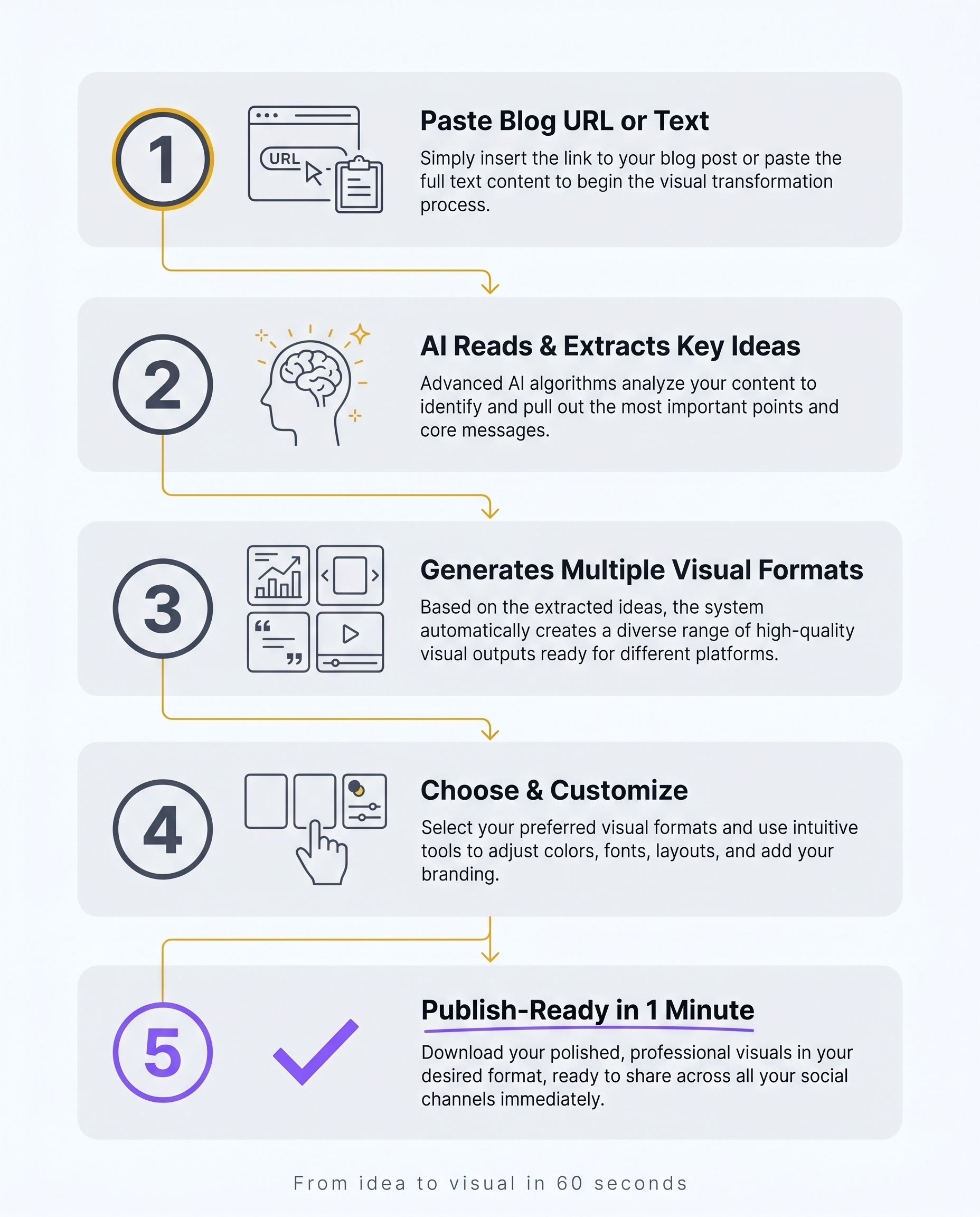 Paste, extract, generate, customize—done in one minute.
Paste your blog post URL (or the text itself) into Canvora, and it reads the content, extracts the key ideas, and generates visual options across multiple formats instantly. A single blog post can produce quote cards that pull punchy lines from the body, stat cards that surface any data points you cited, carousel slides that walk through your main argument step by step, and standalone post graphics sized for the Instagram feed. You choose from 8 visual styles: modern, minimal, bold, elegant, playful, corporate, creative, and dark. If you have a brand kit set up, Canvora applies your logo, colors, and fonts automatically across every visual, so nothing needs manual adjustment to look on-brand. The result is a set of platform-ready static images you can export as PNG files at up to 4K resolution (Starter plan and above), ready to drop straight into your Instagram drafts.
Using Canvora to Generate an Instagram Carousel From a Blog Post
Select the carousel format after pasting your content. Canvora builds up to 10 slides from the source material, pulling section headers, key claims, or step-by-step points into individual slides. Each slide inherits your brand kit automatically.
If any slide needs adjustment, type a plain-language instruction into the editor: "make the headline larger" or "use a darker background." Canvora applies the change without you touching a single layout control.
Generating Multiple Instagram Formats From One Blog Post
One blog post can yield more than a single carousel. Canvora generates quote cards, stat cards, and feed post graphics from the same input, each sized for Instagram. Export the full set as a ZIP of PNG files and you have a week's worth of Instagram content batched from one source.
How to Repurpose a Blog Post Into an Instagram Post Without Any Tools
Repurposing a blog post into an Instagram post without any tools is entirely doable. It just takes longer than most content calendars can afford.
Start by reading the post and pulling out one key takeaway. Not three. One. Write it as a caption: lead with a hook in the first line (that's what shows before the "more" cut-off), keep the whole thing under 150 characters if you want it to read cleanly on mobile, and end with a call to action or a question. Something like: "Most marketers repurpose content wrong. Here's the one shift that changes everything." That's a hook. A summary of your post is not.
For the visual, open your phone's native photo editor or a free app like Snapseed. Pick one image, add a short text overlay, and use a single font. One idea, one image, one font. Anything more and the post competes with itself.
This works. For a one-off post, it's fine.
The problem is math. A manual pass from blog to finished Instagram post takes 20 to 40 minutes. If you publish two blog posts a week and want to repurpose each one into even a single Instagram post, that's a recurring time cost that compounds fast. For teams or agencies running multiple clients or content streams, a manual workflow stops being a workflow and starts being a backlog.
The manual approach is a proof of concept, not a production system.
Multilingual Instagram Content From a Single Blog Post
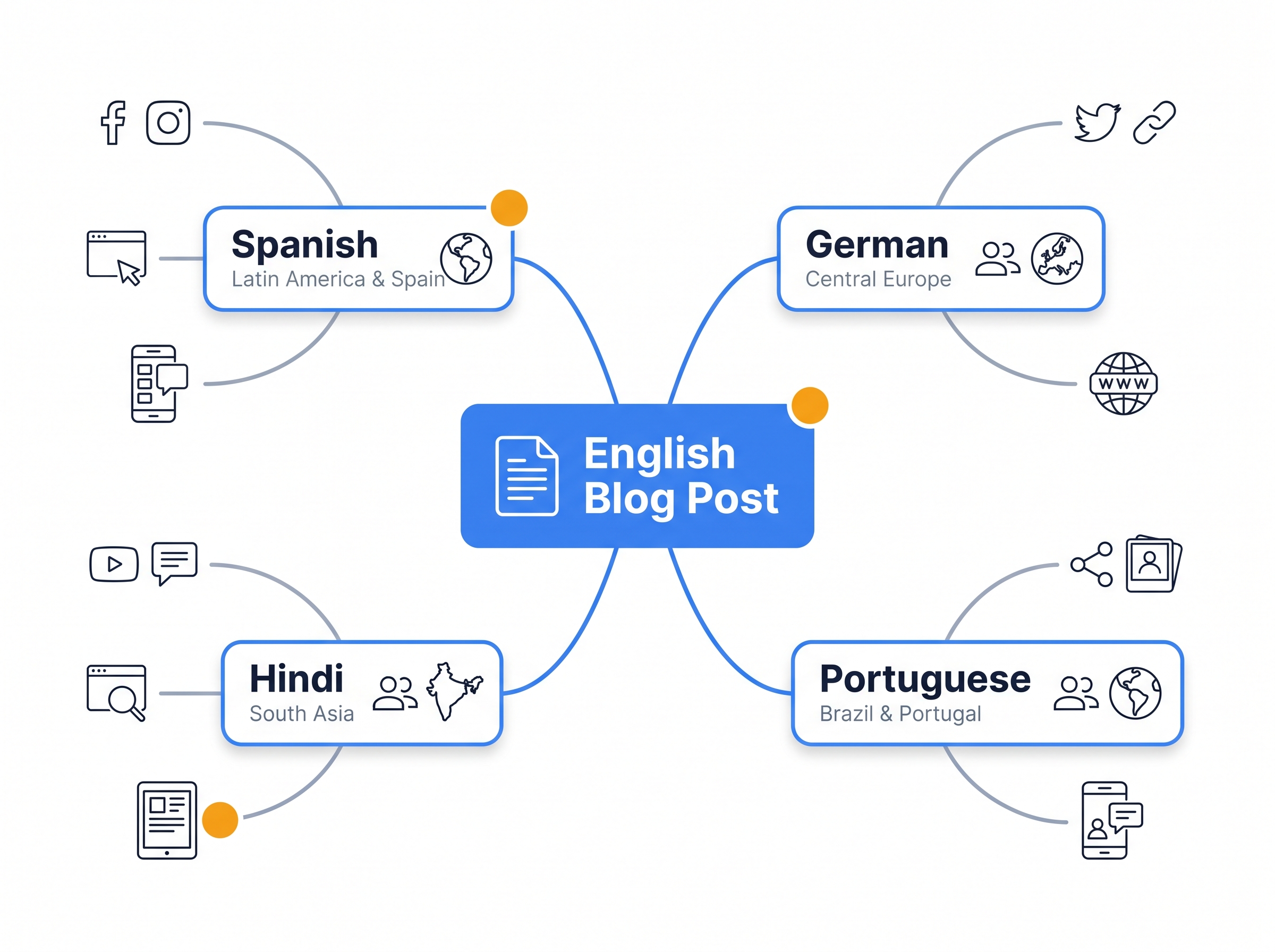 One blog post, multiple languages, global reach.
Many blogs are written in English, but Instagram audiences rarely are. A creator targeting Spanish speakers in LATAM, a brand running accounts across Germany, India, and Brazil, or an agency managing multilingual social calendars all face the same friction: the content exists, but the visuals need to exist in another language too. The usual fix is a separate translation step, a second round of design work, and a longer turnaround. Canvora removes that step entirely.
When you paste a blog URL or upload a document, Canvora generates the text on every visual (headlines, body copy, captions embedded in the graphic) in whichever of its 150+ supported languages you specify. A Spanish-language quote card from an English blog post. A Hindi stat graphic from a case study written in French. The language of the source content and the language of the output are independent variables. You choose the target, Canvora handles the rest.
Why This Matters for Agencies and Multi-Market Brands
Most template-based design tools are English-first by default. Switching languages means manually replacing every text element, checking line lengths, and hoping the font handles the script. That process scales poorly when you are managing five accounts across five markets.
Canvora treats multilingual generation as a core workflow, not a workaround. One input. One generation. Output in the language your audience actually reads.
Common Mistakes When Turning Blog Posts Into Instagram Posts
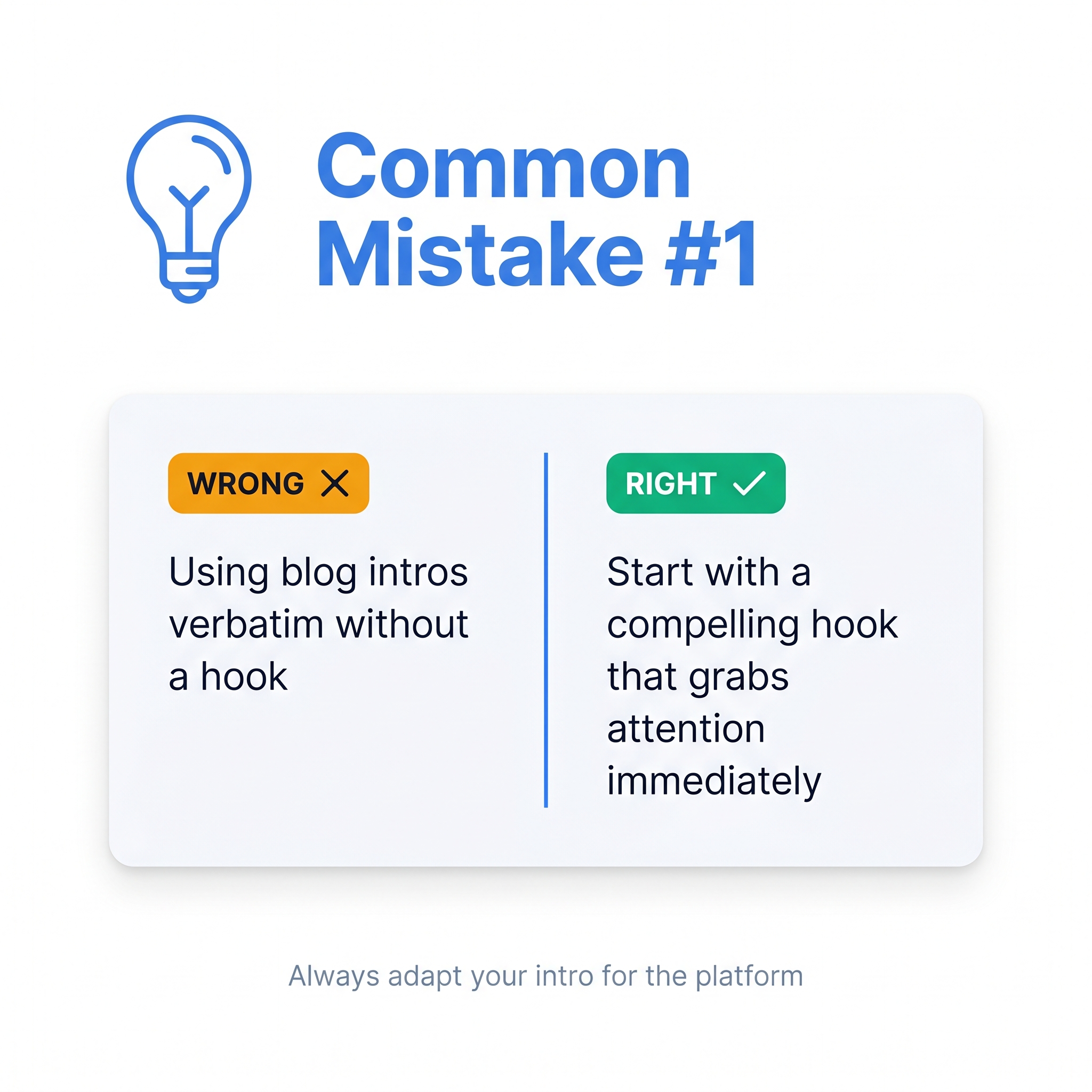 Avoid these three pitfalls for better Instagram repurposing results.
Repurposed content underperforms when the format changes but the writing doesn't.
Copying the blog intro verbatim. Blog posts open with context. Instagram needs a hook. The first line of a caption determines whether someone taps "more" or scrolls past. Cut the preamble and lead with the sharpest point from the whole post.
Overloading the visual with text. One idea per image. A slide crammed with three sub-points and a footnote isn't a visual, it's a screenshot of a Word doc. If the thought needs more than a headline and two lines of supporting copy, split it across two slides.
Letting the visual carry the whole post. The caption is where context, personality, and the call to action live. A strong graphic with no caption is a missed conversation.
Using a wall of hashtags. Instagram's own guidance now points toward 3-5 focused hashtags over 20 generic ones. More isn't more.
Keeping the blog's formal tone. Blog writing tends toward the authoritative. Instagram copy tends toward the direct, even conversational. Read the caption aloud. If it sounds like a white paper, rewrite it.
Posting once and stopping. Content repurposing compounds over time. A single blog post can feed weeks of Instagram content, but only if the cadence holds. Batch the formats, schedule the posts, and treat the workflow as repeatable rather than one-off.
Frequently Asked Questions
Q: How do I turn an article into an Instagram post?
Identify the article's strongest takeaway, stat, or quote, then adapt it into a short caption with a hook and a clear visual. For a carousel, map each key point to one slide (Instagram supports up to 10 slides). Tools like Canvora let you paste the article URL or text directly and generate quote cards, stat cards, and carousel slides automatically, so you skip the manual layout work entirely and spend your time on the caption, not the design.
Q: How many Instagram posts can I get from one blog post?
A typical 1,500-word blog post can yield 3-8 Instagram assets: one carousel covering the main steps or tips, two or three quote cards pulled from standout sentences, a stat graphic if the post contains data, and a teaser image linking back to the full article. The exact number depends on how much structured, visual-friendly content the blog contains. Posts built around lists, frameworks, or data tend to produce more assets than narrative-style pieces.
Q: Do I need a designer to create Instagram visuals from my blog?
No. AI design tools like Canvora let you paste blog content and generate branded Instagram visuals without any design skills. You choose a visual style, apply a brand kit with your logo, colors, and fonts, and refine the output using plain-language instructions ("make the headline larger," "use warmer colors"). The result is a polished, on-brand graphic without opening a design app or touching a layout tool.
Q: What's the best Instagram format for repurposing a blog post?
Carousels work best for listicles, how-to posts, and multi-point arguments because each slide maps to one idea. Single image posts work well for a strong standalone stat or quote. If your blog has a clear conclusion or key lesson, a quote card is the fastest format to produce. Most blog posts support at least two or three different Instagram formats, so there is rarely a reason to produce only one asset per post.
Q: How long does it take to turn a blog post into an Instagram post?
Manually, expect 20-40 minutes per visual including writing, layout, and export. With Canvora, each generation (a single quote card or a full 10-slide carousel) takes about a minute. Producing a complete set of Instagram assets from one blog post (a carousel plus a few cards) involves separate generations and takes roughly 10-15 minutes in total. The time saving compounds quickly when you are repurposing multiple posts at once.
Q: Can I repurpose blog content into Instagram posts in languages other than English?
Yes. Canvora generates the text on visuals in 150+ languages, so you can produce a Spanish quote card or a Hindi stat graphic from an English blog post without a separate translation step. This is useful for creators and agencies managing Instagram accounts across multiple markets or bilingual audiences, since the language switch happens at generation time rather than as a manual post-production task.
Q: How do I keep my Instagram visuals on-brand when repurposing blog content?
Use a brand kit that stores your logo, brand colors, and fonts. In Canvora, applying a brand kit means every generated visual (carousel, quote card, stat graphic) automatically uses your brand's visual identity. The Starter plan includes one brand kit; Pro gives you five; Business gives you unlimited, which suits agencies managing multiple clients or brands under one account.
Q: What's the difference between repurposing a blog post manually versus using an AI tool?
Manual repurposing means reading the post, writing a caption, sourcing or creating an image, and laying out text in a design app. That typically runs 20-40 minutes per asset. An AI tool like Canvora reads the content, extracts key ideas, and generates formatted visuals in about a minute per generation. The trade-off is creative control versus speed and volume. For most content teams, the AI handles the first draft and the editor handles the refinement.
Q: Should I post the full blog post text on Instagram?
No. Instagram audiences scroll quickly and expect short, visual content. Distill the blog into one key idea per post. Use the caption to deliver the core point and a call to action, and let the visual carry the headline or stat. The full argument belongs on the blog. Instagram's job is to surface the most compelling fragment of that argument and send curious readers back to read the rest.
Tools mentioned in this article:
For your team / role:
Create your first visual in under a minute
Paste a blog post, PDF, or idea — Canvora generates finished carousels, infographics, and posts, on brand and in your language.
Free to start · 150 credits, no card · 150+ languages
More from the blog
How to Make an Instagram Carousel from a Blog Post
Learn how to turn any blog post into a polished Instagram carousel, step by step, with tools, tips, and size specs. Start repurposing your content today.
How to Make an Instagram Carousel Without Canva
Skip the template drag-and-drop. Learn how to make an Instagram carousel without Canva using AI tools like Canvora, and get results faster. Try it free.