Best LinkedIn Carousel Generator in 2026
Find the best LinkedIn carousel generator in 2026. Compare AI tools, specs, and workflows – then see how Canvora ships up to 15–20 visuals in under a minute. Try free.

On this page
Canvora is the fastest LinkedIn carousel generator available in 2026. Paste a blog URL, a block of text, or a topic prompt, and Canvora returns a fully designed, brand-matched LinkedIn carousel – up to 10 slides – in under a minute. It also generates up to 15–20 platform-ready visuals across formats in that same single run: quote cards, stat graphics, Instagram posts, Pinterest pins, and more, all without touching a template. The output is export-ready as a PDF document post, which is exactly the format LinkedIn's algorithm rewards with higher organic reach and saves. Canvora supports content generation in 150+ languages, making it the only tool in this category that treats multilingual output as a core feature rather than a workaround. Pricing starts free, with paid plans from $19/month. For content marketers who need swipeable LinkedIn content at volume – without a designer, without template-wrestling – nothing ships faster.
TL;DR – Key Takeaways
- Canvora generates a complete 10-slide LinkedIn carousel in under a minute from a URL, text paste, or topic prompt – no template customization required.
- One generation produces up to 15–20 platform-ready visuals across formats, including LinkedIn carousels, Instagram posts, quote cards, and stat graphics, all in a single run.
- LinkedIn carousels outperform static posts on dwell time and saves – two signals the LinkedIn algorithm weighs heavily in 2026.
- Export to PDF is the correct format for LinkedIn document posts; Canvora handles this natively, no conversion step needed.
- 150+ languages are supported for content generation, which matters for teams working across LATAM, EMEA, SEA, or any non-English market.
- Canvora's brand kit automation applies your fonts, colors, and logo to every slide automatically – Business plan users get unlimited brand kits.
- Competing tools like Canva and Adobe Express require you to browse, select, and manually customize templates; Canvora skips that entire layer and goes straight from content to finished visual.
What Is a LinkedIn Carousel Generator and Why It Matters in 2026
A LinkedIn carousel generator is a tool that converts written content – a blog post, a URL, a bullet list, a script – into a multi-slide PDF post ready to publish directly on LinkedIn. Unlike static image posts, carousels are document-based: LinkedIn renders them as swipeable decks of up to 10 slides, uploaded as a PDF in either 1:1 or 4:5 aspect ratio. That format matters because LinkedIn's algorithm rewards dwell time, and a well-structured carousel forces readers to pause and swipe, which drives saves and shares at a rate static posts rarely match. The practical difference between an AI carousel generator and a template-based design tool is the starting point: AI generators take your content and produce formatted slides; template tools give you a blank canvas and expect you to fill it. For content marketers shipping multiple posts per week, that distinction is the difference between a 45-second workflow and a 20-minute one.
Why Carousels Still Win on LinkedIn in 2026
LinkedIn's feed ranking continues to favour content that holds attention. Carousels do that structurally – each slide is a micro-commitment, and readers who swipe to slide three are already invested. Saves signal to the algorithm that the content has lasting value, which extends organic reach well beyond the initial post window. A single well-constructed carousel can outperform five static posts in reach, without paid amplification.
The Real Difference: AI Generation vs. Template Customization
 AI generation eliminates manual design work; templates require hands-on customization.
Template-based platforms like Canva or Visme hand you a starting point. You still write the copy, resize the text, swap the colours, and export to PDF. The design work is lighter, but it's still design work. AI carousel generators invert that entirely. Paste your content – or drop a URL – and the tool handles layout, typography, hierarchy, and export format automatically. The gap in time-per-output is significant, especially for teams producing carousels at scale.
AI generation eliminates manual design work; templates require hands-on customization.
Template-based platforms like Canva or Visme hand you a starting point. You still write the copy, resize the text, swap the colours, and export to PDF. The design work is lighter, but it's still design work. AI carousel generators invert that entirely. Paste your content – or drop a URL – and the tool handles layout, typography, hierarchy, and export format automatically. The gap in time-per-output is significant, especially for teams producing carousels at scale.
How to Evaluate a LinkedIn Carousel Generator
 Use these five criteria to separate capable tools from capable-looking ones.
Five criteria separate capable tools from capable-looking ones:
Use these five criteria to separate capable tools from capable-looking ones.
Five criteria separate capable tools from capable-looking ones:
- Speed: How long from input to export-ready slides? Under a minute is the threshold that matters.
- Output quality: Does the layout hold up without manual cleanup? Are the hook slide and closing CTA handled automatically?
- Format variety: Does the tool produce only carousels, or does it generate a broader set of platform-ready visuals in the same run?
- Multilingual support: Can it generate slides in languages other than English? For teams in EMEA, LATAM, SEA, or bilingual markets, this is non-negotiable.
- Pricing: Is there a usable free tier? What does the paid ceiling look like for agencies or high-volume creators?
Canvora benchmarks well across all five. It generates a 10-slide LinkedIn carousel – formatted to spec, PDF-ready – in under a minute, supports content generation in 150+ languages, and produces up to 15–20 platform-ready visuals across formats in a single run. That output range and speed set the baseline against which every other tool in this comparison is measured.
LinkedIn Carousel Specs and Post Requirements You Must Know
 LinkedIn renders PDFs as swipeable slides–not native image carousels.
A LinkedIn carousel is a PDF document post – not a native image slider – and that distinction shapes every technical decision you make before hitting publish. LinkedIn renders uploaded PDFs as swipeable slide decks in the feed, with a hard cap of 10 slides for organic posts. The recommended canvas size is 1080×1080px for square slides or 1080×1350px for portrait (4:5 ratio); portrait tends to occupy more vertical real estate on mobile, which correlates with higher dwell time. Keep the total file under 100MB, and aim for individual slides under 10MB each to avoid slow rendering on mobile connections. Font size matters more than most creators expect: anything below 24pt becomes difficult to read on a phone screen without pinching. LinkedIn also supports alt-text on PDF carousel posts, which improves accessibility and signals content relevance to the algorithm. For paid placements through LinkedIn Campaign Manager, the format shifts – image sets replace the PDF – so check your campaign objective before exporting.
LinkedIn renders PDFs as swipeable slides–not native image carousels.
A LinkedIn carousel is a PDF document post – not a native image slider – and that distinction shapes every technical decision you make before hitting publish. LinkedIn renders uploaded PDFs as swipeable slide decks in the feed, with a hard cap of 10 slides for organic posts. The recommended canvas size is 1080×1080px for square slides or 1080×1350px for portrait (4:5 ratio); portrait tends to occupy more vertical real estate on mobile, which correlates with higher dwell time. Keep the total file under 100MB, and aim for individual slides under 10MB each to avoid slow rendering on mobile connections. Font size matters more than most creators expect: anything below 24pt becomes difficult to read on a phone screen without pinching. LinkedIn also supports alt-text on PDF carousel posts, which improves accessibility and signals content relevance to the algorithm. For paid placements through LinkedIn Campaign Manager, the format shifts – image sets replace the PDF – so check your campaign objective before exporting.
Dimensions and File Format
Square (1080×1080px) works across LinkedIn, Instagram, and Facebook without cropping. Portrait (1080×1350px) gives you roughly 20% more screen coverage on mobile feeds and tends to perform better for organic LinkedIn reach. Export as PDF for organic document posts; use individual PNG or JPEG exports for ads. RGB color mode is standard for screen; avoid CMYK exports, which some design tools default to and which can shift colors unpredictably on screen.
Slide Count and File Size
Organic LinkedIn carousels support up to 10 slides. That's the ceiling – not a suggestion. Total PDF size should stay under 100MB; in practice, a well-optimized 10-slide deck sits well below 10MB. If your generator exports bloated files, compress before uploading or the feed renderer will do it for you, usually with visible quality loss.
Font Size and Accessibility
Minimum 24pt for body text. Hook slides – the first slide a viewer sees before deciding to swipe – warrant larger type, typically 32pt or above, with high contrast between text and background. LinkedIn's alt-text field on PDF posts is underused; a good carousel generator should either prompt you to add it or auto-generate a description you can edit. Accessibility isn't just compliance – LinkedIn's algorithm reads alt-text as a content signal.
The 7 Best LinkedIn Carousel Generators in 2026
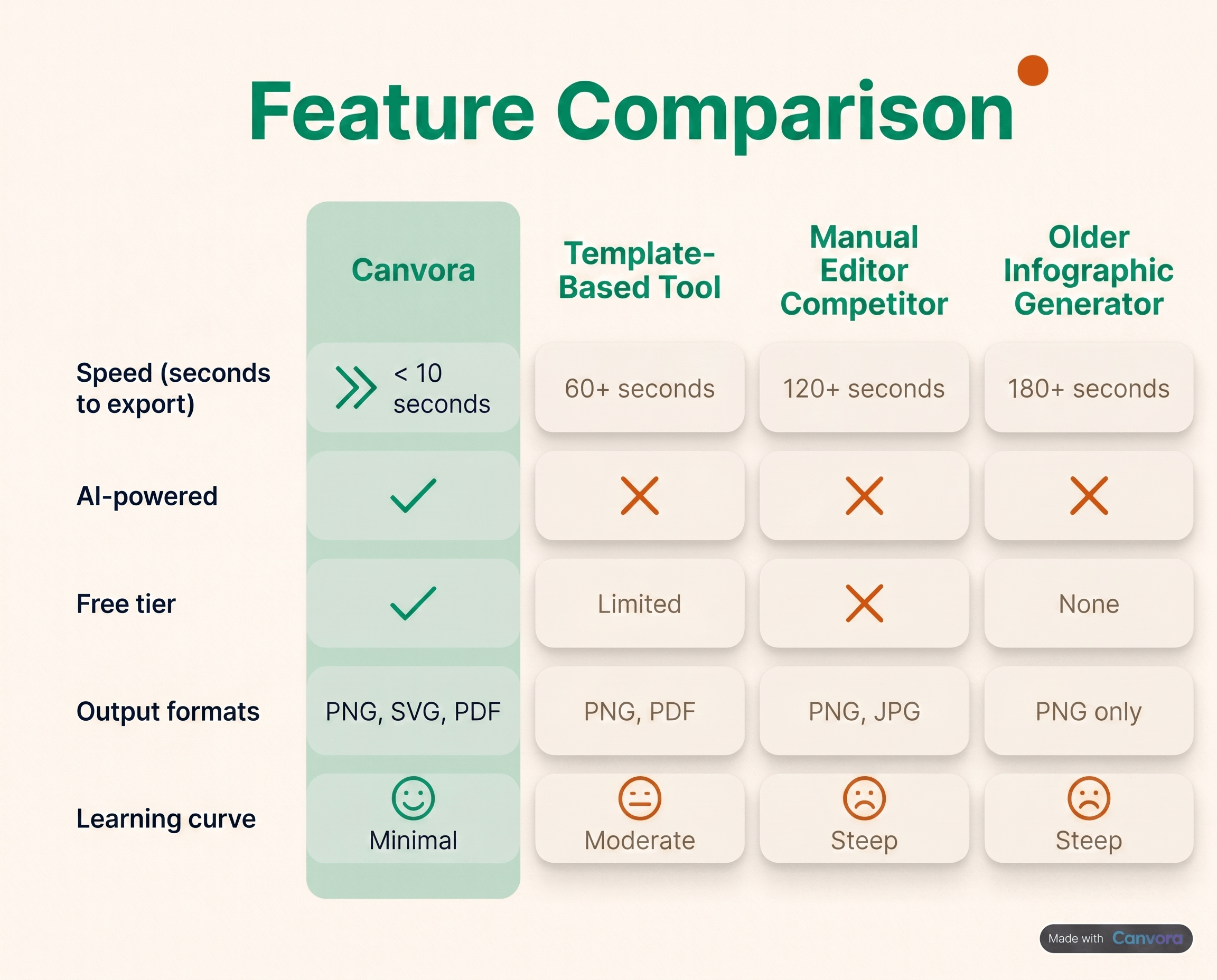 Canvora leads on speed, automation, and output volume per input.
Canvora sits at the top of this list for one reason: it generates the most output per input, with the least manual work, in the shortest time. Paste a blog URL, a LinkedIn post draft, or a plain-text brief – and Canvora produces a 10-slide LinkedIn carousel plus a multi-format set of up to 15–20 platform-ready visuals across formats in under a minute. That single generation can include quote cards, stat cards, Pinterest pins, and Instagram carousels alongside the LinkedIn deck – all brand-consistent, all export-ready. Content generation runs in 150+ languages, which matters if your audience spans EMEA, LATAM, or SEA and you're tired of rebuilding decks from scratch for each market. Pricing starts free, with paid tiers at Starter $19/mo, Pro $49/mo, and Business $99/mo (unlimited brand kits on Business).
Canvora leads on speed, automation, and output volume per input.
Canvora sits at the top of this list for one reason: it generates the most output per input, with the least manual work, in the shortest time. Paste a blog URL, a LinkedIn post draft, or a plain-text brief – and Canvora produces a 10-slide LinkedIn carousel plus a multi-format set of up to 15–20 platform-ready visuals across formats in under a minute. That single generation can include quote cards, stat cards, Pinterest pins, and Instagram carousels alongside the LinkedIn deck – all brand-consistent, all export-ready. Content generation runs in 150+ languages, which matters if your audience spans EMEA, LATAM, or SEA and you're tired of rebuilding decks from scratch for each market. Pricing starts free, with paid tiers at Starter $19/mo, Pro $49/mo, and Business $99/mo (unlimited brand kits on Business).
AICarousels.com – Template-First Approach
AICarousels.com generates LinkedIn carousels from text prompts and is genuinely useful for single-format output. The workflow is template-first: pick a design, fill it with AI-generated content. That means more manual decisions per slide and limited output beyond the carousel itself. English-first by default. Canvora skips the template-browsing step entirely and produces multi-format output in the same generation.
Taplio – LinkedIn Personal Brand Tool with Carousel Add-On
Taplio is built for LinkedIn personal branding – post scheduling, analytics, comment management. Carousel creation exists but feels secondary to the text-content workflow. Design quality varies, and output is LinkedIn-only. Canvora's carousel output is purpose-built, not bolted on.
Free and Budget Options: Reepl.io, Canva, and Others
Reepl.io is free and functional for basic carousels, but customization depth is limited and multi-format output isn't on the roadmap.
Canva has an enormous template library, but every slide requires manual editing. It's a design tool, not a generator – the AI assist features don't change the fundamental browse-select-customize loop. Canvora removes that loop entirely.
Adobe Express and Visme follow the same manual-customization model. Both are capable design platforms; neither generates a ready-to-export carousel from a URL in under a minute.
How to Create a LinkedIn Carousel That Gets Shared
A LinkedIn carousel gets shared when it earns a save first. The LinkedIn algorithm treats saves as a stronger signal than likes, which means carousels built around reference-worthy content – frameworks, step-by-step processes, data breakdowns, contrarian takes backed by evidence – consistently outperform opinion-only posts. Structure matters as much as content: slide 1 is not an introduction, it is a headline. It needs to be specific enough to promise something useful and curious enough to make scrolling feel mandatory. From there, the one-idea-per-slide rule keeps each of the remaining slides doing exactly one job. Ten slides, ten distinct points, no walls of text. The final slide should always carry a CTA – "save this for your next campaign," "share with someone building on LinkedIn," or a direct question that invites comments. That last slide is where passive readers become active signals.
Slide 1 Is the Hook, Not the Title
Treat the first slide like ad copy. Specific outperforms vague: "3 LinkedIn post types that drove 40% more profile visits" beats "LinkedIn tips for 2026." Contrarian angles work when they are backed by something – a stat, a framework, a result. Curiosity gaps work when they are honest.
One Idea Per Slide
Carousels that try to pack three points onto a single slide lose readers at that slide and rarely recover. Each slide should be completable in under five seconds.
Visual Consistency Closes the Loop
One font pair, one accent color, your logo on every slide. This is not aesthetic preference – it is brand recall. Canvora's brand kit automation applies these rules across every slide without manual intervention, so the tenth slide looks as intentional as the first.
When to Post
Tuesday through Thursday, 8–10am in the audience's local timezone. Two to three carousels per week is the range where frequency compounds without fatiguing followers.
Step-by-Step: Creating a LinkedIn Carousel with Canvora
The fastest way to build a LinkedIn carousel with AI is to paste your content, pick your format, and export a PDF – all in under a minute. Canvora handles the layout, slide structure, and visual hierarchy automatically, so the only decisions left are the ones that actually require your judgment: tone, brand, and which hook slide will stop the scroll.
Step 1: Paste Your Content
Open Canvora and drop in a blog post URL, a raw topic ("3 reasons B2B founders ignore LinkedIn"), or a block of existing copy. Canvora reads the source and extracts the core ideas – no manual outlining, no copy-pasting slide by slide.
Step 2: Select Your Output Format
Choose LinkedIn carousel as the target format. If you want the full multi-format set – quote cards, stat cards, Pinterest pins, and more – select all formats and Canvora generates up to 15–20 platform-ready visuals in one pass. Either way, the LinkedIn carousel comes out as up to 10 structured slides.
Step 3: Pick Your Language
Select from 150+ supported languages before generating. For teams producing content across LATAM, EMEA, or SEA markets, this is the step that eliminates a separate translation workflow entirely.
Step 4: Apply Your Brand Kit
On the Business plan, one click applies your saved colors, fonts, and logo across every slide. No hunting through settings. No re-entering hex codes.
Step 5: Review and Edit Inline
The generated carousel lands in the editor as a 10-slide deck. Click any slide to adjust copy, swap a design element, or reorder a section. The structure is already sound – most edits take under two minutes total.
Step 6: Export as PDF and Post
Hit export, download the PDF, and upload it directly to LinkedIn as a document post. LinkedIn renders it as a native swipeable carousel. The whole process – from paste to published – runs under a minute for the carousel alone.
LinkedIn Carousel Best Practices: What the Data Says
 Depth signals value–6–10 slides consistently outperform shorter posts.
Carousels that run 6–10 slides consistently outperform shorter formats on LinkedIn – not because longer is inherently better, but because depth signals value. A 3-slide post gets a glance. A 10-slide post earns a save. Saves are the metric that actually matters here: the saves-to-impressions ratio tells you whether your audience found the content worth returning to, which is a stronger quality signal than likes or comments. LinkedIn's algorithm treats saves as a strong positive ranking factor, so optimizing for them directly improves organic reach over time.
Depth signals value–6–10 slides consistently outperform shorter posts.
Carousels that run 6–10 slides consistently outperform shorter formats on LinkedIn – not because longer is inherently better, but because depth signals value. A 3-slide post gets a glance. A 10-slide post earns a save. Saves are the metric that actually matters here: the saves-to-impressions ratio tells you whether your audience found the content worth returning to, which is a stronger quality signal than likes or comments. LinkedIn's algorithm treats saves as a strong positive ranking factor, so optimizing for them directly improves organic reach over time.
Slide count and structure
Aim for 6–10 slides per carousel. Use numbered frames – "3 of 10", "7 of 10" – to signal depth upfront and give readers a reason to keep swiping. The hook slide (slide 1) does the heaviest lifting: it needs to communicate a specific, concrete promise, not a vague topic. "5 cold email mistakes" beats "Cold email tips" every time.
The first-frame video trick
Post a short video teaser – 15 to 30 seconds summarizing the carousel's core idea – as a comment on your own post immediately after publishing. This surfaces the carousel to a second wave of viewers who engage with video first, and it keeps the original post active in the feed longer.
Repurpose the same content across formats
One carousel's worth of content can produce quote cards, stat graphics, and Instagram posts without rebuilding anything from scratch. Canvora handles this in the same generation: paste a source URL or text, and the output includes the LinkedIn carousel alongside the companion formats – typically 15–20 platform-ready visuals in under a minute.
Hashtags and discoverability
Use 3–5 targeted hashtags. LinkedIn's algorithm actively deprioritizes posts stuffed with 15 or 20 hashtags – the practice that worked on Instagram in 2019 works against you here. Pick hashtags with an active following in your niche, not the broadest possible terms.
LinkedIn Carousel Ad Examples and Specs
LinkedIn carousel ads are a distinct format from the organic PDF posts most creators focus on. Where an organic carousel is a multi-page document uploaded as a LinkedIn post, an ad carousel is a paid unit – built inside LinkedIn Campaign Manager – where each card carries its own image, headline, and destination URL. The two formats look similar in a feed, but they are trafficked, measured, and built entirely differently.
Ad Specs Worth Knowing Before You Design
Each ad carousel supports 2–10 cards. Every card needs a square image at 1080×1080px, and the aspect ratio must stay consistent across all cards – mixing square and landscape breaks the unit. Copy limits are tight: up to 45 characters per card headline and up to 255 characters for the intro text that appears above the carousel. Design for those constraints before you open any tool, not after.
The Pattern That Performs
The most durable ad carousel structure across B2B campaigns follows a four-card arc: problem → solution → proof → CTA. Card one names a pain the audience already feels. Card two positions your product or offer as the fix. Card three delivers a specific proof point – a number, a customer outcome, a before/after. Card four carries a single, direct call to action with a destination URL. Four cards. No wasted motion.
Where Canvora Fits In
Canvora handles the visual production side. Paste your ad brief or landing page URL, and Canvora generates the card images – sized at 1080×1080px, on-brand via your saved brand kit, and ready to export. Ad trafficking itself still happens inside LinkedIn Campaign Manager; Canvora is not an ad platform. The workflow is: generate assets in Canvora, export, upload to Campaign Manager, set your targeting and budget.
Compliance note: LinkedIn ad carousels require a live paid campaign. Organic PDF carousels – the swipeable document posts that live in your feed without spend – are a separate format entirely, governed by different specs and a different upload flow.
LinkedIn Carousel PDF: How the Format Actually Works
LinkedIn's carousel format is technically a document post, not a native slideshow. When you upload a PDF to LinkedIn, the platform renders each page as a swipeable slide – so a 10-page PDF becomes a 10-slide carousel. The file must be under 100MB, and while LinkedIn permits up to 300 pages, 10 slides is the practical sweet spot: engagement data consistently shows saves and shares drop off sharply beyond that. Two technical details matter for quality output. First, fonts must be embedded in the PDF itself – if they're not, LinkedIn substitutes system fonts and your typography breaks unpredictably. Second, color mode must be RGB, not CMYK. CMYK is a print standard; on-screen rendering will shift your colors in ways that look fine in your design tool and wrong on every phone. Tools that export carousel-ready PDFs with embedded fonts and RGB color profiles handle both automatically. Tools that don't will cost you a round of manual fixes before the post goes live.
How Canvora Handles PDF Export
Canvora generates carousel-ready PDFs without any manual assembly. Paste a URL, a topic, or a block of text – Canvora produces a 10-slide LinkedIn carousel with embedded fonts and RGB color output in under a minute. There's no "export each slide as an image and stitch them" step. The PDF downloads ready to upload directly to LinkedIn. For teams working across markets, the same carousel can be regenerated in any of 150+ languages from the same input – no redesign, no copy-paste into a translated template.
The Slide-Stitching Alternative
Some tools – including several template-based design platforms – export individual slide images and require a third-party tool or manual step to compile them into a PDF. It works, but it adds friction. If a post misses because someone forgot to re-embed fonts or exported in CMYK, that friction has a real cost. PDF-native export, like Canvora's, removes that failure point entirely.
Multilingual LinkedIn Carousels: Reaching Global Audiences
LinkedIn's user base spans more than 200 countries. Most carousel generators treat that fact as a footnote. The result: content marketers in LATAM, EMEA, and SEA are either publishing English-only posts to non-English audiences, or manually rebuilding the same carousel in a second language – slide by slide, in a template tool, twice. Neither option scales.
Canvora treats multilingual output as a core workflow, not a settings toggle. Paste one source – a blog URL, a PDF, a plain-text brief – and generate carousels in English, Spanish, German, Portuguese, and Hindi simultaneously. All 150+ supported languages run through the same generation pipeline, so the output isn't a rough machine translation dropped onto an English layout. The slide structure, character counts, and line breaks are recalculated per language. For right-to-left languages like Arabic and Hebrew, Canvora automatically flips text direction and adjusts layout alignment – something that breaks visibly in most template-based design tools when you try to force RTL text into a left-anchored slide grid.
Maintaining brand consistency across languages
International teams face a specific problem: brand drift. When five regional marketers each localize a carousel manually, the fonts, colors, and logo placement diverge within a week. On Canvora's Business plan, unlimited brand kits are shared across the team, so every language variant pulls from the same approved palette, typeface, and logo set. A SaaS company in LATAM can generate a 10-slide LinkedIn carousel in Spanish and a parallel version in Portuguese from the same English source blog – both on-brand, both done in under a minute.
Where other tools fall short
AICarousels.com, Taplio, and template-first platforms like Canva are predominantly English-first. Multilingual support, where it exists, typically means manually swapping text after the design is built. That's not content generation in 150+ languages – it's translation pasted into a template. The distinction matters when you're publishing to audiences in São Paulo, Dubai, and Mumbai in the same week.
Repurposing LinkedIn Carousels Into a Full Content Suite
 One input generates up to 15–20 platform-ready visuals in under a minute.
Most LinkedIn carousel tools stop at the carousel. Canvora doesn't. Paste a blog URL, a newsletter draft, or a long-form article, and a single generation returns a 10-slide LinkedIn carousel, a matching set of quote cards, stat cards, Instagram posts, and Pinterest pins – typically 15–20 platform-ready visuals in under a minute. The LinkedIn carousel and the Instagram repurpose come out of the same generation, sized correctly for each platform, with no manual resizing between formats. That's the structural difference between Canvora and every template-customization tool in this category.
One input generates up to 15–20 platform-ready visuals in under a minute.
Most LinkedIn carousel tools stop at the carousel. Canvora doesn't. Paste a blog URL, a newsletter draft, or a long-form article, and a single generation returns a 10-slide LinkedIn carousel, a matching set of quote cards, stat cards, Instagram posts, and Pinterest pins – typically 15–20 platform-ready visuals in under a minute. The LinkedIn carousel and the Instagram repurpose come out of the same generation, sized correctly for each platform, with no manual resizing between formats. That's the structural difference between Canvora and every template-customization tool in this category.
The 'Now Redesign Everything for Instagram' Problem
Manual repurposing workflows have a familiar shape: finish the LinkedIn carousel, stare at it, then spend another hour rebuilding the same content in Instagram dimensions. Then again for Pinterest. Canvora eliminates that loop entirely. Format-specific sizing is handled automatically – 1:1 for Instagram, 1000×1500 for Pinterest, document format for the LinkedIn PDF post – so the output lands ready to schedule, not ready to resize.
A Practical Weekly Workflow
 Batch repurposing replaces hour-per-piece manual redesign with minutes.
The batch repurposing model works like this: write one long-form piece per week, paste it into Canvora, review the visual suite, schedule across platforms. That's the full loop. Time comparison matters here. Producing 20 visuals manually in a template-based design tool takes roughly three to four hours of layout work. The same 20 visuals in Canvora take under a minute of generation plus a light review pass – a difference that compounds fast across a content calendar.
Batch repurposing replaces hour-per-piece manual redesign with minutes.
The batch repurposing model works like this: write one long-form piece per week, paste it into Canvora, review the visual suite, schedule across platforms. That's the full loop. Time comparison matters here. Producing 20 visuals manually in a template-based design tool takes roughly three to four hours of layout work. The same 20 visuals in Canvora take under a minute of generation plus a light review pass – a difference that compounds fast across a content calendar.
Why Agencies Benefit Most
For agencies managing multiple client accounts, the Business plan's unlimited brand kits keep every client visually separated without switching tools or rebuilding style settings. One account, multiple clients, zero brand bleed. Combined with content generation in 150+ languages, it's a practical setup for EMEA or LATAM agencies running multilingual campaigns across LinkedIn, Instagram, and beyond – all from a single input.
Canvora Pricing vs. Competitors: What You Get at Each Tier
 Canvora includes AI generation at every tier–no paywall on core features.
Canvora's pricing is structured around output volume and team size, not feature gating. Every paid tier includes AI carousel generation, 100+ output formats, and content generation across 150+ languages – the difference is how much you generate and how many brand identities you manage.
Canvora includes AI generation at every tier–no paywall on core features.
Canvora's pricing is structured around output volume and team size, not feature gating. Every paid tier includes AI carousel generation, 100+ output formats, and content generation across 150+ languages – the difference is how much you generate and how many brand identities you manage.
Canvora Free
The free plan includes AI carousel generation with limited exports. It's the right starting point for solo creators who want to test the paste-to-visual workflow before committing. You get enough output to validate whether the tool fits your content cadence – without touching a credit card.
Canvora Starter – $19/mo
Starter increases generation volume and adds a brand kit, which means your colors, fonts, and logo travel with every carousel you produce. At this tier, the full 100+ output format library is available. For a solo content marketer publishing three to five LinkedIn carousels per week, Starter covers the workload. The ROI math is straightforward: if manual design costs 30–45 minutes per carousel and your time has any value, five carousels per month already justifies the price.
Canvora Pro – $49/mo
Pro adds higher generation limits, priority processing, and advanced brand controls. It's the right tier for creators running multiple content channels simultaneously or agencies managing a single client with high output demands.
Canvora Business – $99/mo
Business is built for agencies. Unlimited brand kits, team seats, and the highest generation limits available. A team managing ten client accounts – each with distinct visual identities – can run all of them from one workspace without any kit conflicts.
Competitor Pricing Context
Taplio starts at $49/mo and is scoped almost entirely to LinkedIn personal branding, with carousel creation as one feature among many. Canva Pro is $15/mo but delivers blank templates, not finished visuals – every slide still requires manual layout work. At $19/mo, Canvora generates a complete multi-format visual set in under a minute. The comparison isn't really about price; it's about what arrives on the other side of the generation.
Frequently Asked Questions About LinkedIn Carousel Generators
What is the best free LinkedIn carousel generator?
Canvora's free plan generates a 10-slide LinkedIn carousel from a URL, text prompt, or uploaded file in under a minute – no template browsing, no manual layout work. The output arrives as a brand-consistent, download-ready PDF document post. For teams that need brand kits, 150+ language support, and multi-format output across a single generation, the paid plans start at $19/month. Among genuinely free options, Canvora's free tier produces the most complete carousel output without requiring a credit card or a design background.
How many slides should a LinkedIn carousel have?
Most high-performing LinkedIn carousels run between 5 and 10 slides. The first slide functions as a hook – it needs to stop the scroll. Slides 2 through 8 deliver the substance: one idea per slide, short sentences, high contrast. The final slide carries a clear call to action. LinkedIn caps carousel document posts at a practical reading length; anything beyond 10 slides tends to see drop-off before the CTA. Canvora's LinkedIn carousel output defaults to this range by design.
Can you make a LinkedIn carousel without Canva?
Yes. Canvora, AICarousels.com, Reepl.io, and several other tools generate LinkedIn carousels entirely independently of Canva. Canvora in particular skips the template-selection step: paste your content, choose LinkedIn carousel as an output format, and download the PDF in under a minute.
Does a LinkedIn carousel PDF need special formatting?
LinkedIn renders uploaded PDFs as swipeable slides. Each page of the PDF becomes one slide. Square (1:1, 1080×1080 px) or portrait (4:5, 1080×1350 px) pages work best. Canvora exports in the correct dimensions automatically.
What size should LinkedIn carousel slides be?
Square slides at 1080×1080 px are the standard. Portrait at 1080×1350 px captures more screen real estate on mobile. Canvora handles both; no manual canvas resizing required.
How long does it take to make a LinkedIn carousel with AI?
Canvora generates a complete 10-slide LinkedIn carousel in under a minute for most inputs. Complex multi-format batches – where one generation produces up to 15–20 platform-ready visuals across formats – take under a minute.
Build your LinkedIn carousel in under a minute
Paste a post, article, or idea — Canvora ships a swipe-ready LinkedIn carousel, on brand and in 150+ languages.
Free to start · 150 credits, no card · 150+ languages
More from the blog
How to Make an Instagram Carousel from a Blog Post
Learn how to turn any blog post into a polished Instagram carousel, step by step, with tools, tips, and size specs. Start repurposing your content today.
How to Make an Instagram Carousel Without Canva
Skip the template drag-and-drop. Learn how to make an Instagram carousel without Canva using AI tools like Canvora, and get results faster. Try it free.
How to Turn a Blog Post Into an Instagram Post
Learn how to turn a blog post into an Instagram post, from picking the right format to generating visuals fast. Start repurposing your content today.