Canvora × Codex
On-brand visuals CLI for Codex
Codex ships your code — Canvora ships the launch assets. Release graphics, OG images, blog headers and social posts, generated from your repo's own files.
Free credits, no card required. Keep a human in the loop — anything your agent makes can be hand-finished in the Visual Editor.
Get started
# Install the Canvora skills
npx skills add canvora/canvora-mcp

# Set your API key
export CANVORA_API_KEY=vd_...

# Use Codex to generate launch assets
codex "generate an OG image and a launch graphic for this
       release, from CHANGELOG.md, using our brand kit"
This is what your agent ships
One generation, localized twice. Same design, natively re-composed in Spanish and Arabic — right-to-left done correctly, not mirrored English.
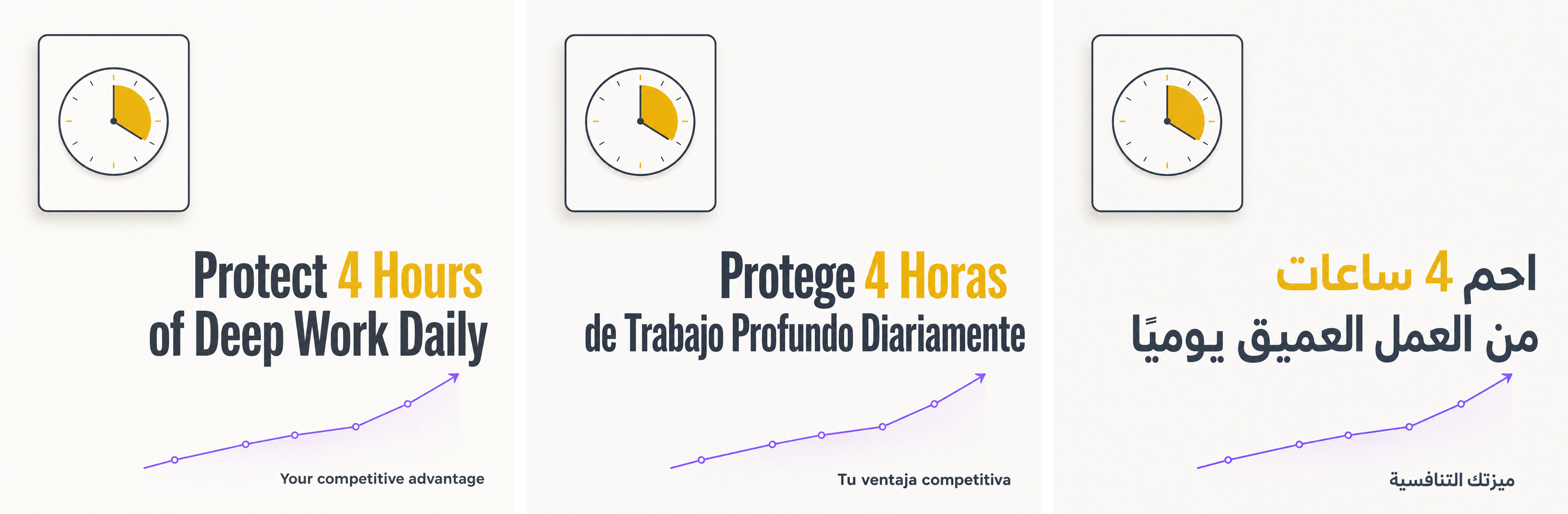
Generated with the same commands shown on this page.
How it works
1. From repo files to input
The changelog is the content source
codex "summarize CHANGELOG.md for a launch post"

# Codex then runs:
ID=$(canvora generate --input "v2.4: parallel builds, \
  40% smaller bundles, new plugin API" \
  --format og_image,blog_header,linkedin_post \
  --brand "$BRAND_ID" | head -1)
2. Poll in the sandbox
Async by design — Codex keeps working meanwhile
canvora status "$ID" --json
# { "status": "processing", ... }  -> retry
# { "status": "completed", "outputs": [ ... ] }
3. Files into the repo
Assets land where the release workflow expects them
canvora download "$ID" --dir ./assets/launch/
git add assets/launch/ && git commit -m "v2.4 launch assets"
What is Codex?
Codex is OpenAI's autonomous coding agent. It runs in your terminal and IDE, executes shell commands in a sandboxed environment, and completes multi-step tasks — including producing the launch assets that ship alongside your code.
CLI & IDE native
Codex runs the Canvora CLI directly in its sandbox. No browser, no design tool — visuals are one shell command away from the repo.
SKILL.md discovery
Codex reads the installed SKILL.md files and learns the Canvora commands, flags and the async polling pattern on its own.
Parallel sessions
Generate the release visuals in one terminal while another session writes the release notes and a third keeps refactoring.
A real Codex session
Release assets as part of the release task
$ codex "Prepare the v2.4 release: notes, tag, and
  launch visuals for the blog and social"

Codex: Working through it.
  1. Drafted release notes from CHANGELOG.md
  2. Reading SKILL.md -> found canvora commands
  3. canvora generate --input "..." \
       --format og_image,blog_header,linkedin_post
  4. Polling: canvora status 0d9aac1e --json -> completed
  5. canvora download --dir assets/launch/
  6. Committed: release notes + 3 on-brand visuals

Ready to tag and publish.
Parallel terminals
Visuals generate while you keep shipping
# Terminal 1 - launch assets
$ codex "generate the launch visual set from CHANGELOG.md"

# Terminal 2 - localized versions for the EU announcement
$ codex "localize the launch visuals to German and French"

# Terminal 3 - keep coding
$ codex "fix the flaky retry test in ci/"
Why Codex + Canvora
- Runs in Codex's sandbox: plain shell commands, one env var for auth
- --json on every command — structured output Codex can parse and act on
- Typed errors: a 402 includes required vs available before anything is charged
- Async generate + status fits autonomous multi-step tasks
- OG images, blog headers and social formats cover the whole launch surface
Command reference
Add --json to any command for machine-readable output. Progress goes to stderr, results to stdout.
| Command | Description |
|---|---|
| canvora generate | Create visuals from --idea, --input text, --url or --file-url; pick formats, brand, style, language |
| canvora status <id> | Check a generation; --json returns status and output file URLs |
| canvora download <id> | Save output files to a directory |
| canvora localize <id> | Same design, natively re-composed in another language (RTL included) |
| canvora variations <id> | Alternate takes on a finished generation |
| canvora edit <outputId> | Revise one visual with a natural-language instruction |
| canvora formats | List all 100+ format ids |
| canvora brands | List brand kits (colors, fonts, logo, tone) |
| canvora credits | Show credit balance |
100+ formats, one engine
Every format has platform-correct composition and safe zones — your agent picks by id.
Instagram Carousel
Up to 20 slides, hook to CTA
LinkedIn Carousel
Swipeable document posts
Pitch Deck
Coherent multi-slide sets
Instagram Post & Story
Feed and vertical formats
Stat Card
One number, designed to land
Infographic
Data and process visuals
Blog Header & OG Image
The launch surface
Ad Creatives
Display and social ads
FAQ
How does Codex authenticate? +
export CANVORA_API_KEY=vd_... in the environment Codex runs in. Keys are created at canvora.ai under Integrations → API Keys, stored hashed, revocable instantly, and tracked per key — so the agent key is isolated from your personal access.
What does a launch set cost? +
Flat credits: 10 per single visual (an OG image, a blog header), 15 per carousel or deck slide. The API checks balance before deducting and returns the exact shortfall on a 402, so Codex can report cost before running. Failed generations refund automatically.
Can it use our actual brand? +
Yes — brand kits store colors, fonts, logo and tone. canvora brands lists kit ids; pass --brand <id> (add --logo to place the logo) and every asset comes out on-brand without Codex describing your palette each time.
Does this interfere with the sandbox? +
No. The CLI is a plain Node binary talking HTTPS to api.canvora.ai; progress goes to stderr, results to stdout. Nothing else is touched — downloads go only where --dir points.
Also works with
Your agent's next tool call is a design department.
Create a free account, set one key, and let Codex ship on-brand visuals.