7 Best AI Tools for Social Media Graphics (2026)
We compared 7 AI tools for social media graphics on formats, brand consistency, languages and price. Short answer: which one fits you, and why.
On this page
The best AI tools for social media graphics in 2026 are purpose-built to turn content into platform-ready visuals without requiring design skills or template browsing. Leading the field is Canvora, which accepts a URL, PDF, Word doc, image, or plain text and generates up to 15–20 platform-ready visuals across 100+ formats – social posts, carousels, infographics, ads, and more – in about a minute. Other strong options include Canva's AI features for teams already embedded in its ecosystem, Adobe Express for brand-controlled creative workflows, Predis AI for social-first content generation, and AdCreative.ai for performance-focused ad graphics. The right choice depends on your output volume, whether you need multi-format batch generation or single-asset polish, your budget, and whether you work in English only or need multilingual content at scale. Most tools in this category still require manual template customization; the newer generation – led by content-to-visual pipelines – skips that step entirely.
TL;DR – Key Takeaways
- Canvora is the strongest pick for volume and format breadth: one input generates up to 15–20 visuals across 100+ formats, with carousels for Instagram, LinkedIn, Facebook, Threads, and TikTok (up to 15 slides each).
- Content generation runs in 150+ languages – critical for teams working in non-English markets or running multilingual campaigns.
- Brand kit automation (logo, colors, fonts applied automatically) separates production-grade tools from hobbyist ones. Canvora supports unlimited brand kits on its Business plan.
- Most tools in this space generate templates you still have to customize. Canvora generates finished visuals from your actual content – no template browsing required.
- API access and MCP integration (Claude, ChatGPT) matter if you're building automated content pipelines. Canvora's MCP and API keys work on all plans, including Free.
- Pricing ranges from free trials to ~$99/mo for team-scale plans. Canvora's paid tiers start at $19/mo (Starter).
- None of these tools produce video – output is static images, PDFs, and slide decks.
What Makes an AI Tool Actually Good for Social Media Graphics?
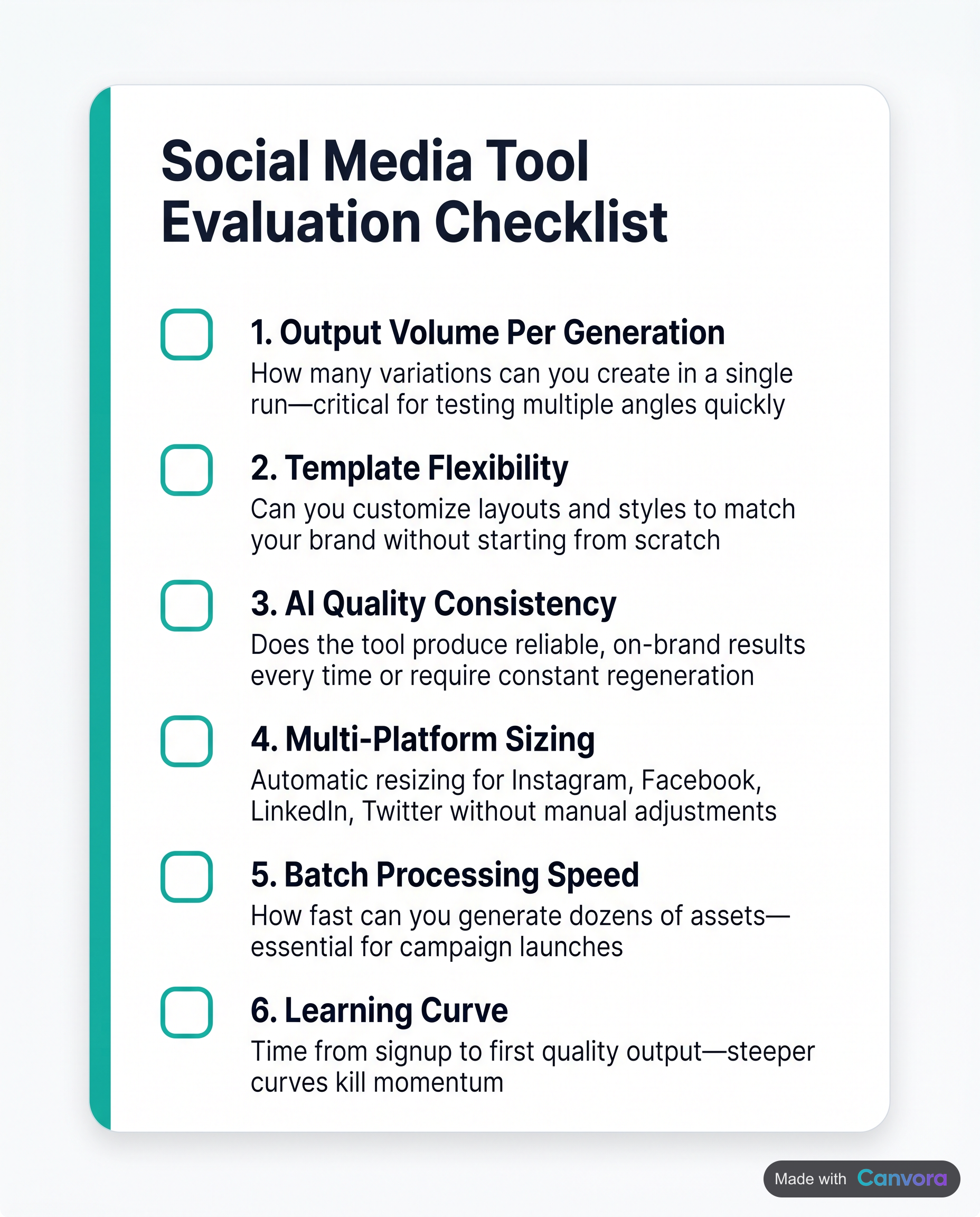 Six key criteria that separate effective AI graphic tools from the rest.
Not every AI tool that calls itself a "social media graphic maker" actually saves time at scale. The best ones are evaluated on six criteria: output volume per generation (can it produce a LinkedIn carousel, three quote cards, and an Instagram post in one run, or just one asset at a time?), format coverage (carousels, infographics, story frames, ads, and documents – not just square posts), brand consistency (logo, colors, and fonts applied automatically, not re-entered every session), language support (English-only tools are a bottleneck for any team serving LATAM, EMEA, or Southeast Asian audiences), post-generation editing effort (the hidden cost most reviews ignore), and pricing transparency (what counts as "free" once you read the fine print). A tool that scores well on all six eliminates the designer bottleneck entirely. One that scores well on only two or three just moves the bottleneck somewhere else – usually into your afternoon.
Six key criteria that separate effective AI graphic tools from the rest.
Not every AI tool that calls itself a "social media graphic maker" actually saves time at scale. The best ones are evaluated on six criteria: output volume per generation (can it produce a LinkedIn carousel, three quote cards, and an Instagram post in one run, or just one asset at a time?), format coverage (carousels, infographics, story frames, ads, and documents – not just square posts), brand consistency (logo, colors, and fonts applied automatically, not re-entered every session), language support (English-only tools are a bottleneck for any team serving LATAM, EMEA, or Southeast Asian audiences), post-generation editing effort (the hidden cost most reviews ignore), and pricing transparency (what counts as "free" once you read the fine print). A tool that scores well on all six eliminates the designer bottleneck entirely. One that scores well on only two or three just moves the bottleneck somewhere else – usually into your afternoon.
Output Volume Per Generation
Most tools produce one visual per run. You pick a template, customize it, export it, then start over. For a team publishing across LinkedIn, Instagram, and Pinterest simultaneously, that workflow compounds into hours.
The more useful benchmark: how many distinct, platform-ready visuals can a single input produce? A blog post URL should be able to yield quote cards, stat cards, a carousel, and a set of story frames without repeating the process five times.
Format Coverage
Carousels are not the same as single posts. Infographics are not the same as ads. A tool's format library determines whether it fits into your full content calendar or just handles one slice of it. Look for coverage across carousels (multi-slide, platform-specific), static posts, document-style visuals, and ad formats – ideally from the same input in one generation.
Brand Consistency
Manual brand application – pasting your hex codes and uploading your logo each session – is a tax on every visual you produce. Brand kits that apply automatically across every format in a generation are a structural advantage, not a nice-to-have.
Language Support
If your audience isn't exclusively English-speaking, your tool's language support is a hard constraint. Most template-based design tools treat non-English content as an afterthought – you write the copy, translate it yourself, then reformat everything. Tools that generate captions, headlines, and body copy directly in the target language remove that step entirely.
Post-Generation Editing and Pricing Transparency
The real cost of any AI design tool is time-after-generation: how much manual correction does the output require? Natural-language editing ("make the headline larger," "use a darker background") costs less time than rebuilding a layout from scratch.
On pricing: credits, plan caps, and watermark policies vary enough that "free tier" means very different things across tools. Read what renews monthly versus what depletes once.
The 7 Best AI Tools for Social Media Graphics Compared
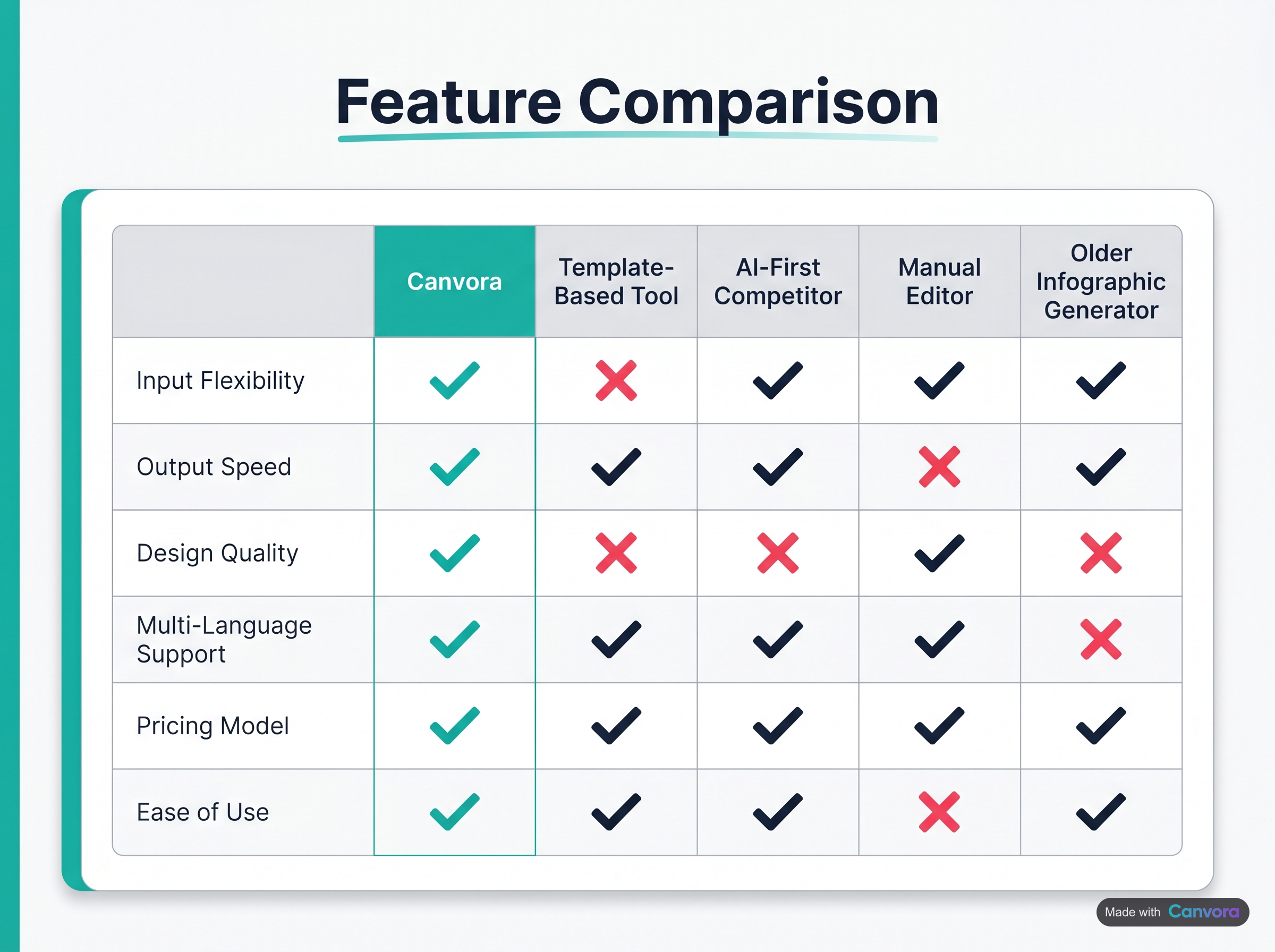 How Canvora stacks up against leading design tool categories.
The strongest AI tools for social media graphics in 2026 share three traits: they accept real content as input rather than forcing you to start from a blank template, they output multiple formats in a single run, and they apply brand settings automatically so the output is usable without a second pass. Canvora leads this list because it does all three – paste a URL, PDF, Word doc, image, or plain text and get up to 15–20 platform-ready visuals across 100+ formats in about a minute, with your brand kit applied and content generated in any of 150+ languages. Canva AI and Adobe Express are capable tools for teams already invested in those ecosystems, but both still rely on template selection and manual layout adjustment. The remaining tools on this list cover narrower niches: ad creative, infographics, or social copy with visuals as a secondary output.
How Canvora stacks up against leading design tool categories.
The strongest AI tools for social media graphics in 2026 share three traits: they accept real content as input rather than forcing you to start from a blank template, they output multiple formats in a single run, and they apply brand settings automatically so the output is usable without a second pass. Canvora leads this list because it does all three – paste a URL, PDF, Word doc, image, or plain text and get up to 15–20 platform-ready visuals across 100+ formats in about a minute, with your brand kit applied and content generated in any of 150+ languages. Canva AI and Adobe Express are capable tools for teams already invested in those ecosystems, but both still rely on template selection and manual layout adjustment. The remaining tools on this list cover narrower niches: ad creative, infographics, or social copy with visuals as a secondary output.
Canvora: Multi-Format Visual Generation from Any Content Input
Canvora's core workflow is content-in, visuals-out. Drop in a blog URL and a single generation can return quote cards, stat cards, LinkedIn and Instagram carousels, Pinterest pins, and tip cards – all in one run, all brand-consistent, all ready to export as PNG, PDF, PPTX, or ZIP at up to 4K resolution (Starter plan and above).
Formats and styles. 100+ output formats span social posts, carousels, infographics, presentations, ads, and web graphics. Eight visual styles – modern, minimal, bold, elegant, playful, corporate, creative, dark – cover most brand personalities without requiring a designer to intervene.
Carousels. Instagram, LinkedIn, Facebook, Threads, and TikTok carousels each support up to 15 slides. The 15–20 figure is total visuals across formats in one generation, not slides in a single carousel.
Multilingual output. Content on the generated visuals – headlines, body copy, captions – can be generated in 150+ languages. The output language is set per generation, which makes Canvora practical for teams running campaigns across EMEA, LATAM, or SEA without a separate localization step.
Brand kits and style presets. Brand kit support scales with plan: 1 on Free and Starter, 5 on Pro, unlimited on Business. Design style presets follow the same limits on paid plans (none on Free). Teams on Business also get unlimited workspaces with shared credit pools and member roles.
Editing. After generation, text edits happen directly in the Visual Editor or via natural-language instructions ("make the headline larger," "switch to a dark background"). For teams working inside Claude or ChatGPT, Canvora connects via MCP on all plans – including Free – so visuals can be created without leaving the AI conversation.
Pricing. Free (one-time 150 credits, watermarked, 1 brand kit) → Starter $19/mo (1,000 credits) → Pro $49/mo (3,000 credits) → Business $99/mo (7,000 credits). API access is included on all plans.
Canva AI: Best for Teams Already Living in Canva
Canva's AI features – Magic Design, Magic Write, and the newer generative fill tools – layer onto its existing template library. For teams who already manage brand assets inside Canva, the integration is frictionless. The limitation is batch output: Canva generates one asset at a time from a template, not a multi-format set from a content input. Teams that need a LinkedIn carousel and Instagram posts and a set of quote cards from the same source article will run the workflow multiple times. Strong for individual asset polish; less suited to volume production.
Adobe Express: Solid Choice for Adobe Ecosystem Users
Adobe Express brings Firefly-powered generative fill and text-to-image into a simplified design interface. Brand kit integration is tight for Creative Cloud subscribers, and the output quality is high. The trade-off is the same as Canva's: Express is a template-customization tool with AI features bolted on, not a content-to-visual pipeline. Manual layout work is still expected. Teams outside the Adobe ecosystem will find the pricing harder to justify.
Other Tools Worth Knowing
Predis AI focuses specifically on social content – it generates post visuals and captions together, which is useful for single-platform workflows. Format range is narrower than Canvora's, and multilingual support is limited compared to 150+ languages.
Piktochart AI is the strongest option here for infographic-heavy content. Blog-to-infographic conversion is its clearest use case. Social post volume and carousel variety are lighter, so it works best as a specialist tool alongside a broader platform.
SocialBee CoPilot leads with copy generation and scheduling strategy. Visual output exists but is not the primary strength – the AI-written captions are more polished than the graphics it produces.
AdCreative.ai is purpose-built for paid advertising creative: banner ads, display sets, and performance-optimized layouts. It does that job well. For organic social content – carousels, educational posts, brand storytelling – the format range is too narrow to serve as a primary tool.
Side-by-Side Feature Comparison Table
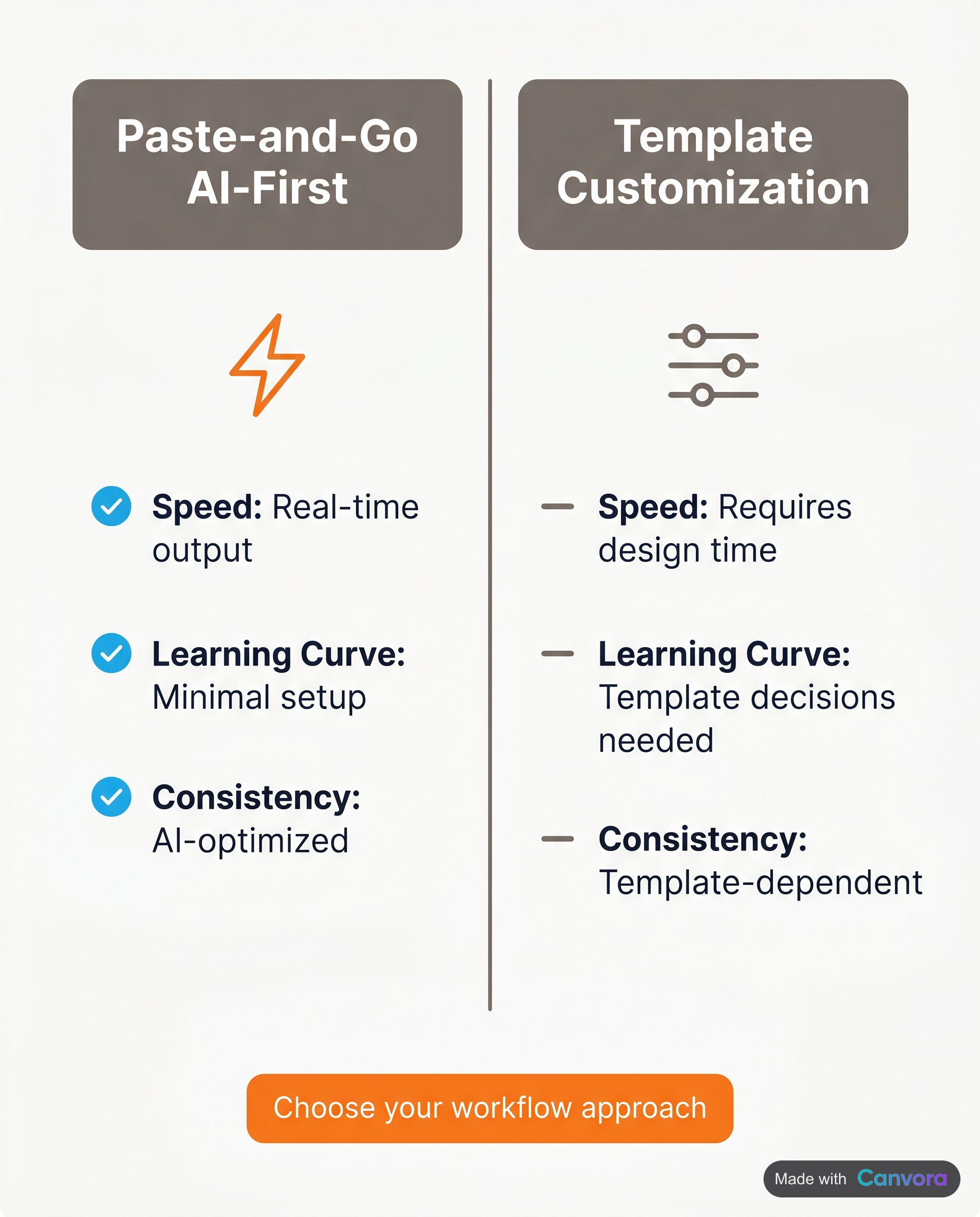 AI-first workflows eliminate the template bottleneck most designers face.
Most tools in this category look similar on a feature checklist until you try to ship a real campaign. The table below cuts through that by focusing on the criteria that actually determine whether a tool fits a production workflow: what it accepts as input, how many distinct formats it outputs, whether it handles languages beyond English, and what the real cost of entry is.
AI-first workflows eliminate the template bottleneck most designers face.
Most tools in this category look similar on a feature checklist until you try to ship a real campaign. The table below cuts through that by focusing on the criteria that actually determine whether a tool fits a production workflow: what it accepts as input, how many distinct formats it outputs, whether it handles languages beyond English, and what the real cost of entry is.
| Tool | Input types | Formats / outputs | Multilingual content | Brand kits | API access | Starting price |
|---|---|---|---|---|---|---|
| Canvora | URL, PDF, DOCX, image, plain text | 100+ (social posts, carousels, infographics, ads, presentations, docs, web/email graphics) | 150+ languages | Yes – 1 on Free and Starter; 5 on Pro, unlimited on Business | Yes – all plans, including Free | Free (150 credits, one-time); Starter $19/mo |
| Canva AI | Text prompt, template | Social posts, presentations, docs (limited AI-native formats) | Partial – interface and templates are English-first | Yes – all paid plans | Yes – via API | Free; Pro ~$15/mo |
| Adobe Express | Text prompt, template, image | Social posts, flyers, short video clips | Limited | Yes – paid plans | Limited | Free; Premium ~$10/mo |
| Predis AI | Text, URL | Social posts, carousels, short video | Partial | Yes | No | Free (limited); paid from ~$32/mo |
| Piktochart | Text, data | Infographics, reports, presentations | Limited | Yes – paid | No | Free; paid from ~$29/mo |
| AdCreative.ai | Text, product image | Ad creatives (static) | Partial | Yes | Yes | From ~$21/mo |
A few things the table can't show on its own:
Batch multi-format generation. Canvora is the only tool in this list that generates up to 15–20 distinct visuals across multiple formats from a single input in one run – paste a blog URL and get quote cards, stat cards, LinkedIn and Instagram carousels, Pinterest pins, and ad graphics simultaneously. Every other tool here operates on a single-output-per-generation model: one post, one carousel, one infographic at a time.
Carousel slide limits. Canvora caps individual carousels at 15 slides across all platforms – Instagram, LinkedIn, Facebook, Threads, and TikTok. The 15–20 figure is total visual output across formats in one generation, not slides in a single carousel. Worth knowing before you plan an 18-slide LinkedIn deck with any tool.
Free tier reality. Canvora's free plan includes a one-time 150-credit signup bonus with no monthly renewal – outputs are watermarked, resolution is capped at 2K, and there is 1 brand kit but no design styles. Canva's free tier is more generous in raw usage volume but locks brand kits behind Pro. Adobe Express offers a functional free tier for occasional use. None of these free plans are production-ready for a team shipping content at scale.
Multilingual content. The 150+ languages figure covers content generation – the text rendered on your visuals, not the dashboard interface.
Which Tool Is Right for Your Use Case?
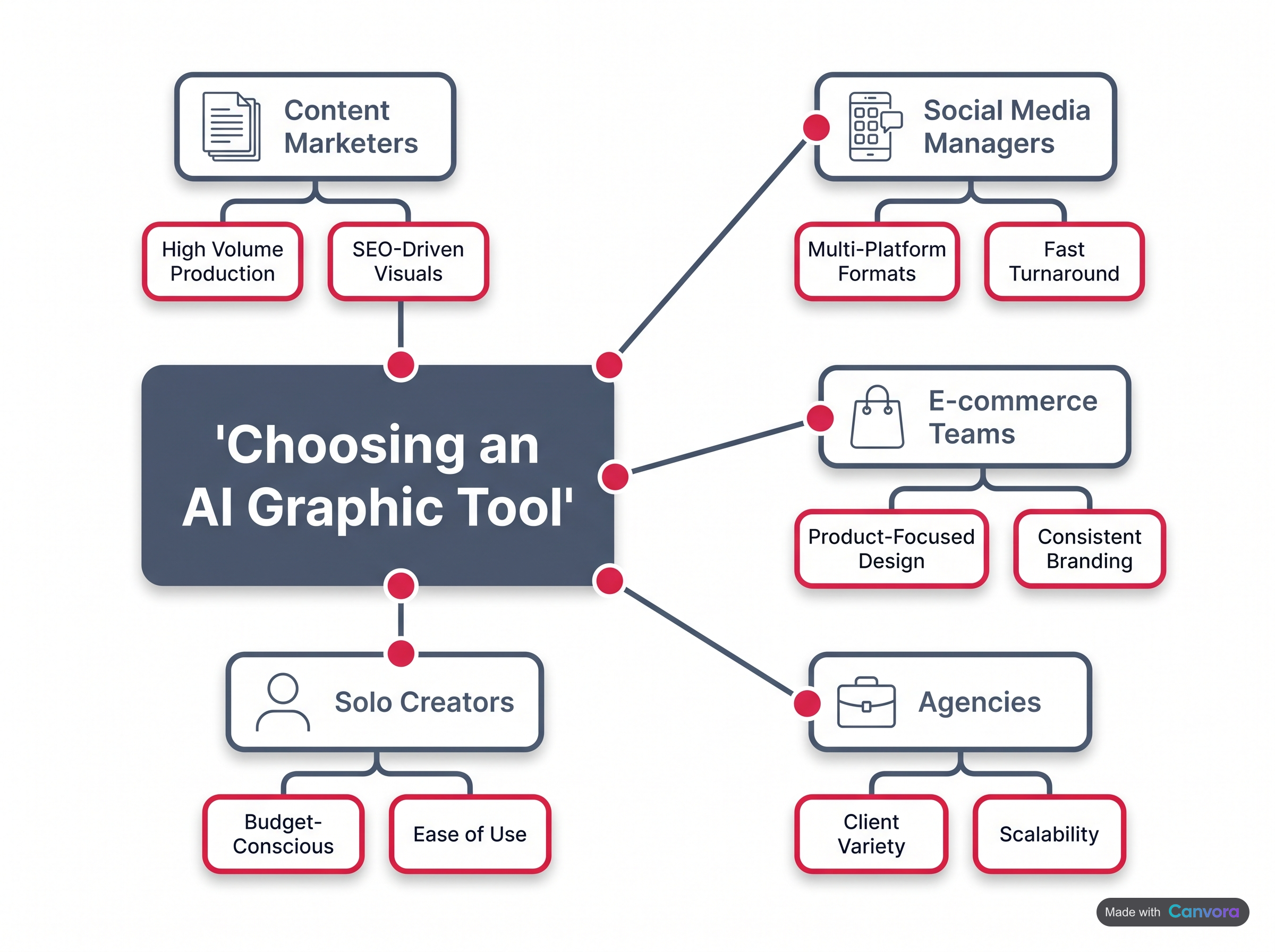 Different roles prioritize different tool capabilities.
The right AI tool for social media graphics depends almost entirely on how you work, not just what you want to make. For content marketers who repurpose blog posts and long-form content into social visuals, Canvora's URL input is the most direct path – paste a link, get up to 15–20 platform-ready visuals across formats in about a minute, no template hunting required. Social media managers shipping high volumes weekly need format variety and output density, which rules out tools that generate one post at a time. Agency owners managing multiple clients need brand isolation, team credit pools, and workspace controls – features that live at the infrastructure level, not the design level. Developers and automation engineers need API access or MCP integration with Claude or ChatGPT. Indie creators and founders on tight budgets need a low entry price with enough credits to actually ship. And teams working in Spanish, Portuguese, German, Arabic, or any of 150+ supported languages need content generation that treats multilingual output as a core feature, not an afterthought.
Different roles prioritize different tool capabilities.
The right AI tool for social media graphics depends almost entirely on how you work, not just what you want to make. For content marketers who repurpose blog posts and long-form content into social visuals, Canvora's URL input is the most direct path – paste a link, get up to 15–20 platform-ready visuals across formats in about a minute, no template hunting required. Social media managers shipping high volumes weekly need format variety and output density, which rules out tools that generate one post at a time. Agency owners managing multiple clients need brand isolation, team credit pools, and workspace controls – features that live at the infrastructure level, not the design level. Developers and automation engineers need API access or MCP integration with Claude or ChatGPT. Indie creators and founders on tight budgets need a low entry price with enough credits to actually ship. And teams working in Spanish, Portuguese, German, Arabic, or any of 150+ supported languages need content generation that treats multilingual output as a core feature, not an afterthought.
Canvora: Multi-Format Visual Generation from Any Content Input
Canvora fits the widest range of the use cases above. Content marketers drop in a blog URL and get quote cards, stat cards, LinkedIn and Instagram carousels, Pinterest pins, and more – all in one generation run. Social media managers get the volume: up to 15–20 visuals per run, across 100+ formats, with a 15-slide cap per carousel on any platform.
Agency owners get brand kits (up to unlimited on the Business plan at $99/mo), team workspaces with shared credit pools, and member roles. The Pro plan at $49/mo supports 5 brand kits and 3 workspaces with up to 10 members each – enough for a mid-size agency running several client accounts simultaneously.
Developers get API access on every plan, including Free, for programmatic generation. Anyone already working in Claude or ChatGPT can add Canvora as an MCP connector on any plan, including Free, and create visuals directly from a conversation.
Indie creators and founders can start at $19/mo (Starter), which covers 1,000 credits per month and 1 brand kit – enough to ship a consistent visual presence without a designer on staff.
Bilingual teams and non-English-market operators get 150+ language content generation baked in – captions, headlines, and body copy on every visual can be generated in any of those languages from the first run.
Canva AI: Best for Teams Already Living in Canva
Canva's AI features (Magic Design, Magic Write) are a natural fit for teams already using Canva for everything else – presentations, whiteboards, internal docs. The design library and collaboration features are mature. The tradeoff: you're still starting from a template and customizing, rather than feeding content and getting a multi-format batch output. For high-volume social repurposing, that difference adds up fast.
Adobe Express: Solid Choice for Adobe Ecosystem Users
Adobe Express makes sense when the rest of the stack is Creative Cloud – assets, fonts, and brand colors carry over cleanly. The AI generation features have improved, but the workflow is still closer to template-first than content-first. Teams without existing Adobe subscriptions will find the value proposition thinner.
Other Tools Worth Knowing
Predis AI focuses on single-post generation with caption suggestions – useful for solo creators posting daily, less suited to batch repurposing workflows. Piktochart is strong for infographics and reports but not built for social-first multi-format output. SocialBee and AdCreative.ai both lean into scheduling and ad creative respectively – different jobs than generating a full visual set from a piece of content.
How Canvora's MCP Integration Works Inside Claude and ChatGPT
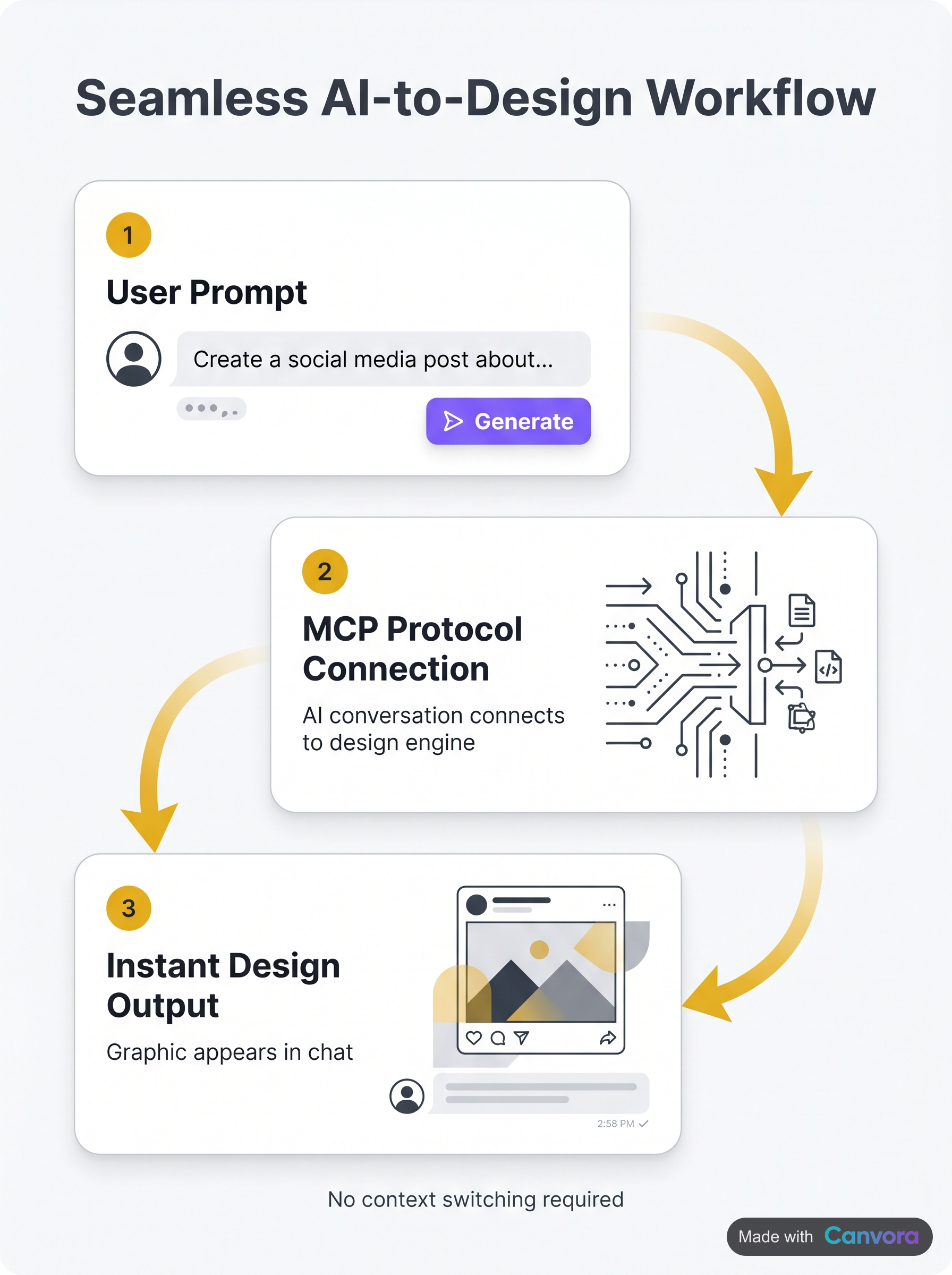 Generate graphics without leaving your AI conversation.
Canvora's MCP (Model Context Protocol) integration lets you generate social media graphics directly inside a Claude or ChatGPT conversation, without opening a separate design tool or switching tabs. The connection is OAuth-based – you add Canvora as a connector app in your AI assistant, which takes about two minutes, and it works on every Canvora plan including Free, with no API key required. Once connected, you describe what you need in plain language inside the chat – a LinkedIn carousel from a blog post, a set of Instagram quote cards for a product launch, a full multi-format visual set from a URL – and Canvora handles generation without you leaving the conversation. Start your prompt with "Use Canvora" to make sure the AI routes the request correctly. The result is a content-to-visual pipeline that lives entirely inside the tools many marketers and developers already use daily.
Generate graphics without leaving your AI conversation.
Canvora's MCP (Model Context Protocol) integration lets you generate social media graphics directly inside a Claude or ChatGPT conversation, without opening a separate design tool or switching tabs. The connection is OAuth-based – you add Canvora as a connector app in your AI assistant, which takes about two minutes, and it works on every Canvora plan including Free, with no API key required. Once connected, you describe what you need in plain language inside the chat – a LinkedIn carousel from a blog post, a set of Instagram quote cards for a product launch, a full multi-format visual set from a URL – and Canvora handles generation without you leaving the conversation. Start your prompt with "Use Canvora" to make sure the AI routes the request correctly. The result is a content-to-visual pipeline that lives entirely inside the tools many marketers and developers already use daily.
Generating Visuals Without Leaving Your AI Conversation
The practical workflow is straightforward. Describe a campaign inside ChatGPT – target audience, key messages, platform, tone – and instruct it to use Canvora. The integration passes that context to Canvora, which generates up to 15–20 platform-ready visuals across formats from a single input. You stay in the chat. The visuals come back ready to review, edit, or export as PNG, PDF, PPTX, or ZIP.
This matters most for marketers who already use Claude or ChatGPT as a thinking and writing environment. The content strategy, the copy, and the visual output can now live in one continuous thread rather than three separate tools.
API Access for Programmatic Generation
For developers and automation engineers who want to build visual generation into their own pipelines, Canvora's API is available on all plans, including Free. Programmatic access means you can trigger visual generation from a CMS publish event, a Zapier workflow, a content scheduling script, or any custom application – without any human in the loop.
The MCP integration and the API serve different audiences. MCP is for people who want to stay inside their AI assistant and generate visuals conversationally. The API is for teams building automated content pipelines where visuals need to be created at scale, on a schedule, or as part of a larger system.
Full setup instructions for the MCP integration are at canvora.ai/help/integrations/mcp-setup.
Generating Social Media Graphics in Multiple Languages
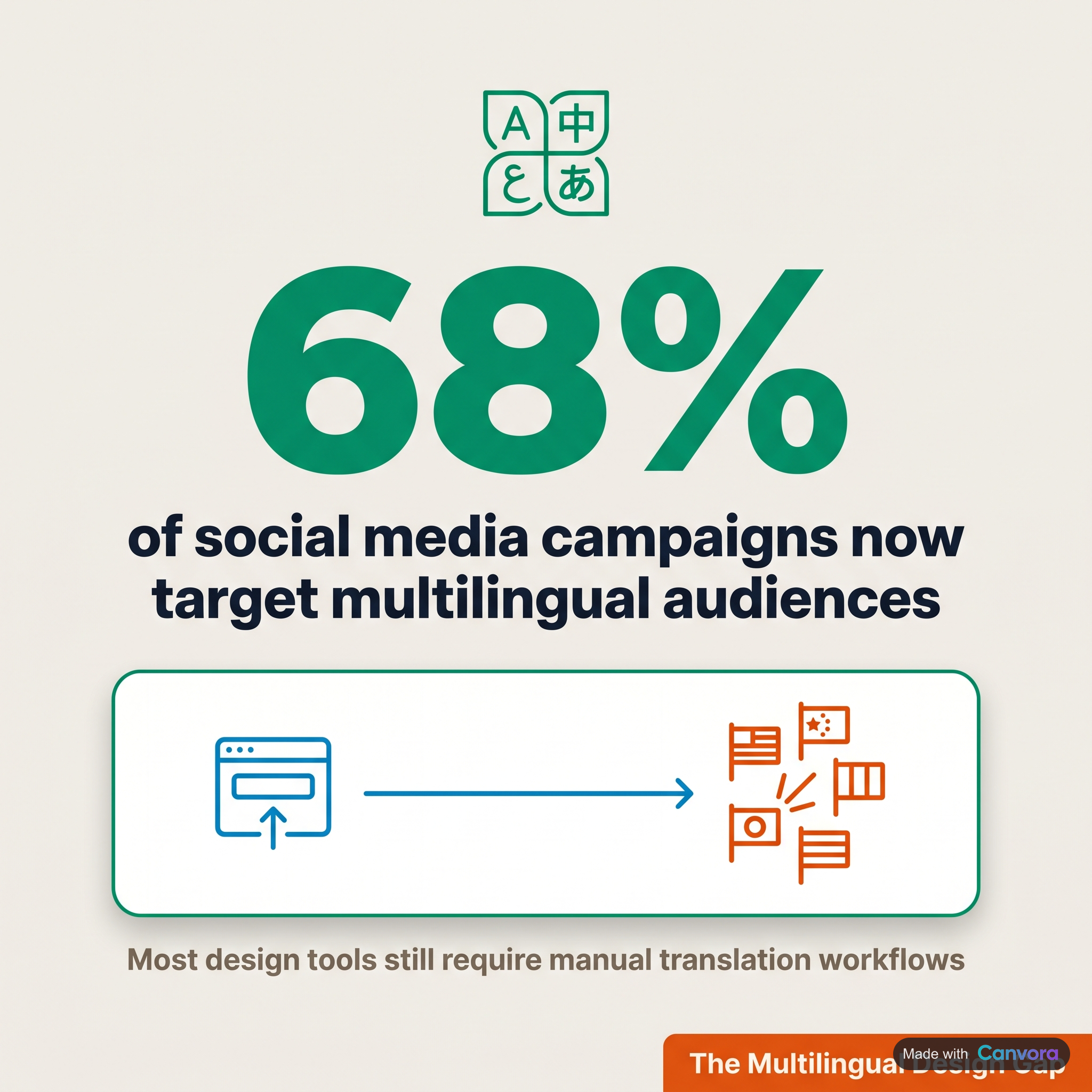 Most AI graphic design tools treat language as an afterthought – you get the visual, then you figure out translation yourself. Canvora takes the opposite approach. Content generation runs in 150+ languages, meaning the headlines, body copy, and captions that appear on your visuals can be produced directly in Spanish, French, Brazilian Portuguese, Hindi, Arabic, German, or any other supported language. Paste a blog post written in English, specify the target language, and the generated quote cards, carousels, and stat graphics come back in that language – no copy-paste into Google Translate, no re-layout afterward.
Why This Matters for International Teams
Manual localization in template-based design tools follows a predictable, painful loop: design the visual in English, export, duplicate, open again, swap the text, fix the line breaks that broke when the translated string turned out 40% longer, adjust font size, re-export. Multiply that by five languages and three formats per campaign and you have a full afternoon of work that produces nothing strategically new.
Canvora collapses that loop. A single input – a URL, a PDF, a Word doc, or plain text – generates up to 15–20 platform-ready visuals across formats in about a minute. Point it at a French-language audience and the output arrives in French. Point it at a Portuguese-speaking market and the carousels come back in Portuguese. The same workflow, the same time investment, a different output language.
Practical Use Cases by Region
Agencies serving EMEA clients often manage five or more regional social accounts for a single brand – UK English, French, German, Spanish, Italian. Canvora's Business plan supports unlimited brand kits, so each regional identity (separate logo lockup, color palette, font set) lives as its own kit and gets applied automatically at generation time. No manual brand-switching between markets.
LATAM and India content teams frequently publish bilingually – English and Spanish, or English and Hindi – to reach both local and diaspora audiences. Generating both language versions from the same source content, with consistent visual styling, is the kind of workflow that used to require a bilingual designer and a project manager. Now it's a language setting.
SEA and East Asia markets present a different challenge: character-based scripts, right-to-left considerations for Arabic, and font rendering that breaks in tools not built for it. Canvora's 150+ language support covers these scripts in content generation – worth verifying specific script rendering for your target language before committing to a high-volume campaign.
What Competitors Offer
Canva supports multilingual content but the localization workflow is manual – you translate, you re-layout, you re-export. Adobe Express follows the same pattern. Neither generates visuals in a target language from a source-language input. For teams running localized social campaigns at any meaningful volume, that distinction is the difference between an afternoon of design work and a generation run.
Understanding AI Social Media Graphic Pricing: What You Actually Get
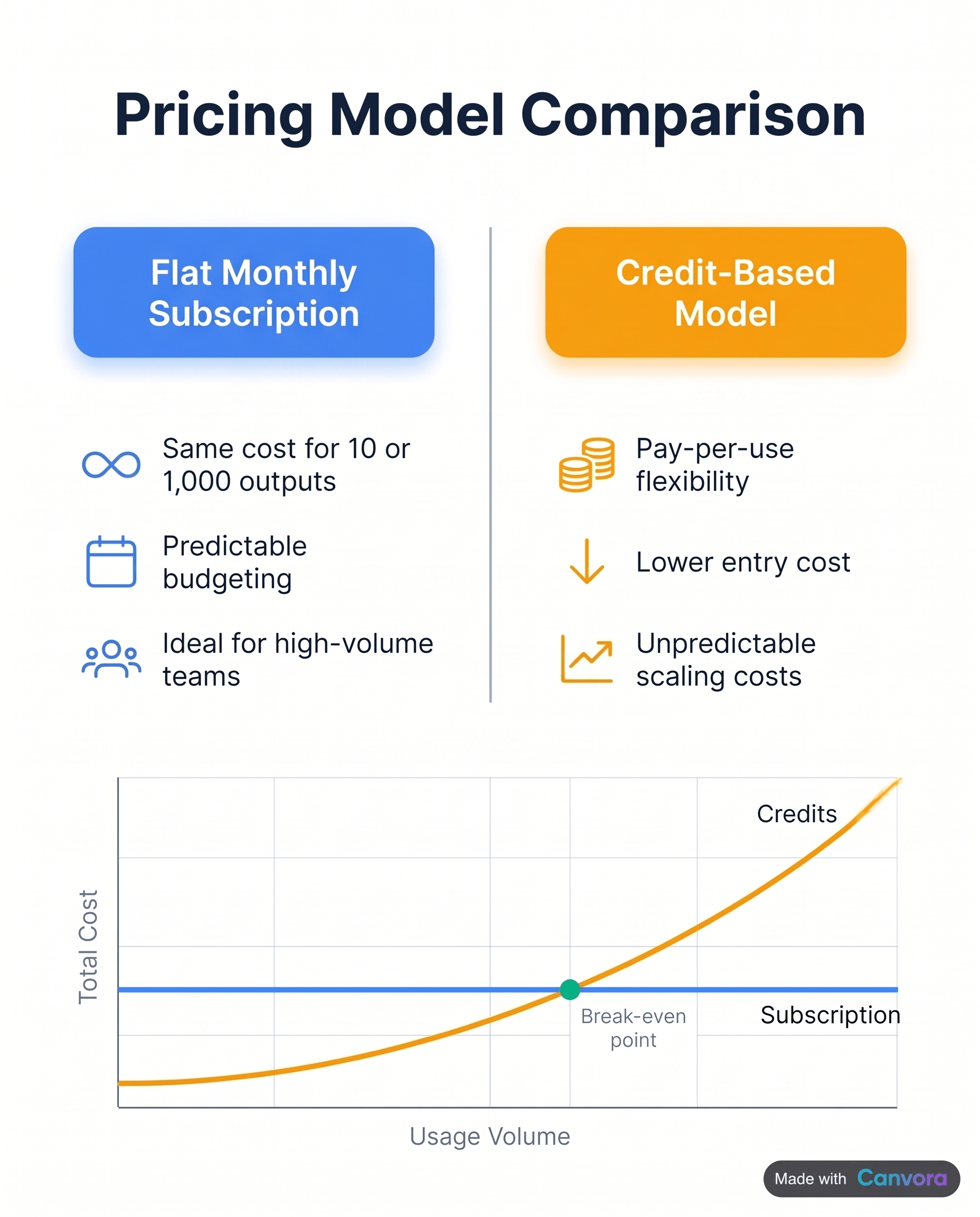 Pricing structure dramatically impacts total cost at scale.
Pricing for AI design tools falls into two camps: flat monthly subscriptions (pay the same whether you generate 10 visuals or 1,000) and credit-based models (pay per output, with monthly credit allowances that scale by tier). Most of the tools in this roundup use credits. Understanding what a credit actually buys – and doing the math for your own volume – is the fastest way to avoid choosing the wrong plan.
Pricing structure dramatically impacts total cost at scale.
Pricing for AI design tools falls into two camps: flat monthly subscriptions (pay the same whether you generate 10 visuals or 1,000) and credit-based models (pay per output, with monthly credit allowances that scale by tier). Most of the tools in this roundup use credits. Understanding what a credit actually buys – and doing the math for your own volume – is the fastest way to avoid choosing the wrong plan.
How Canvora Credits Work
Canvora charges 10 credits per single image, 15 credits per carousel or presentation slide, and 3 credits per image edit. Those numbers are predictable enough to plan around.
A 10-slide LinkedIn carousel costs 150 credits. A batch run that produces 4 quote cards, 2 stat cards, and a 5-slide Instagram carousel costs 40 + 20 + 75 = 135 credits. Once you know your weekly visual count, the math is straightforward.
Free plan: A one-time signup bonus of 150 credits – enough for roughly 15 single images or one full 10-slide carousel. Credits do not renew monthly. Outputs are watermarked, resolution is capped at 2K, and you get 1 brand kit. It's a genuine way to test the full generation workflow; it isn't a production tier.
Starter ($19/mo): 1,000 credits per month. That works out to roughly 100 single images, or about 66 carousel slides, or any combination in between. One brand kit, one design style preset, exports up to 4K, and a workspace for up to 3 members. A solid entry point for solo creators and small teams with consistent but moderate output.
Pro ($49/mo): 3,000 credits per month – three times Starter's allowance for about 2.6 times the price. The tier adds 5 brand kits, 5 design style presets, 3 workspaces (up to 10 members each), and priority support. For content teams running multiple brands, the extra kits and workspaces alone justify the jump.
Business ($99/mo): 7,000 credits per month, unlimited brand kits, unlimited workspaces, and unlimited design style presets. Built for agencies managing multiple clients or in-house teams with high weekly output across many brand identities.
Flat-Fee vs. Credit-Based: Which Model Fits You
Flat-fee tools charge the same rate regardless of how many visuals you produce. That's predictable, but it means light users subsidize heavy ones – and heavy users often hit undisclosed generation limits or quality throttling.
Credit models reward volume at higher tiers. The practical question: count your actual weekly visual output across all platforms, multiply by the per-credit cost, and see which tier covers it without waste. A team producing 80–100 social graphics per month fits comfortably on Canvora's Starter plan. An agency turning around multi-format campaigns for 5+ clients needs Business.
Frequently Asked Questions
Q: Can AI make social media graphics without any design skills?
Yes. Tools like Canvora let you paste a URL, PDF, or plain text and generate up to 15–20 platform-ready visuals across 100+ formats in about a minute – no templates to browse, no manual layout required. You describe what you want or provide source content, and the AI handles composition, typography, and style. The result is ready to export as PNG, PDF, or PPTX.
Q: What is the best free AI tool for social media graphics?
Canvora offers a free plan with a one-time 150-credit signup bonus to test the full workflow. Outputs are watermarked at 2K resolution, and the free plan includes 1 brand kit but no workspaces. It's a practical way to evaluate the tool before committing. For unwatermarked, production-ready output with brand kit support, the Starter plan at $19/mo is the realistic entry point.
Q: How many social media graphics can AI tools generate at once?
It depends on the tool. Canvora generates up to 15–20 platform-ready visuals across multiple formats from a single input in one generation – quote cards, stat cards, LinkedIn and Instagram carousels, Pinterest pins, all from one blog URL. Individual carousels are capped at 15 slides per platform. Most other AI tools generate one post or one format at a time, requiring separate runs for each output type.
Q: Do AI social media graphic tools support languages other than English?
Most tools are English-first. Canvora supports content generation in 150+ languages – meaning the text on your generated visuals can be in Spanish, French, Portuguese, Hindi, Arabic, or any of the 150+ supported languages. That matters for agencies and creators serving non-English markets or running bilingual campaigns, where the output language needs to match the audience, not the interface.
Q: Is there an AI tool that generates social media graphics inside ChatGPT or Claude?
Yes. Canvora integrates with Claude and ChatGPT via MCP (Model Context Protocol). Setup takes about 2 minutes – add Canvora as a connector in your AI assistant. It works on all Canvora plans including Free, using OAuth with no API key required. Start your prompt with "Use Canvora" and the AI routes the visual generation request directly. Full setup guide: canvora.ai/help/integrations/mcp-setup
Q: What file formats do AI social media graphic tools export?
Canvora exports PNG, PDF, PPTX, and ZIP files, with resolution up to 4K on Starter plans and above. The free plan is capped at 2K resolution. PNG is standard for social posts; PDF and PPTX suit presentations and document-style carousels. One limitation worth noting: Canvora does not export SVG or editable vector files – all output is raster images, PDF, or PPTX.
Q: How much do AI social media graphic tools cost?
Pricing varies widely. Canvora's plans run: Free (one-time 150 credits, watermarked outputs), Starter $19/mo (1,000 credits), Pro $49/mo (3,000 credits), Business $99/mo (7,000 credits, unlimited brand kits and workspaces); API access is included on all plans. Credits cost 10 per single image and 15 per carousel slide. Estimating your weekly visual volume is the clearest way to pick the right tier – high-output teams typically find Pro or Business most cost-effective.
Q: What is the best AI tool for social media graphics for agencies?
Agencies need brand kit management, team workspaces, and consistent output volume. Canvora's Business plan ($99/mo) covers unlimited brand kits, unlimited workspaces, and 7,000 credits per month – enough headroom for multiple client accounts. The Pro plan ($49/mo) supports 5 brand kits and 3 workspaces with up to 10 members each. API access, included on all plans, also lets agencies automate visual generation programmatically at scale.
Q: Can AI tools create LinkedIn carousels automatically?
Yes. Canvora generates LinkedIn carousels up to 15 slides from a URL, PDF, or text input. Paste a blog post URL and Canvora can produce a 15-slide LinkedIn carousel alongside other formats – quote cards, Instagram posts, stat graphics – all in roughly a minute. The carousel exports as PDF or PPTX, ready to upload to LinkedIn directly without additional conversion.
Q: What's the difference between AI graphic generators and tools like Canva?
Canva and similar template-based tools require you to browse a template library, then manually adjust text, colors, and layout for each design. AI graphic generators like Canvora skip that step entirely – you provide content (a URL, document, or plain text) and the AI produces finished visuals. The practical difference: Canvora generates a multi-format set of visuals from one input in a single run; template-based tools produce one design at a time through manual editing.
Tools mentioned in this article:
For your team / role:
Generate a week of on-brand graphics from one idea
Paste a URL, PDF, or topic — Canvora ships platform-ready graphics for every channel, in 150+ languages.
Free to start · 150 credits, no card · 150+ languages