Gerador de posts para redes sociais com IA grátis
Procurando um gerador de posts para redes sociais com IA grátis que cria o design, não só a legenda? Veja como o Canvora gera de 15 a 20 posts prontos.
Nesta página
O Canvora é o gerador de posts para redes sociais com IA grátis indicado para quem quer a arte pronta, e não só a legenda. Você cola uma URL, um PDF, um documento do Word, uma imagem ou um texto, e em cerca de um minuto recebe até 15–20 peças estáticas prontas para cada plataforma, em mais de 100 formatos. O plano gratuito dá um bônus único de 150 créditos para testar o fluxo completo; se você só precisa de texto, um gerador de legendas resolve, mas o design ainda vai ficar por sua conta.
A maioria das ferramentas grátis que prometem "gerar posts para redes sociais" entrega uma coisa só: texto. Talvez uma legenda, talvez um título. O que elas não entregam é a peça pronta — a imagem, o carrossel ou a arte que você publica sem abrir uma segunda ferramenta. O Canvora é diferente: é uma plataforma de design com IA que não exige nenhum conhecimento de design. No plano gratuito, as peças saem com marca d'água e em no máximo 2K, mas a geração funciona por completo — carrosséis, cards de citação, infográficos, posts — para Instagram, LinkedIn, Facebook, Threads e TikTok. E a geração de conteúdo funciona em mais de 150 idiomas, inclusive no plano gratuito.
Resumo rápido
- O Canvora gera o texto e a peça final a partir de um único conteúdo (URL, PDF, DOCX, imagem ou texto simples), sem uma etapa separada de design.
- Uma única geração produz até 15–20 peças prontas em mais de 100 formatos, incluindo carrosséis (até 15 slides), cards de citação, infográficos e posts.
- O plano gratuito dá um bônus único de 150 créditos, suficiente para testar o fluxo completo, mas as peças saem com marca d'água e os créditos não se renovam todo mês.
- A geração de conteúdo funciona em mais de 150 idiomas: o texto das suas peças pode sair em qualquer idioma compatível.
- Os planos pagos começam em US$ 19/mês (Starter) e liberam exportações sem marca d'água em até 4K, renovação mensal de créditos e mais kits de marca.
- O Canvora funciona dentro do Claude e do ChatGPT via MCP em todos os planos, inclusive no gratuito, sem chave de API.
- Diferente de ferramentas de template como Canva ou Adobe Express, o Canvora gera as peças direto do seu conteúdo: não tem template para procurar, personalizar ou redimensionar na mão.
O que é um gerador de posts para redes sociais com IA grátis?
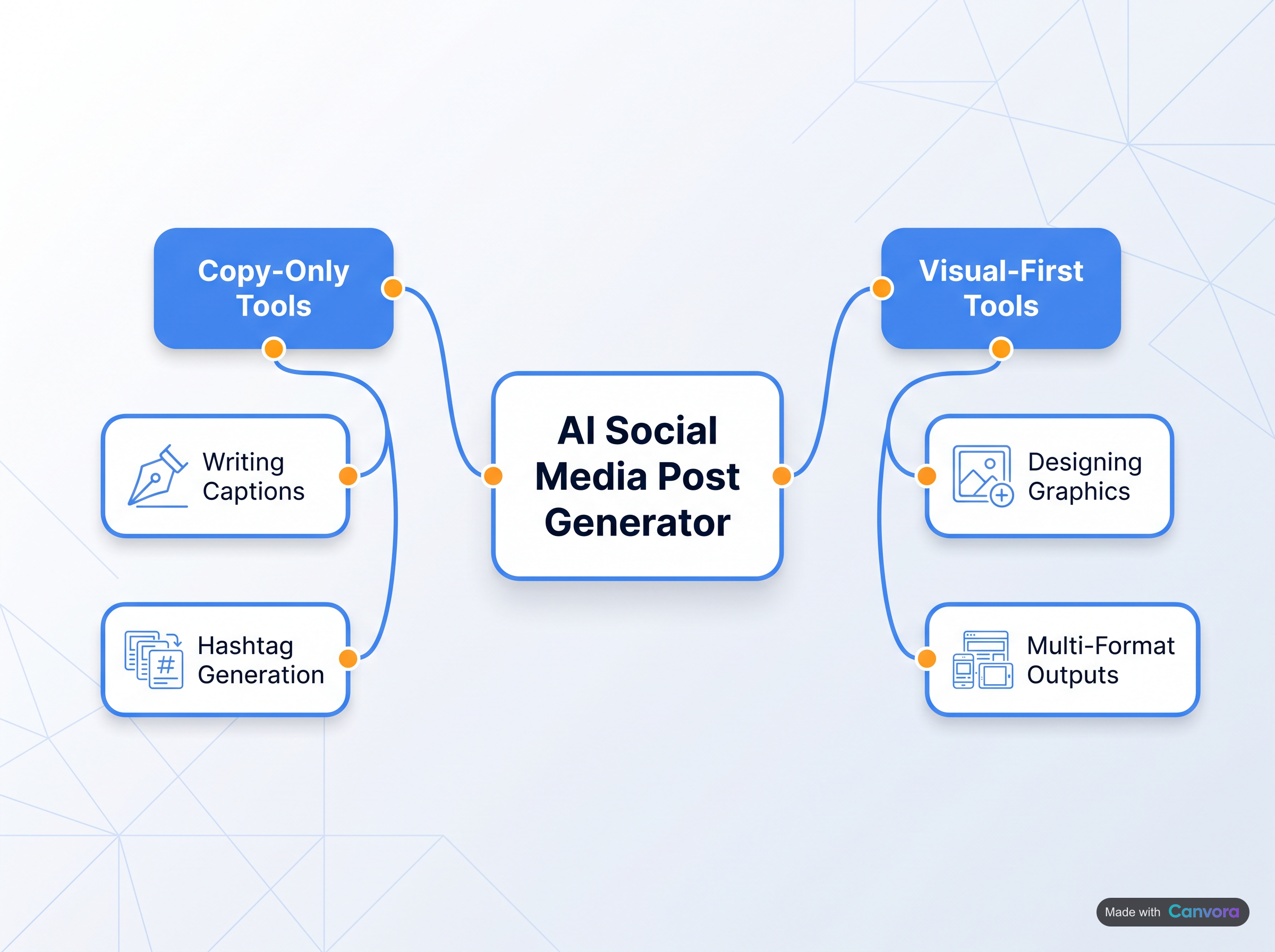 Os geradores de posts com IA se dividem entre os focados em texto e os focados em imagem.
É qualquer ferramenta que automatiza parte da criação de conteúdo para redes sociais sem cobrar nada de início. Na prática, a categoria se divide em dois tipos bem diferentes:
- Geradores só de legenda — ferramentas como o Easy-Peasy AI ou o assistente de IA do Buffer — escrevem o texto do post, mas devolvem o design para você. Ainda é preciso abrir uma ferramenta de design, achar um layout, encaixar o texto e exportar.
- Geradores de peças visuais vão além: pegam seu conteúdo e produzem imagens prontas para cada plataforma, que você publica direto.
O Canvora está claramente no segundo grupo. Cole uma URL, suba um PDF ou digite um prompt, e ele gera até 15–20 peças estáticas em mais de 100 formatos — cards de citação, carrosséis, infográficos, anúncios e mais — em cerca de um minuto. Geradores de legenda resolvem o problema do texto, mas não o do design, e um carrossel para LinkedIn ou um post para Instagram exige os dois; é justamente na etapa de design que a maioria dos fluxos de conteúdo trava. O Canvora resolve os dois numa única geração: o texto já aparece na peça, formatado e com estilo, pronto para exportar em PNG, PDF ou PPTX.
Por que a maioria dos planos grátis decepciona — e o que observar
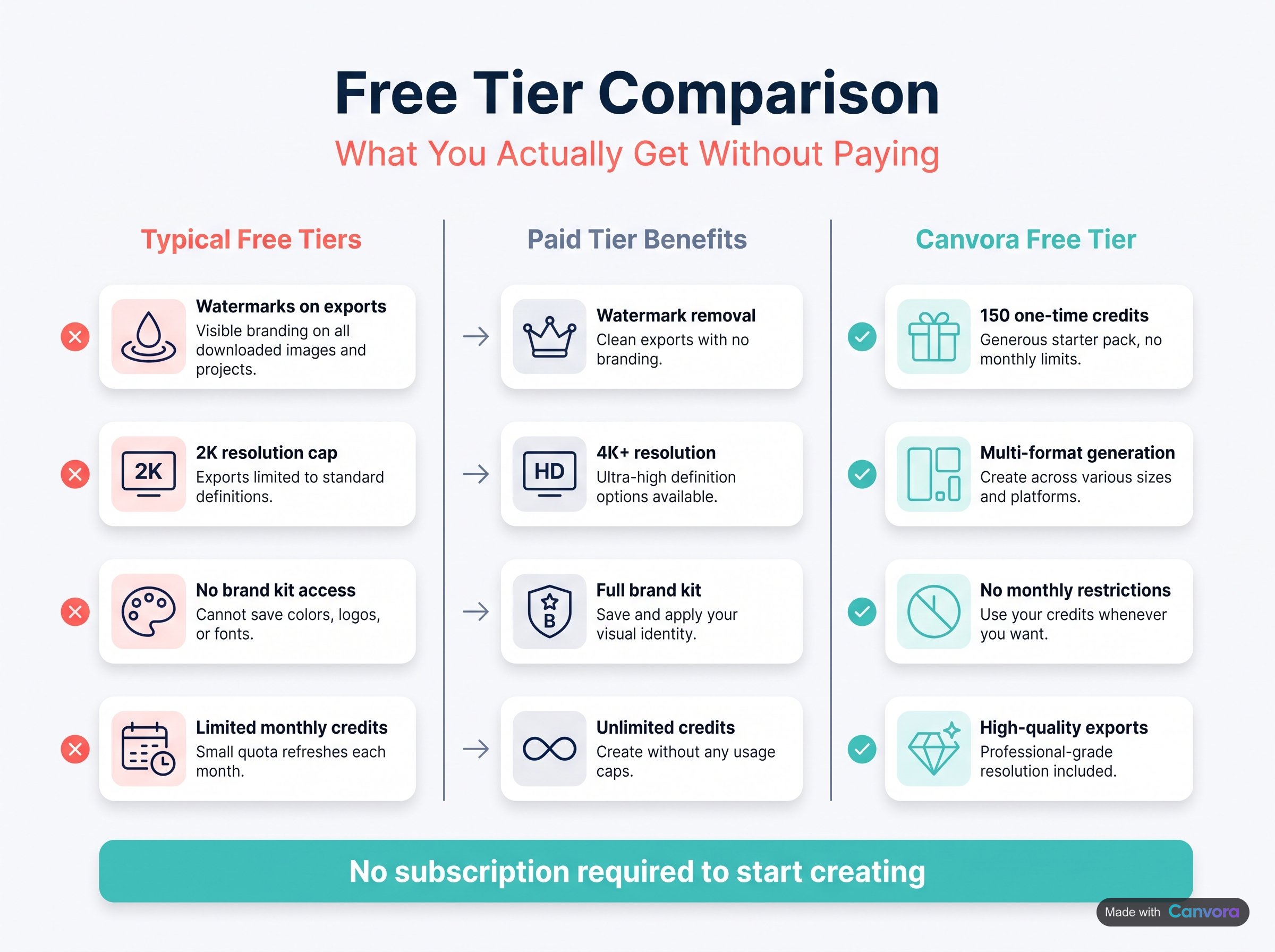 A maioria dos planos grátis limita resolução e recursos; o do Canvora oferece créditos únicos.
Os planos grátis das ferramentas de IA para redes sociais costumam prometer muito e entregar uma fatia pequena. As limitações mais comuns: marca d'água, resolução limitada a 2K ou menos, nenhum suporte a kit de marca e créditos que acabam depois de poucas gerações. Algumas ferramentas oferecem um plano grátis permanente com uma pequena recarga mensal; outras dão um bônus único no cadastro e nada depois disso. Os planos grátis também variam muito entre si: uns colocam marca d'água, outros limitam créditos sem renovação, outros bloqueiam totalmente os recursos de marca.
O plano gratuito do Canvora está no segundo grupo, e vale dizer isso com todas as letras: 150 créditos no cadastro, sem renovação mensal, peças com marca d'água, resolução 2K e 1 kit de marca. Dá para rodar o fluxo de ponta a ponta — colar uma URL, ver surgirem até 15–20 peças prontas, editar um título com linguagem natural —, mas não é um plano para produção. Quando os 150 créditos acabam, a geração para até você fazer upgrade. Encare como um teste prático, não como um plano gratuito para uso contínuo.
O que checar antes de apostar em qualquer plano grátis. A pergunta útil não é "tem plano grátis?", e sim "o plano grátis me deixa testar o fluxo completo?". Marca d'água é aceitável numa avaliação; não ter acesso aos recursos principais, não. Veja se o plano grátis bloqueia a geração em si ou só o acabamento. Resolução e formato de exportação também pesam mais do que parece: PNG em 2K serve para a web, mas se você precisa de exportações em 4K, apresentações em PPTX ou documentos em PDF, isso exige o plano Starter do Canvora (US$ 19/mês) ou superior.
O que não fica bloqueado. A integração MCP com o Claude e o ChatGPT e o acesso à API estão disponíveis em todos os planos, inclusive no gratuito (detalhes mais abaixo).
Como o Canvora gera as peças — e não só as legendas
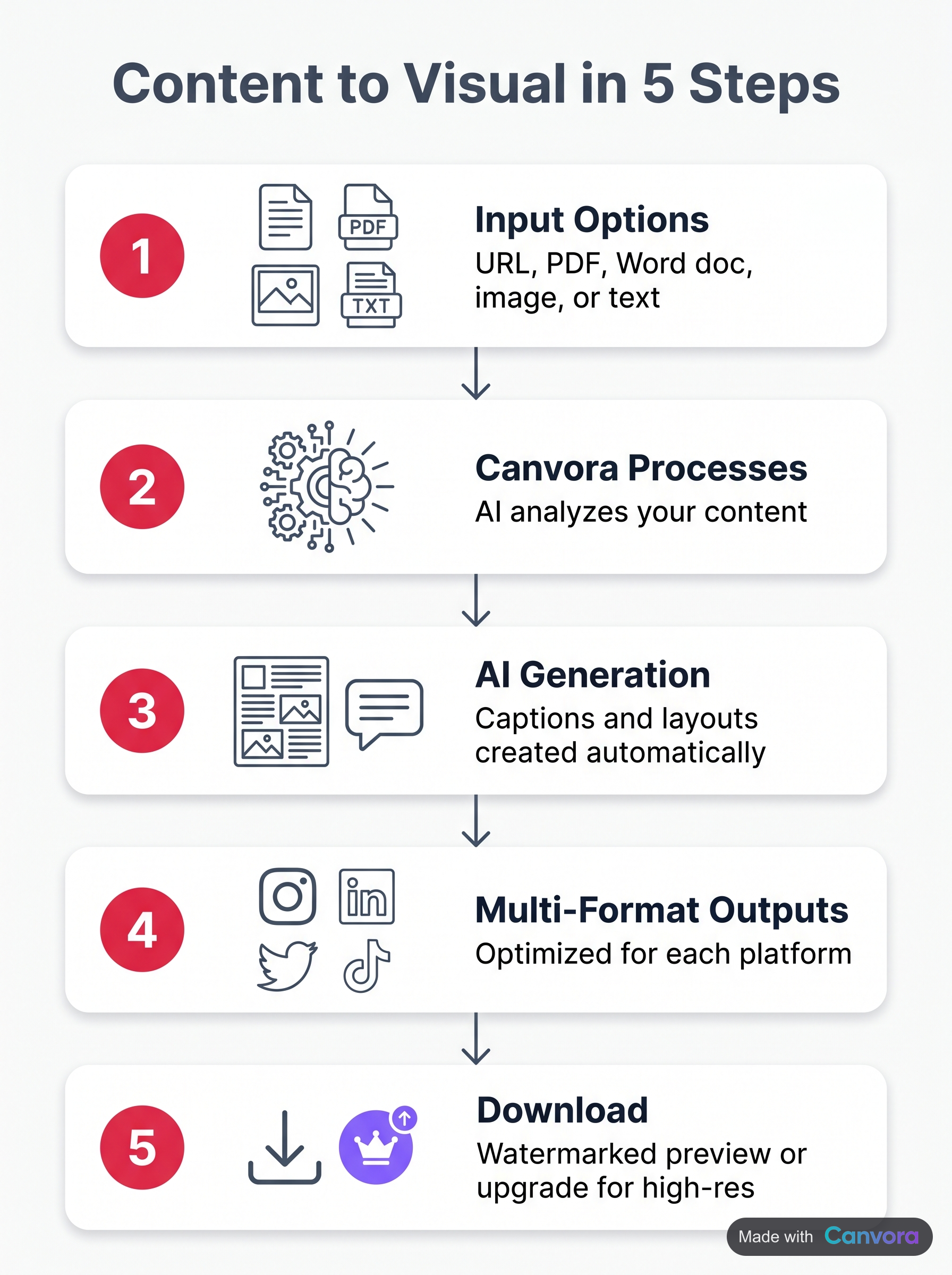 O Canvora transforma qualquer conteúdo em peças prontas para redes sociais em cinco etapas.
O Canvora pula a galeria de templates. Cole uma URL, envie um PDF, suba um documento do Word, compartilhe uma imagem ou digite um texto, e a plataforma gera até 15–20 peças prontas para cada plataforma, em vários formatos, a partir desse único conteúdo, em cerca de um minuto. Nada de navegar, escolher layout ou trocar texto de exemplo na mão. É o conteúdo que define o design, e não o contrário.
Esse é o grande contraste com ferramentas como Canva ou Adobe Express. Elas te dão um template em branco e esperam que você preencha. O Canvora lê o que você escreveu e produz as peças. O fluxo é: colar o conteúdo, escolher um estilo, exportar.
Plataformas e formatos
Uma única geração pode produzir cards de citação, cards de dados, cards de dicas, pins para Pinterest, posts para Instagram, posts para LinkedIn, posts para Facebook e carrosséis para Instagram, LinkedIn, Facebook, Threads e TikTok, todos com até 15 slides. Apresentações, infográficos e artes para anúncios também entram no pacote. São mais de 100 formatos no total, em oito estilos visuais: moderno, minimalista, ousado, elegante, divertido, corporativo, criativo e escuro. Escolha o estilo que combina com a marca antes de gerar; tudo o que sair vai refleti-lo.
Mais de 150 idiomas, direto na peça
Tudo o que o Canvora produz — títulos, corpo do texto, legendas integradas ao design — pode ser gerado em mais de 150 idiomas: português, espanhol, alemão, hindi, japonês ou qualquer idioma compatível. A maioria das ferramentas de template é pensada primeiro em inglês e exige tradução manual em cada etapa. Para agências com clientes internacionais e equipes com campanhas na América Latina, EMEA, Sudeste Asiático ou qualquer mercado multilíngue, isso elimina uma etapa de localização que, de outra forma, exigiria outra ferramenta ou tradução manual antes mesmo de o design começar.
Canvora vs. geradores de posts com IA só de legenda
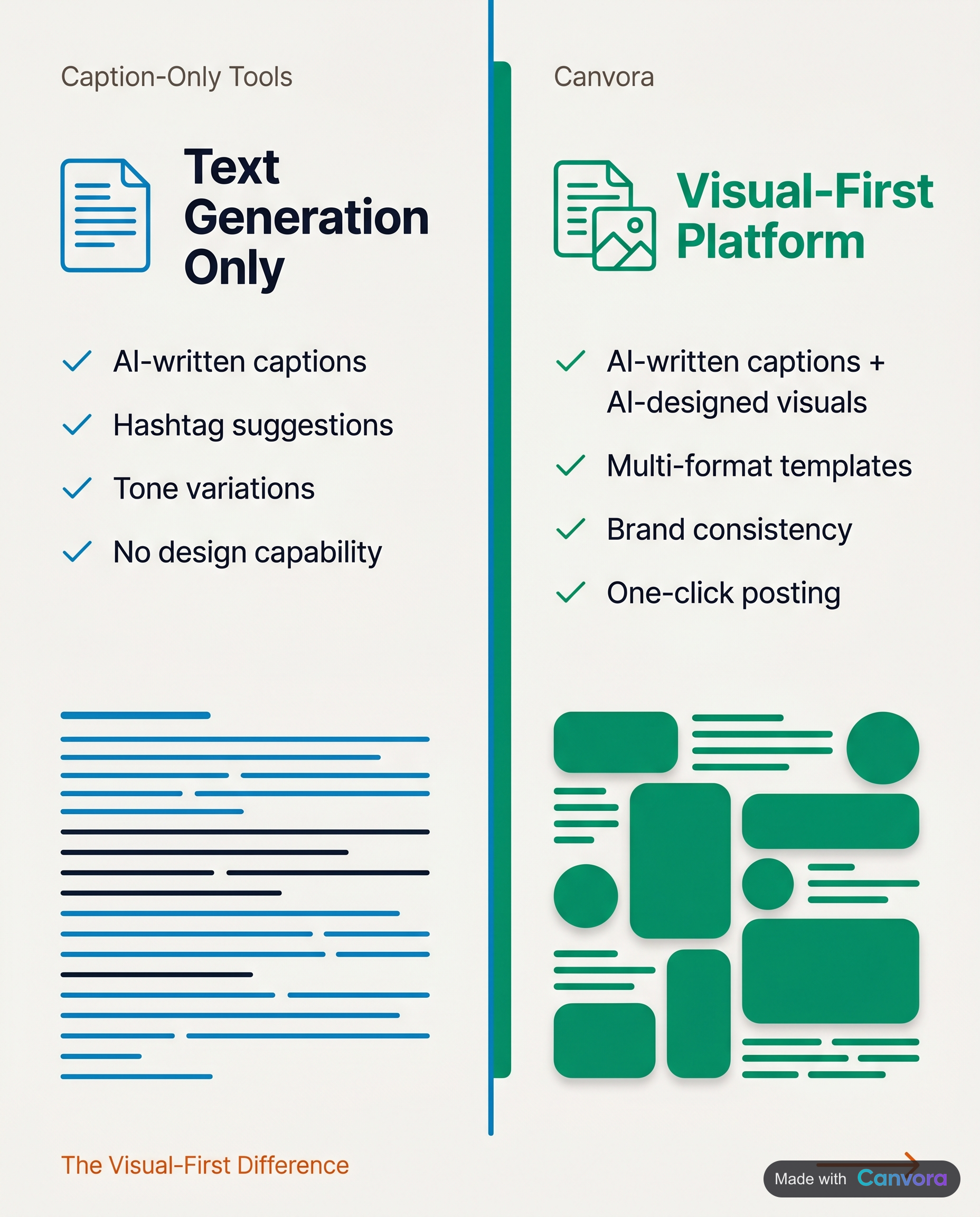 Ferramentas de legenda escrevem o texto; o Canvora escreve e desenha o post completo.
A maioria das ferramentas de IA que se apresentam como geradoras de posts para redes sociais para no texto. O assistente de IA do Buffer escreve legendas. O Easy-Peasy gera variações de texto. As ferramentas de texto do PlayPlay rascunham roteiros. Tudo útil, mas o resultado são palavras na tela, não uma peça pronta. Você ainda precisa abrir uma ferramenta de design, achar um template, encaixar o texto, ajustar o layout e exportar.
| Geradores só de legenda (Buffer, Easy-Peasy, PlayPlay) | Ferramentas de template (Canva, Adobe Express) | Canvora | |
|---|---|---|---|
| O que entregam | Texto | Um template para você personalizar | Peças prontas para publicar |
| Etapa de design | Fica com você | Manual: navegar pela galeria e personalizar | Gerada direto do seu conteúdo |
O Canvora fecha essa lacuna. Cole uma URL, um PDF ou um bloco de texto, e o resultado é um conjunto de peças estáticas prontas para cada plataforma — carrosséis para LinkedIn, posts para Instagram, cards de citação, artes com dados —, e não um rascunho esperando um designer. A imagem é a entrega final, não o ponto de partida para outra ferramenta.
O que o Canvora não é
Essa distinção vale para os dois lados. O Canvora não substitui o Figma nem o Photoshop. Ele não oferece controle manual de layout pixel a pixel e não gera arquivos vetoriais editáveis. Para equipes que precisam de governança de marca rigorosa no nível de cada componente, uma ferramenta de design dedicada continua fazendo parte do stack. O Canvora foi feito para outro problema: produzir volume sem designer. Quando uma equipe de conteúdo precisa de até 15–20 peças prontas por semana para LinkedIn, Instagram, Facebook, Threads e TikTok, a diferença entre "a IA escreve a legenda" e "a IA gera a peça pronta" é a diferença entre uma etapa feita e o trabalho entregue.
Usando o Canvora dentro do Claude e do ChatGPT (integração MCP)
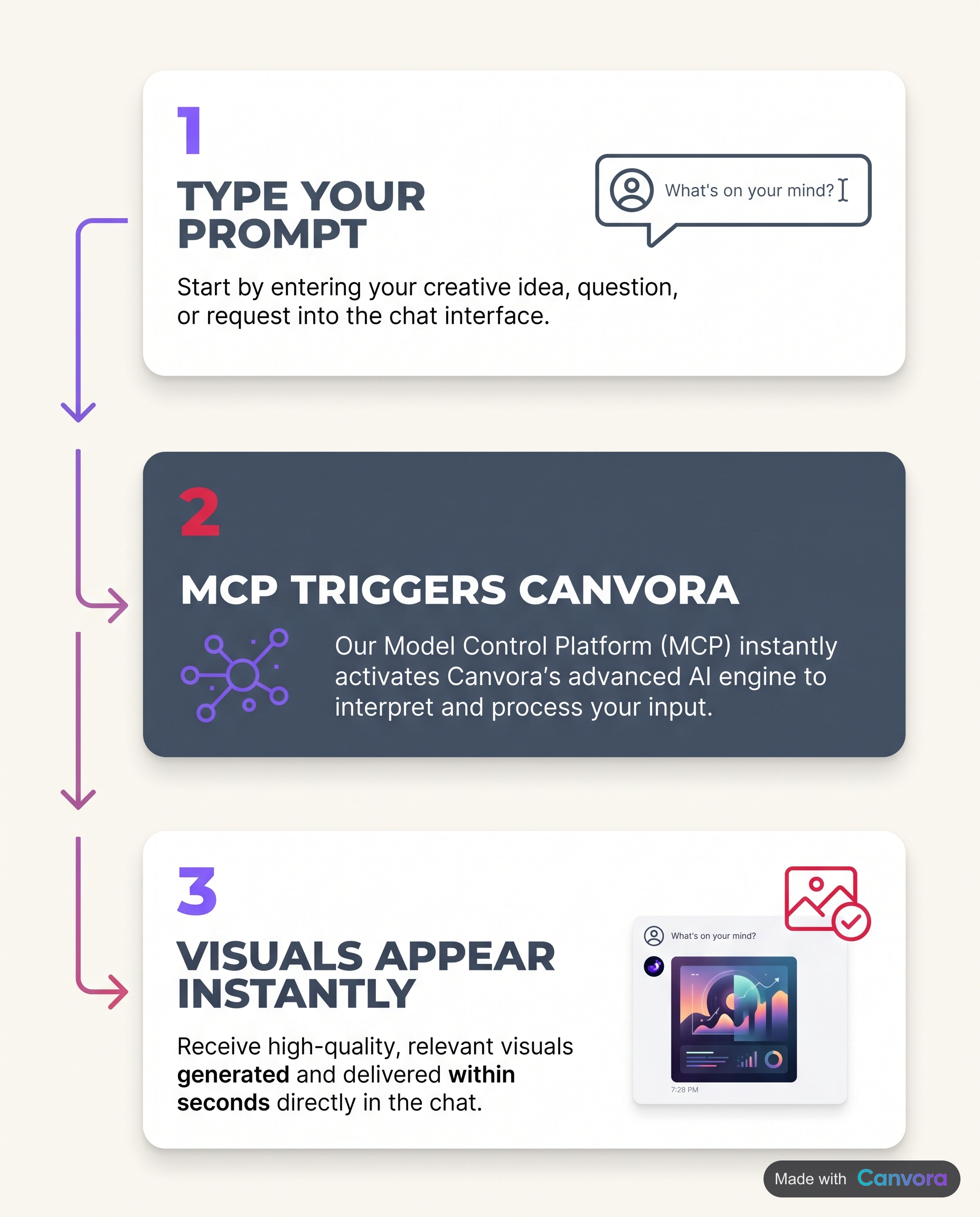 Gere peças para redes sociais direto no chat com a IA, sem trocar de ferramenta.
O Canvora se conecta ao Claude e ao ChatGPT via MCP (Model Context Protocol), e você gera peças prontas sem sair da conversa com a IA. A integração usa OAuth — sem chave de API — e funciona em todos os planos, inclusive no gratuito. A configuração leva cerca de dois minutos. Depois de conectar, comece o prompt com "Use Canvora" para que a IA direcione o pedido corretamente.
Na prática, é simples: abra uma conversa no ChatGPT ou no Claude e descreva o que você precisa — "Use Canvora para criar um carrossel de 5 slides para LinkedIn resumindo este post do blog URL". A integração puxa o conteúdo, aplica seu kit de marca, se houver um configurado, e devolve as peças prontas. Sem trocar de aba, sem baixar arquivos para subir em outro lugar. O guia completo de configuração está em canvora.ai/help/integrations/mcp-setup.
Para desenvolvedores e engenheiros de automação. Quem precisa de controle programático além da interface de chat pode usar a API do Canvora diretamente. O acesso à API está incluído em todos os planos, inclusive no gratuito. Isso permite disparar a geração de peças a partir de pipelines de conteúdo, fluxos do CMS ou ferramentas internas, sem intervenção manual. O MCP combina com a geração conversacional e pontual; a API, com fluxos agendados, de alto volume ou integrados a sistemas. Os dois produzem os mesmos mais de 100 formatos.
Preços do Canvora: planos Free, Starter, Pro e Business
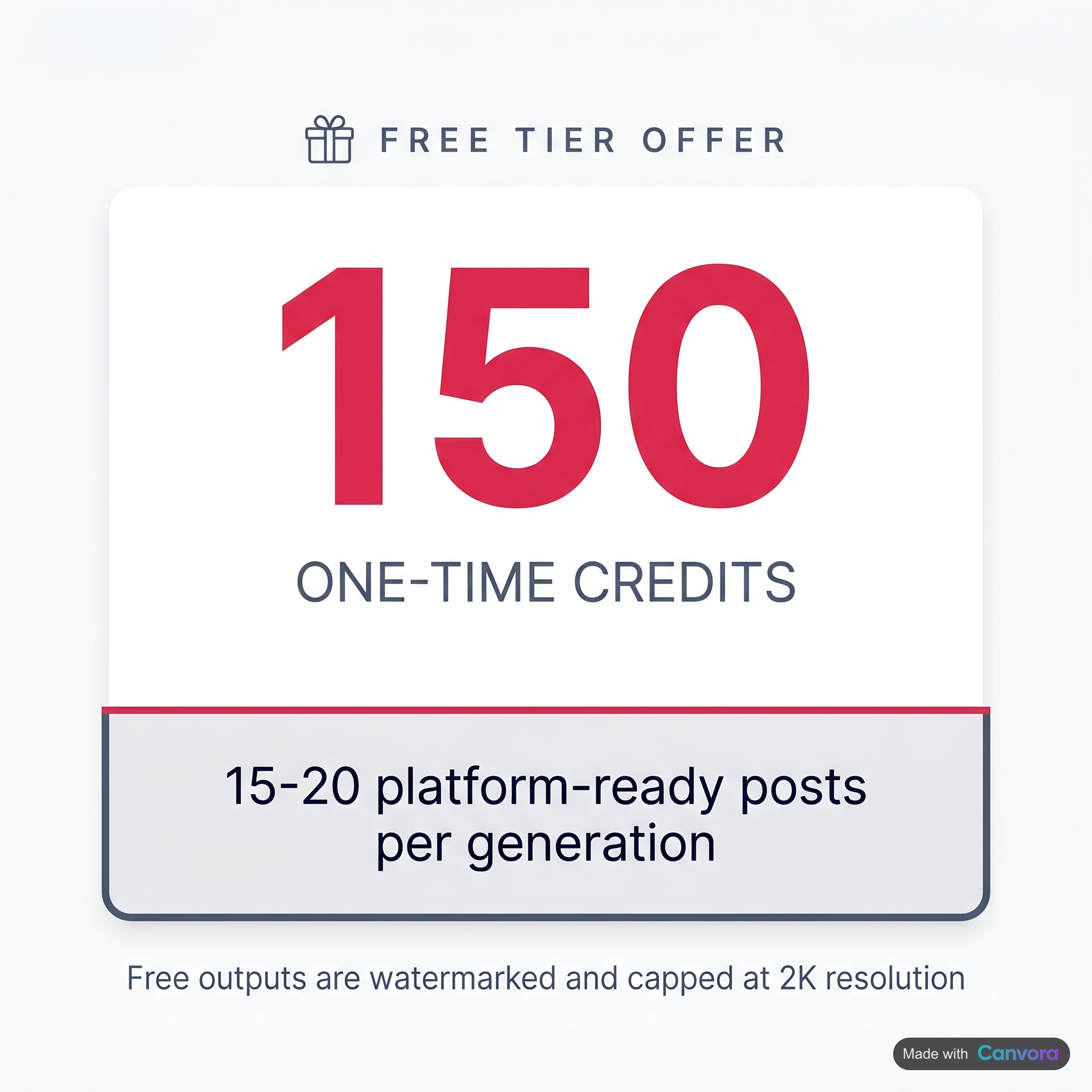 O plano gratuito inclui 150 créditos únicos, sem renovação mensal.
| Plano | Preço | Créditos | O que inclui |
|---|---|---|---|
| Free | Grátis | 150 (únicos, sem renovação) | Marca d'água, resolução 2K, 1 kit de marca, API e MCP |
| Starter | US$ 19/mês | 1.000 por mês | Exportações em 4K, 1 kit de marca, 1 preset de estilo de design, 1 workspace com até 3 membros |
| Pro | US$ 49/mês | 3.000 por mês | 5 kits de marca, 5 presets de estilo de design, 3 workspaces com até 10 membros cada, acesso à API |
| Business | US$ 99/mês | 7.000 por mês | Kits de marca, presets de estilo e workspaces ilimitados, acesso à API |
O plano gratuito é uma cota única: 150 créditos no cadastro, sem renovação mensal. Dá para rodar o fluxo completo e ver exatamente o que a ferramenta produz, mas não para uso contínuo em produção. O Starter é a porta de entrada prática para um criador solo ou uma equipe pequena que publica com constância. O Pro é onde costumam ficar as agências com alguns clientes ou as equipes que produzem conteúdo em escala. O Business é o plano certo para agências ou equipes internas que cuidam de várias marcas ao mesmo tempo.
Como os créditos são gastos: cada imagem avulsa custa 10 créditos; cada slide de carrossel ou apresentação, 15; cada edição de imagem, 3. Um carrossel de 10 slides para LinkedIn, por exemplo, custa 150 créditos. A integração MCP com o Claude e o ChatGPT está disponível em todos os planos, inclusive no gratuito, e conecta via OAuth em cerca de dois minutos.
Quem mais aproveita um gerador de posts com imagem
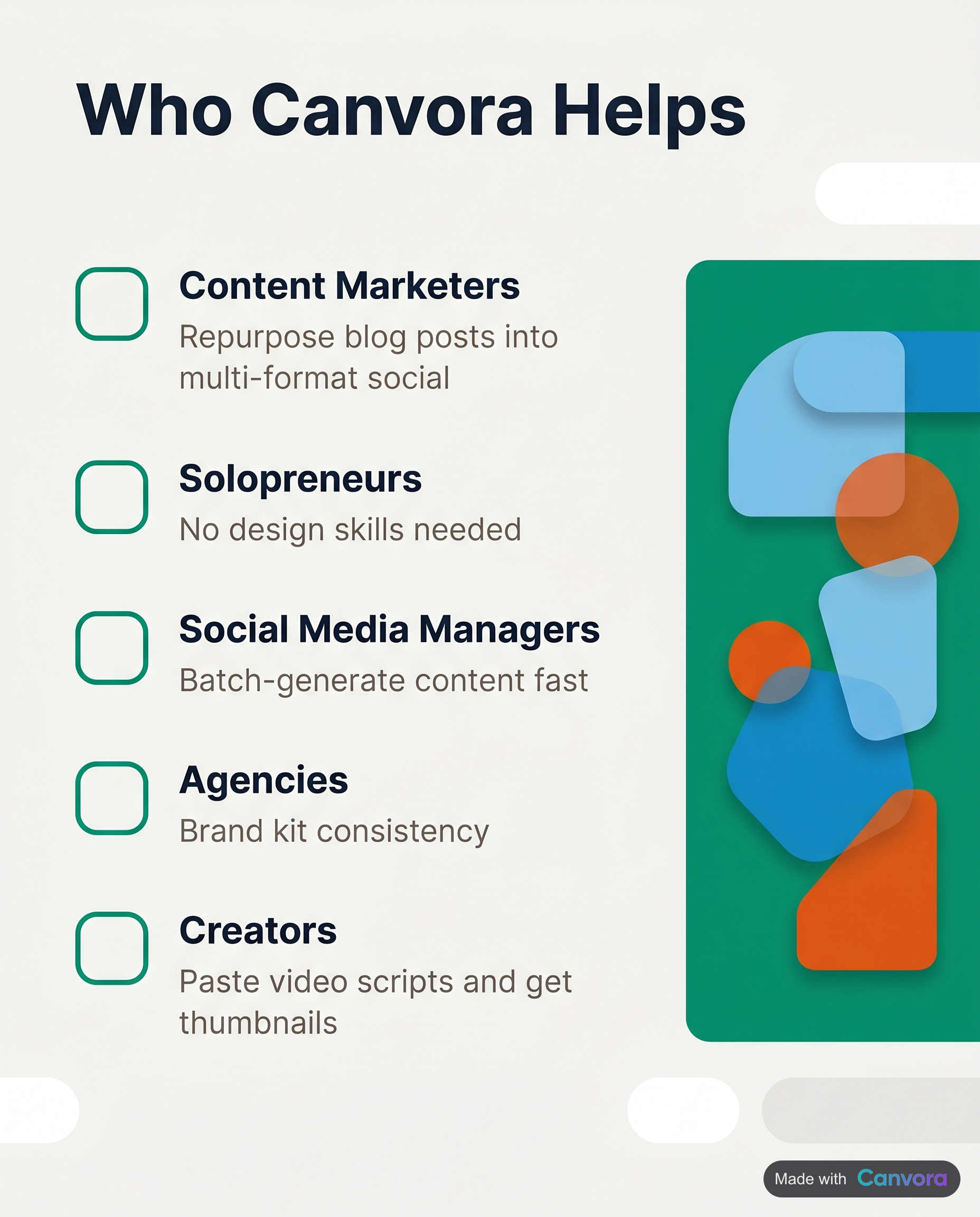 Profissionais de marketing de conteúdo, empreendedores solo e agências são os que mais economizam tempo.
Cada perfil esbarra num obstáculo diferente com conteúdo para redes sociais. É aqui que o Canvora costuma remover os maiores.
- Profissionais de marketing de conteúdo que reaproveitam posts do blog. Cole a URL de um post. O Canvora lê o conteúdo e devolve um conjunto completo — cards de citação, cards de dados, carrosséis para LinkedIn e carrosséis para Instagram — em cerca de um minuto. Sem briefing para designer, sem caçar template, sem decidir layout. O post já está escrito; só falta existir a parte visual. É nesse fluxo que a maioria das equipes de conteúdo recupera mais tempo.
- Social media que cuidam de várias marcas. Gerenciar três ou quatro contas de marca significa três ou quatro identidades visuais. Os kits de marca do Canvora aplicam o logo, as cores e as fontes certas automaticamente na hora de gerar, então tudo sai dentro da marca sem conferência manual. O Starter suporta um kit de marca; o Pro, cinco.
- Donos de agência com campanhas de clientes. O plano Business oferece workspaces ilimitados, kits de marca ilimitados e créditos compartilhados: um workspace por cliente, cada um com sua identidade de marca e seu acesso de equipe. Essa estrutura cresce sem aumentar o time.
- Criadores independentes e fundadores sem verba para design. O plano Starter (US$ 19/mês, 1.000 créditos) cobre uma semana inteira de conteúdo para redes sociais sem designer. Dez créditos por imagem, quinze por slide de carrossel: a conta fecha.
- Desenvolvedores e engenheiros de automação. O acesso à API, incluído em todos os planos, permite gerar peças de forma programática. Integre a um pipeline de conteúdo, a um gatilho de publicação do CMS ou a uma ferramenta interna.
- Equipes internacionais e multilíngues. A geração de conteúdo funciona em mais de 150 idiomas. Um único fluxo no Canvora cobre todos os mercados em que a equipe atua, sem etapa separada de localização nem segunda ferramenta.
Como começar a usar o Canvora de graça
Crie sua conta em canvora.ai e você ganha um bônus único de 150 créditos, suficiente para rodar várias gerações completas em vários formatos e ver exatamente o que o fluxo entrega. Não precisa de cartão de crédito para começar.
- Dê um conteúdo para o Canvora trabalhar. Cole uma URL, suba um PDF ou um documento do Word, envie uma imagem ou simplesmente digite sua ideia. Não tem template para procurar: o conteúdo é o briefing.
- Escolha os formatos e o estilo visual. Selecione os formatos que você quer — carrossel para LinkedIn, posts para Instagram, cards de citação, infográficos, pins para Pinterest e muito mais, entre mais de 100 opções. Depois escolha um estilo: moderno, ousado, minimalista, elegante, divertido, corporativo, criativo ou escuro. O Canvora gera até 15–20 peças prontas a partir desse único conteúdo em cerca de um minuto.
- Revise e edite. Todas as peças são editáveis. Troque um título digitando direto no Editor Visual ou use linguagem natural — "aumente a fonte", "mude para um fundo mais escuro" — e a IA ajusta. Sem painel de camadas, sem reposicionar nada na mão.
- Exporte. Baixe em PNG, PDF ou PPTX. No plano gratuito, as peças saem com marca d'água e em no máximo 2K. Faça upgrade para o Starter (US$ 19/mês) para exportar sem marca d'água, em 4K, e ter um kit de marca salvo.
Opcional: gere dentro do Claude ou do ChatGPT. Conecte o Canvora ao Claude ou ao ChatGPT via MCP — a configuração leva cerca de dois minutos. Depois disso, você gera peças direto de qualquer conversa com a IA, sem trocar de aba.
Perguntas frequentes
Existe um gerador de posts para redes sociais com IA realmente grátis que cria as imagens?
Sim. O Canvora tem um plano gratuito com um bônus único de 150 créditos no cadastro, que gera imagens de verdade — não só legendas — em mais de 100 formatos. As peças do plano gratuito saem com marca d'água e em no máximo 2K, e os créditos não se renovam todo mês, então o plano gratuito é ideal para testar o fluxo completo antes de se comprometer. Os planos pagos começam em US$ 19/mês, se você precisa de peças prontas para produção e sem marca d'água.
Qual é a diferença entre um gerador de legendas e um gerador de posts com imagem?
Um gerador de legendas entrega um texto, e você ainda precisa criar o design em volta dele. Um gerador de posts com imagem, como o Canvora, entrega peças prontas — cards de citação, carrosséis, cards de dados — para publicar. Cole uma URL, um PDF ou um texto simples e o Canvora devolve até 15–20 peças prontas para cada plataforma, em vários formatos, numa única geração. Sem personalizar template, sem tela em branco para preencher.
Quantos posts para redes sociais o Canvora gera de uma vez?
A partir de um único conteúdo, o Canvora produz até 15–20 peças prontas em vários formatos — uma combinação de cards de citação, cards de dados, carrosséis para LinkedIn, posts para Instagram, pins para Pinterest e mais. Cada carrossel tem limite de 15 slides por plataforma (Instagram, LinkedIn, Facebook, Threads, TikTok). O número de 15–20 é o total de peças diferentes em todos os formatos, não os slides de um único carrossel.
O Canvora funciona com o ChatGPT ou o Claude?
Sim. O Canvora se integra ao Claude e ao ChatGPT via MCP (Model Context Protocol). A conexão é feita por OAuth, não exige chave de API e está disponível em todos os planos, inclusive no gratuito. A configuração leva cerca de 2 minutos. Comece seu prompt com "Use Canvora" para direcionar a geração corretamente. As instruções completas estão em canvora.ai/help/integrations/mcp-setup.
Dá para gerar posts para redes sociais em outros idiomas além do inglês?
Sim. O Canvora gera conteúdo em mais de 150 idiomas, ou seja, o texto das suas peças (títulos, legendas, corpo do texto) pode sair em qualquer idioma compatível. Isso torna o Canvora prático para equipes com campanhas na América Latina, EMEA, Índia, Sudeste Asiático ou Leste Asiático, e para criadores bilíngues que precisam do mesmo conjunto de peças em vários idiomas.
Para quais plataformas o Canvora cria posts?
O Canvora gera peças para Instagram, LinkedIn, Facebook, Threads, TikTok, Pinterest e outras, em mais de 100 formatos. Os carrosséis funcionam em todas as principais plataformas, com até 15 slides cada. Você exporta em PNG, PDF, PPTX ou ZIP. Um limite claro: o Canvora não gera vídeo nem conteúdo animado. Todas as saídas são imagens estáticas, PDFs ou arquivos PPTX.
Quanto custa o Canvora depois do plano gratuito?
Os planos pagos são o Starter (US$ 19/mês, 1.000 créditos), o Pro (US$ 49/mês, 3.000 créditos) e o Business (US$ 99/mês, 7.000 créditos). Cada imagem avulsa custa 10 créditos, cada slide de carrossel ou apresentação custa 15 e cada edição de imagem custa 3. O acesso à API e a integração MCP com o Claude e o ChatGPT estão disponíveis em todos os planos, inclusive no gratuito.
Os geradores de posts com IA grátis colocam marca d'água?
Muitos colocam, inclusive o plano gratuito do Canvora. O plano gratuito gera peças com marca d'água em resolução 2K, com um bônus único de 150 créditos que não se renova todo mês. Exportações sem marca d'água em até 4K estão disponíveis a partir do plano Starter (US$ 19/mês). Se você precisa de peças prontas para publicar, um plano pago é o ponto de partida prático.
Posso usar o Canvora para transformar um post de blog em conteúdo para redes sociais?
Sim. Cole a URL do seu blog no Canvora e ele gera um conjunto de peças em vários formatos a partir do conteúdo: cards de citação, cards de dados, carrosséis e posts específicos para cada plataforma. Não é preciso copiar e colar texto nem escolher templates — o resultado cobre vários formatos numa única geração. Para profissionais de marketing de conteúdo que publicam com frequência e precisam de peças para redes sociais sem um designer dedicado, é um fluxo direto.
O Canvora exige conhecimento de design ou personalização de templates?
Não. O Canvora parte da geração: você fornece o conteúdo (URL, PDF, documento do Word, imagem ou texto simples), escolhe um entre 8 estilos visuais e ele entrega as peças prontas. Não tem galeria de templates nem trabalho manual de layout. Você pode ajustar o resultado com linguagem natural ("aumente o título", "use cores mais quentes") ou editar o texto direto no Editor Visual, mas o ponto de partida é sempre uma peça pronta, não uma tela em branco.
Ferramentas citadas neste artigo:
Para sua equipe / função:
Crie seu primeiro design em menos de um minuto
Cole um texto, um link ou um PDF e o Canvora cria carrosséis, infográficos e posts com a sua marca, feitos em português.
Free to start · 150 credits, no card · 150+ languages