Best AI Carousel Maker in 2026: 7 Tools Compared Honestly
The best AI carousel maker for Instagram and LinkedIn in 2026, compared by use case: design quality, multilingual support, automation, pricing. Facts checked August 2026 – including the tools that beat us at things.
On this page
There is no single best AI carousel maker in 2026 – there's a best one per workflow. If you want a finished carousel generated automatically from a URL, document or topic – on-brand, in your language – Canvora is the strongest pick. If you want to hand-edit every slide from a template starting point, aiCarousels or PostNitro fit better. If carousels are one output among a scheduling-led workflow, look at Predis. And if you want maximum manual control with the biggest template library, that's still Canva. Full disclosure first: this page is written by the Canvora team. That's why every competitor section below says plainly what that tool does better than we do, and why the comparison criteria are stated before the rankings.
TL;DR — best by use case
- Automatic generation from content (URL/PDF/text): Canvora
- Carousel-only specialists with a slide editor: aiCarousels (lightweight, cheap) or PostNitro (deepest editor + API)
- Caption + scheduling volume across accounts: Predis.ai
- Maximum templates, full manual control: Canva
- Non-English carousels (Spanish, Arabic, Turkish, Hindi…): Canvora — the only tool here designing natively in 150+ languages with RTL support
- Agents/automation (generate carousels from ChatGPT, Claude, n8n): Canvora via MCP/API
How we compared (methodology)
Facts checked August 2026. Every capability and price below was verified against each vendor's own public pages (their pricing pages, feature pages and help centers) in August 2026. The comparison criteria: how much of the work the tool does unprompted (structure + copy + design), slide-editing control, brand kit application, multilingual output, export formats, and price for a solo creator posting 3 carousels/week. The Canvora outputs shown on this page are real, unretouched generations. Where a vendor's own pages were ambiguous, we say so rather than guess.
The core split in this market is workflow, not features – and it looks like this:
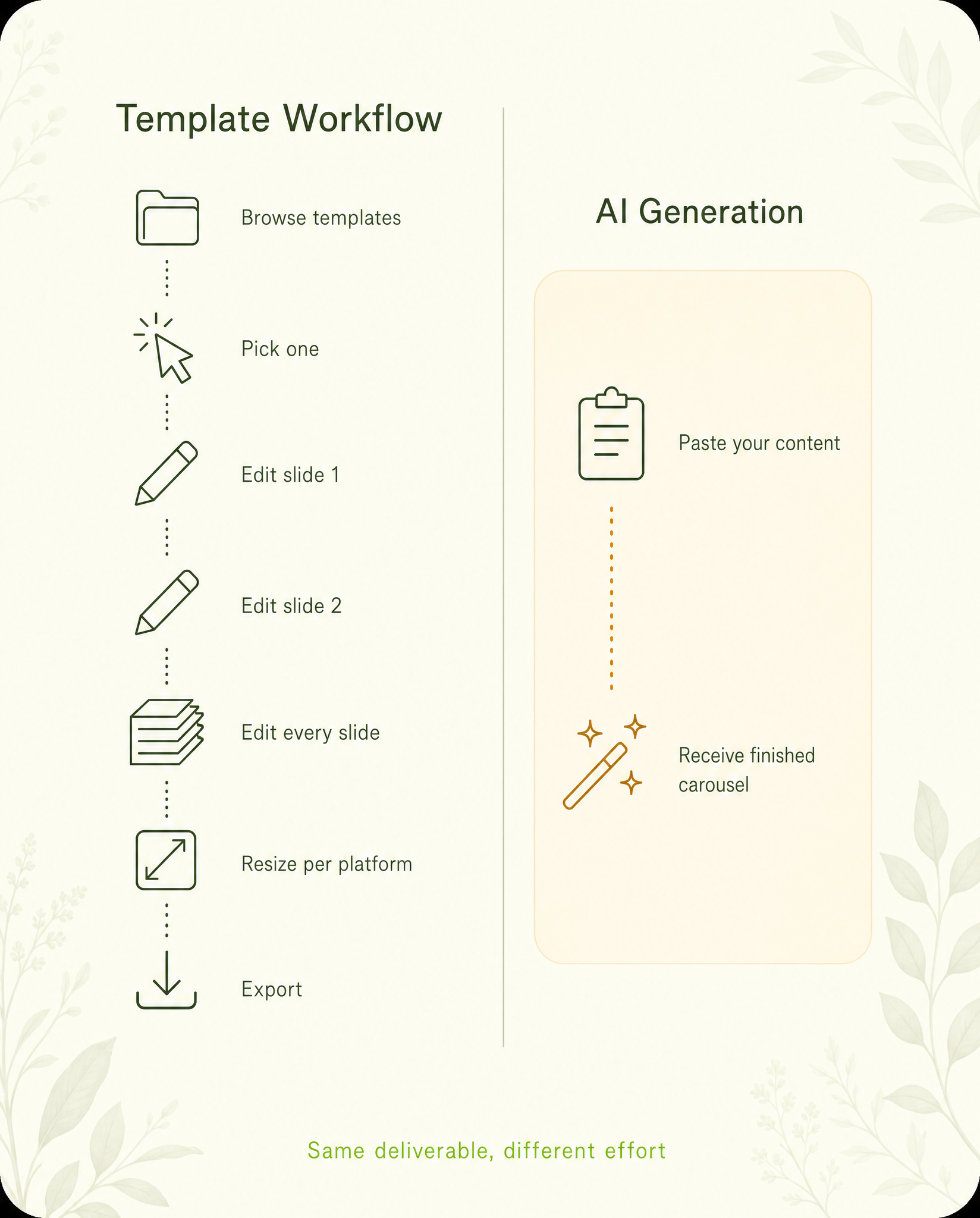 The same deliverable, two very different amounts of work. Every tool below sits somewhere on this spectrum.
The tools
1. Canvora — best for automatic, on-brand, multilingual carousels
Our product – read this section with that in mind. Canvora's model is content-in, deliverable-out: paste a URL, upload a PDF, or describe the topic in chat, and it returns a structured carousel – hook slide, one idea per slide, CTA – with design, typography and brand kit applied, plus up to 15–20 other platform formats from the same input if you want them. Two things are genuinely hard to find elsewhere: native multilingual generation (150+ languages, including correct right-to-left Arabic/Hebrew – the carousel is designed in the language, not translated into an English layout) and agent access – carousels can be generated from inside ChatGPT or Claude via MCP, or from scripts via API/CLI, on every plan including Free.
Editing works both ways: tell the AI what to change ("make the headline bigger", "swap slide 3's stat") or open the Visual Editor and fine-tune text, colors, images and layout by hand before export.
Where others beat us: there's no template gallery to browse – generation starts from your content, not from picking a template. If your workflow is template-first, Canva's library is unmatched. Free plan: 150 one-time credits (a carousel slide costs 15). Paid from $19/mo.
2. aiCarousels — best lightweight carousel specialist
A focused tool that does one thing – carousels – and does it accessibly: generate from a topic, pasted text, a URL, a PDF or even a YouTube video, then refine in a simple slide editor. Cheap (about $15/month, less on annual, with a free basic maker that needs no sign-up) and fast to learn. It claims support for 100+ languages. Choose aiCarousels if you want an affordable, carousel-only tool with hands-on slide editing. Trade-offs: carousels are the product – single-image posts, decks and broader campaign formats aren't; design variety leans on its template styles; and brand identity is applied per-design rather than from a persistent multi-brand kit.
3. PostNitro — best for slide-level editing control
Carousel-specific generator with a proper slide editor (fonts, sizing, CTA elements, custom templates), brand presets and multi-platform sizes. It drafts from a topic, an article URL, text or a Twitter thread, and it's the only carousel specialist here with an embeddable API. Free plan (5 slides, watermarked), paid from $15/month. Choose PostNitro if you want AI to draft the carousel but expect to rework slides by hand – or want carousels inside your own product. Trade-offs: output is carousels only (PDF/PNG), and the AI drafting composes text into templates rather than generating the design itself.
4. Predis.ai — best for scheduling-led volume
Predis generates complete posts (visual + caption + hashtags) and pushes them to a scheduler, across many accounts. Its strength is calendar volume, not per-carousel design depth. Pricing is credit-metered from $32/month ($19 on annual billing) with a 7-day trial. Choose Predis if you manage multiple accounts and the bottleneck is filling calendars. Trade-offs: design is template-driven with thinner per-slide control, and its multilingual support is stated for captions in 18+ languages – the vendor doesn't document how non-English on-image text is composed.
5. Canva — best template library, most manual work
Canva's carousel workflow is manual: pick a template set, edit each page, export. Magic Write helps with copy, but structure and design are on you – Canva has no first-party AI carousel generator (marketplace apps fill that gap). The template library and canvas editor remain the best in the industry, the free tier is generous, and Pro runs about $15/month. Choose Canva if you enjoy designing and want full control of every pixel. Trade-offs: it's the slowest path to a finished carousel, and multilingual means running Translate over an existing design – free accounts get exactly one translation, and Canva's own default is to shrink your text when the translation runs longer than the original.
6. Taplio — best if you live on LinkedIn
Taplio is a LinkedIn-growth suite (scheduling, analytics, AI posts) with carousel generation as one feature – including a free standalone carousel tool. Plans run $39–$199/month. Choose Taplio if LinkedIn is your only channel and you want the growth tooling around the content. Trade-offs: LinkedIn-only, and carousel design is theme-based with PDF-only export in two fixed sizes.
7. Adobe Express — best Adobe-ecosystem fit
Template-based with Firefly AI for images, strong if your assets already live in Adobe's ecosystem. Carousel creation is manual multi-page design – there's no AI carousel generator. A free tier exists with daily-refreshing AI limits; Premium is a paid upgrade. Choose Adobe Express if you're already paying for Creative Cloud.
Comparison table
| Generates from URL/PDF | Design done for you | Slide-canvas editor | Native multilingual | Agent/API access | Free tier | |
|---|---|---|---|---|---|---|
| Canvora | Yes | Yes | Yes (Visual Editor) + AI instruction edits | Yes (150+, RTL) | Yes (MCP/API, all plans) | 150 credits |
| aiCarousels | Yes (URL/PDF/YouTube) | Partial | Yes | 100+ languages (their claim) | No | Free basic maker |
| PostNitro | Yes (URL/article/thread) | Partial | Yes | Not documented | Embed API (paid) | 5 slides/mo, watermarked |
| Predis.ai | Topic-based | Partial | Limited | Captions, 18+ languages | Not advertised | 7-day trial |
| Canva | No | No | Yes — best in class | Translate-over (100+) | Limited | Yes |
| Taplio | Not documented | Partial | Limited | Not documented | No | Free carousel tool |
| Adobe Express | No | No | Yes | Translate-over | No | Yes |
The bottom line
Decide on your workflow first, then the tool picks itself. If you're pasting content and want a finished, on-brand carousel back – especially in a language other than English, or from inside an AI agent – start with Canvora's free plan and judge the raw output yourself. If you're a template-first designer who wants to browse a library and build from it, start with Canva. Either way, run the same content through two tools once: ten minutes of side-by-side beats any comparison table, including this one.
Turn your content into a carousel now
Paste a URL, PDF, or idea — Canvora generates a ready-to-post carousel, on brand and in 150+ languages.
Free to start · 150 credits, no card · 150+ languages