
The Contentdrips Alternative Where AI Designs Every Slide
Contentdrips mostly puts AI-written copy into templates you pick. Canvora designs each slide around your content, and one API or MCP call style covers carousels, decks, posts and documents.
The short answer
Choose Contentdrips if you want AI-written copy in fixed templates, bulk carousels from a CSV and publishing to LinkedIn, Instagram and TikTok from the same tool. Choose Canvora if AI should design each slide around your content and one brief should also become decks, documents and posts, in 150+ languages. Contentdrips' paid plans start at $19/month; Canvora has credit packs from $10 with no subscription.
By Canvora · Updated November 6, 2026
| Feature | Canvora | Contentdrips |
|---|---|---|
| Best for | Designed sets in many formats and languages | Template carousels in bulk and LinkedIn publishing |
| Starting price | Free credits; packs from $10; plans from $19/month | 7-day free trial; Starter $19/month |
| Output | 100+ formats: carousels, decks, documents, ads | Carousels, quote cards, infographics, banners |
| Exports | PNG, JPG, WebP; PDF and PowerPoint on paid plans or packs | PDF, PNG, plus MP4/GIF |
| Languages | 150+, typeset natively | Language selector; no published list |
| In ChatGPT and Claude | Yes, plus MCP server and API | MCP for Claude and Cursor; API and MCP from Pro ($35/month) |
Contentdrips vs Canvora: feature by feature
See exactly how Canvora compares. We're transparent about where we excel and where Contentdrips might be better.
| Feature | Canvora | Contentdrips | Edge |
|---|---|---|---|
| How Designs Are Made | AI designs every slide of a carousel, deck or document from scratch around your content and brand kit, or follows a style preset you saved | Pick from 500+ templates and AI fills them, or describe a single graphic to its AI design agent | Similar |
| Template Control | Style presets lock the look of every post, from your own images or a public Instagram profile; layouts still vary | Fixed templates you choose and lock, so every post follows the same layout | Similar |
| Formats | 100+ formats: carousels, slide decks, documents and one-pagers, infographics, ads, stories, thumbnails and website visuals | Carousels, quote cards, infographics, banners, testimonials and other social graphics | Canvora |
| Bulk Generation | One brief at a time in the app, or loop through briefs with the API | CSV to carousel: one row per carousel from a spreadsheet | Contentdrips |
| Publishing | No scheduling or auto-publishing; you download and post | Publishes and schedules to LinkedIn, Instagram and TikTok | Contentdrips |
| API and MCP | One MCP server and REST API for every format: a carousel, a deck or a single post from the same tools | REST API and MCP server (24 tools, incl. scheduling and publishing) on Pro and up, built mostly around filling templates | Canvora |
| AI Chat Apps | Approved app in ChatGPT and works inside Claude | MCP works with Claude, Cursor and other MCP clients | Similar |
| Languages | Designs typeset natively in 150+ languages; localize a finished set and keep the design | Language selector for AI-written copy; no published list of supported languages | Canvora |
| Exports | PNG, JPG and WebP; PDF and PowerPoint on paid plans or credit packs | PDF for LinkedIn carousels, PNG images, and MP4/GIF (carousel to video) | Similar |
3
Canvora Leads
4
Similar
2
Contentdrips Leads
Designed from the content, not dropped into a template
Real Canvora outputs. Most come from one short note for a fictional bakery, Hearth & Ember, made with its brand kit. We have not run Contentdrips for this page, so there is no side-by-side.

Carousel cover
Cover slide from the bakery note, with the brand's fonts, orange accent and logo. The carousel slides had small chat edits.

Carousel inner slide
A later slide in the same carousel. The layout changes to suit the dish instead of repeating one template.

Single post
A square post from the same note and brand kit.

One-page flyer
The same brief as a printable one-pager with the menu and hours.
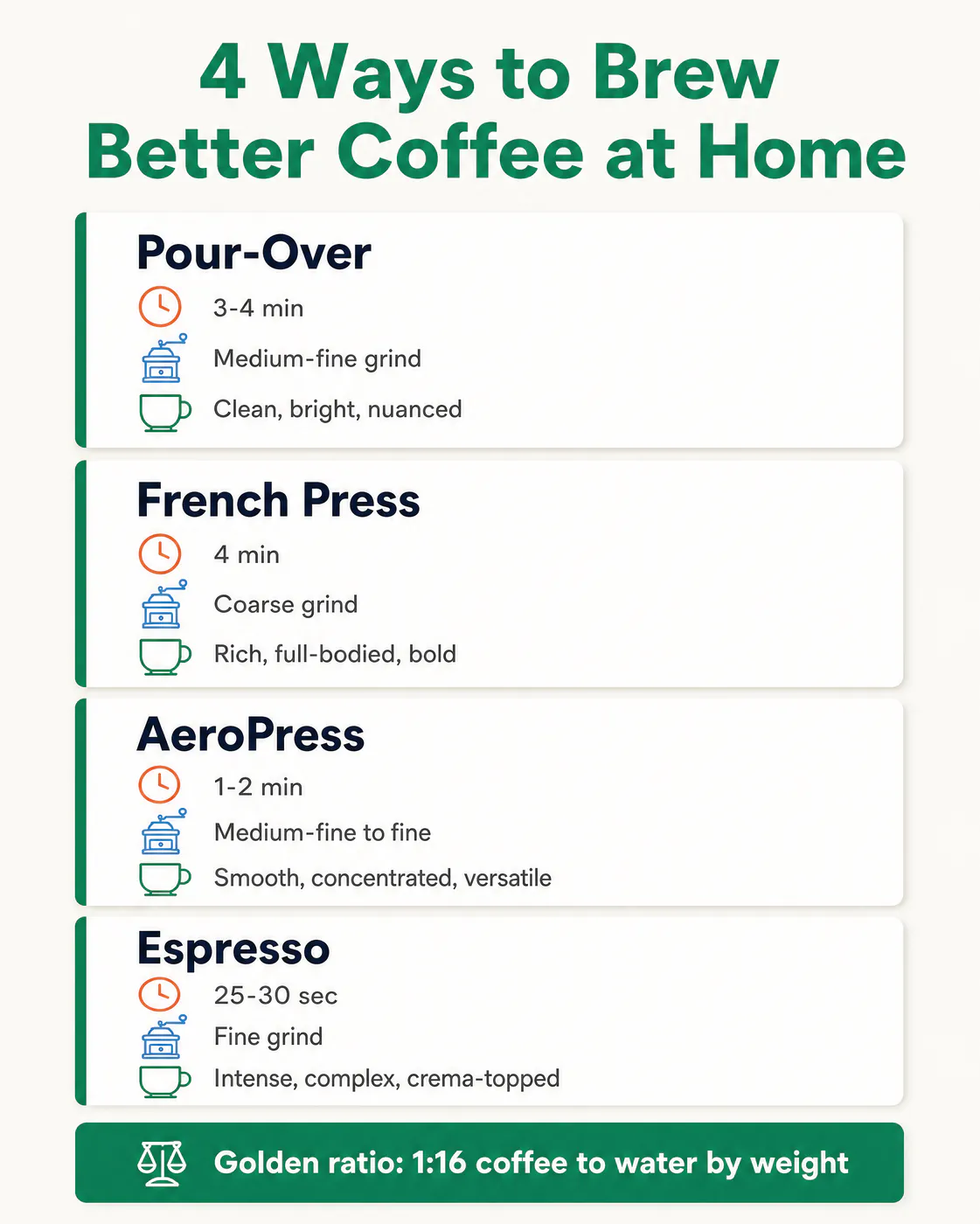
Infographic
A separate example: a coffee brewing guide laid out as a vertical infographic.
Which is best for what?
Quick picks by use case. Where Contentdrips is the better choice, we say so.
Best for bulk carousels from a spreadsheet: Contentdrips
Contentdrips turns each row of a CSV into a carousel on the template you choose. Canvora has no CSV upload; for volume you loop briefs through its API.
Best for publishing to LinkedIn from the same tool: Contentdrips
Contentdrips publishes and schedules to LinkedIn, Instagram and TikTok (all three on Pro). Canvora doesn't schedule or publish; you download and post.
Best for posts locked to one approved layout: Contentdrips
With Contentdrips you pick a template and every post follows it. Canvora designs each piece fresh, so layouts vary.
Best for slides designed around your content: Canvora
Canvora reads your content and designs each slide or post around it with your brand kit, instead of filling placeholders.
Best for one API for carousels, decks and documents: Canvora
Canvora's MCP server and REST API cover every format it makes, so an agent asks for a carousel, a deck or a one-pager the same way.
Best for content in several languages: Canvora
Canvora typesets designs natively in 150+ languages and can localize a finished set while keeping the design.
Pros and cons
Canvora
Pros
- AI designs each slide around your content and brand kit
- 100+ formats, including decks and documents
- 150+ languages typeset natively
- Credit packs from $10; works in ChatGPT, Claude and via MCP/API
- Style presets keep every post on one look; import one from any public Instagram profile
- Curated inspiration from your niche to start from
- Voice input: describe what you need out loud
Cons
- No CSV bulk upload in the app
- No scheduling or publishing
- No fixed template to lock layouts
Contentdrips
Pros
- CSV to carousel for bulk creation
- Publishes and schedules to LinkedIn, Instagram and TikTok
- 7-day free trial with 50 AI credits
- Fixed templates keep every post on one layout
Cons
- Mostly template-based; its AI design agent makes single graphics
- API and MCP need the Pro plan or higher
- Mostly social graphics; no slide decks
Should you choose Contentdrips or Canvora?
Both tools have strengths. Here's our honest recommendation.
Recommended
Choose Canvora if you...
- Getting a designed carousel, deck, one-pager and posts from one article, PDF or idea
- Agents and developers who want one API for every format, not just carousels
- Brands publishing in several languages
- Keeping your exact wording with exact-text mode
- Matching a look you already like, from your own images or a public Instagram profile
Alternative
Choose Contentdrips if you...
- Turning a spreadsheet into dozens of carousels on a fixed template
- Posting and scheduling to LinkedIn from the same tool
- Teams that want every post locked to one approved layout
- AI-written LinkedIn posts that match your past writing style
Contentdrips vs Canvora pricing
Transparent pricing - no hidden fees
Contentdrips vs Canvora: common questions
Everything you need to know about choosing between these tools
Is Contentdrips free?
Contentdrips offers a 7-day free trial with 50 AI credits, then Starter at $19 a month, Pro at $35 and Ultimate at $65 (checked November 2026). Canvora gives you free credits to start, with every format available.
What is the best Contentdrips alternative?
It depends on why you're switching. For another carousel tool with templates and scheduling, PostNitro is a close match. If you want AI to design each slide around your content and turn the same brief into decks, documents and posts in 150+ languages, Canvora is built for that.
Does Contentdrips have an API and MCP server?
Yes. Contentdrips has a REST API and an MCP server for generating carousels and graphics from its templates. Both are included from the Pro plan ($35 a month), not on Starter. Canvora's MCP server and REST API cover every format it makes, so an agent can ask for a carousel, a deck or a document the same way.
What is the difference between Contentdrips and Canvora?
Contentdrips is mostly template-first: you choose from 500+ designs and AI writes the words that go into them, and its AI design agent can make single graphics from a description. Canvora is design-first: it reads your content and designs each slide or post around it, across 100+ formats including decks and documents.
Can Canvora create carousels in bulk from a CSV like Contentdrips?
Not from a CSV upload. In the app you create one set per brief. If you need volume, the Canvora API and MCP server let you send many briefs in a loop. For spreadsheet-driven carousels on one fixed template, Contentdrips is the simpler tool.
Can Canvora post to LinkedIn?
No. Canvora has no scheduling or auto-publishing. You download PNGs, or a PDF on paid plans and credit packs, and upload them to LinkedIn or your scheduler. Contentdrips can publish to LinkedIn directly, as well as Instagram and TikTok.
How much do Canvora and Contentdrips cost?
Contentdrips: 7-day free trial, then $19, $35 or $65 a month, with API and MCP from the $35 Pro plan (checked November 2026). Canvora: free credits to start, credit packs from $10 (450 credits, valid 12 months, no watermark, 4K and PDF/PowerPoint export), or monthly plans at $19, $49 and $99. A single visual uses 10 credits, each carousel or deck slide 15, and each edit 3.
Can I edit Canvora designs after they're generated?
Yes. Use the Visual Editor, or describe the change in chat, such as "make the headline bigger". Each edit uses 3 credits.
How we compared
We compared the two on the jobs people most often switch for: LinkedIn and Instagram carousels, bulk creation, publishing and use from AI agents. Every price and feature here comes from each company's own website, checked in November 2026.
We make Canvora, so read this with that in mind. We've tried to be fair, and the rows above show where Contentdrips is the better pick.
More Comparisons
Explore how Canvora compares to other tools
Ready to create faster?
Start free with credits to try it, no card needed.
Get Started Free